ACPA, ACPAdigital, StudentAffairs

A Conversation with @ACPAPrez @GavinHenning: The Future of Organizational Learning in Higher Ed #ACPAlearning

As we look to the future trends of training and development, it will be critical for professional organizations and trade associations to consider how to meet the training and development needs of their constituents. Considering the nature of how we work, the evolution of how it’s changing, and the demands that lie ahead, more organizations are considering new ways to optimize learning and development.

ACPA-College Student Educators International is one of the professional associations I have been a member of and been working with to consider new ways of delivering learning. ACPA is interested in understanding more about how to support organizational learning, with regards to its membership needs. Being involved in the ACPA Digital Task  Force and program planning for the #ACPA16 Convention, I know the ACPA International Office, the Board, and its members are interested and working on dynamic ways to learn.

What does training and development look like among student affairs educators today? What do you want your professional development to look like? How can ACPA support organizational learning to meet your needs, issues, and challenges on campus? Let’s find out more what the ACPA President has to say about: The Future of Organizational Learning in Higher Ed
BannerACPAlearningAs ACPA considers the needs of their current members, I plan to chat with Gavin more about how the association plans to support student educators for their own training and growth in the field. We’ll talk about initiatives and ways ACPA is innovating for organizational learning, but also discuss the challenges and considerations, including:

  • What does professional development look like today for student educators or in the field of student affairs?
  • What are the current workplace learning and performance needs for higher education staff/faculty in relation to the new ACPA/NASPA Professional Competency Areas for Student Affairs Educators, specifically the newly added Technology Competency?
  • What’s on the horizon for #ACPAlearning? How will the ACPA organization support learning and development in the future? Thoughts, predictions, and “ponderings.”

Join me for a conversation with @ACPA President Gavin Henning on Monday (9/14) from 12-1 pm Central Time on Google+ Hangouts On Air as we discuss more about how ACPA learns and supports  the professional development of college and university student educators. Feel free to post your comments, questions, or thoughts you have for the ACPAprez here in advance. Then tune in for the LIVE conversation here and/or join the banter on the Twitter backchannel using the hashtag #ACPAlearning

Notes from the conversation: View the story “#ACPAlearning: A Conversation with @ACPAprez @GavinHenning on Learning & Development in Student Affairs” on Storify
ACPA, ACPAdigital, Conference

#ACPA16 CFP: Genius Labs and Pecha Kucha Powered By @ACPA

August brings us to a time of back-to-school fun, but it also means the deadline for the 2016 ACPA Convention (#ACPA16) program proposals is coming fast! There are plenty of program categories to choose from for your #ACPA16 proposal; however, on behalf of the Technology Programs Team, let me highlight two NEW additions to the CFP this year and how you can successfully submit your proposal(s) for Genius Labs and Pecha Kucha Powered By ACPA.

Genius Labs

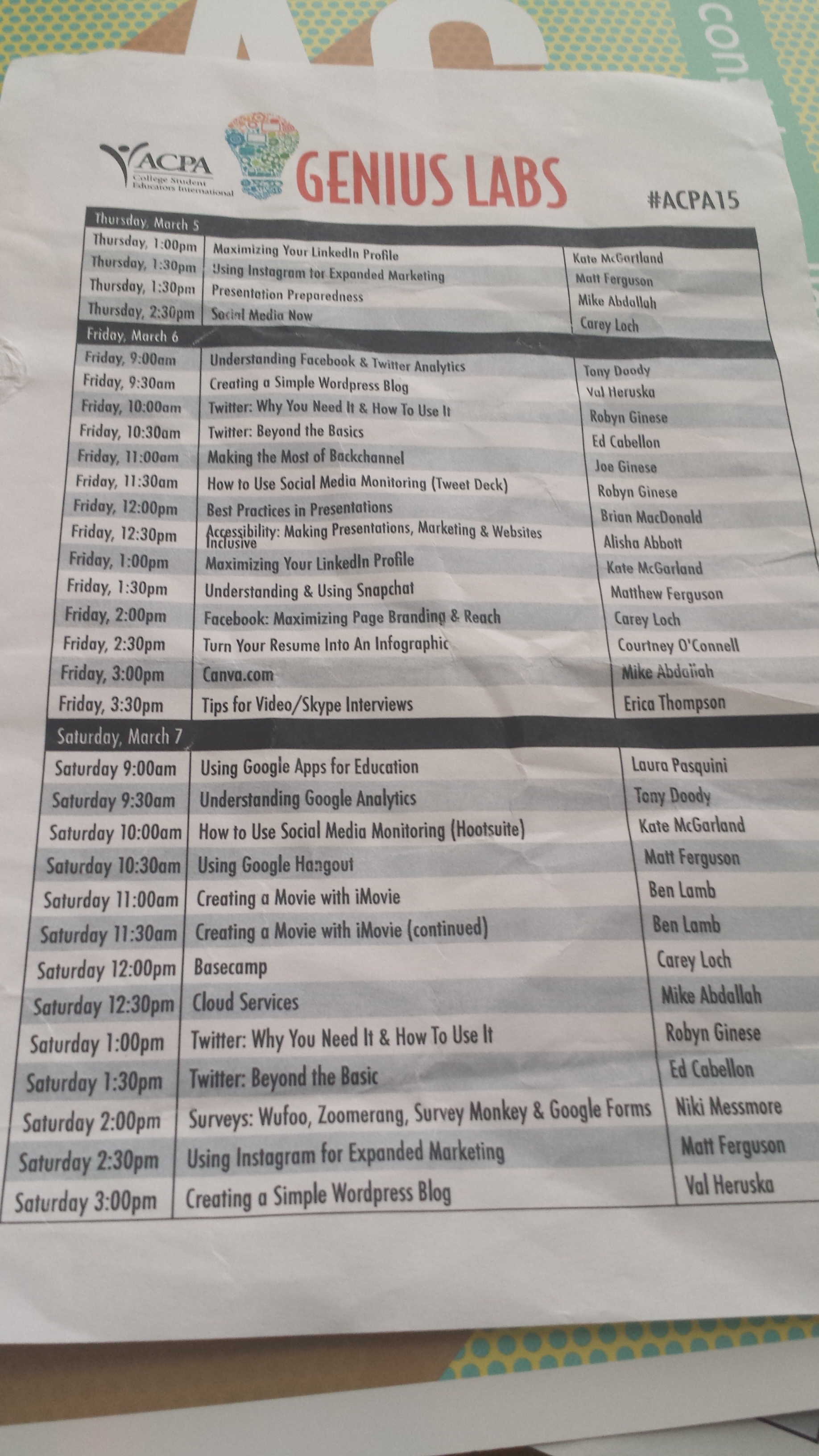
The convention’s Genius Labs are 20-minute skill-building workshops highlighting a number of practical activities (primarily focused on technology, but not limited to) for participants to learn about, experiment with, and implement immediately.

InfoCourt

Genius Labs topics are up to you! We hope to provide a variety of engaging content areas with the intent of having meaningful instruction for all skill levels, offering attendees effective (and often free) new resources, and building confidence and competence in technical tools to help you work at your institution. Want to learn how to develop your proposal or ask about a potential Genius Labs topic, be sure to connect with Erica Thompson (by email or @EricaKThompson).

listofacpa16genlabs

Pecha Kucha Powered By ACPA

Pecha Kucha is an innovative presentation format during which the speaker’s 20 slides auto-advance every 20 seconds. It is the art of concise presentations. This event is guaranteed to challenge conventional presentation styles, while inspiring colleagues in 6 minutes and 40 seconds!

pecha-kucha-02Your Pecha Kucha Powered By ACPA talk can highlight issues from the field of higher education, student development, our professional competencies, and/or your own personal experiences. Want to see a few examples from past ACPA Conventions? Browse the Pecha Kucha Talks from previous years:

For more information about the origins of Pecha Kucha visit the official website, and for questions about your Pecha Kucha Powered By ACPA proposal please reach out to Laura Pasquini (by email or @laurapasquini).

For both the Genius Labs and Pecha Kucha Powered by ACPA talk proposals, we recommend sharing and showing your work. For Pecha Kucha Powered by ACPA program proposals, we want you to “audition” so we can “see” you in action to understand more about your potential talk. This proposal can include either a presentation lecture capture or screencast to showcase your talk or ideas. Here are a few free screencasting options to consider:

To help us select your Genius Labs demonstration, our team would love to see your examples, ideas, experiences, applicable resources, and concepts you will be share for either presentation. This might include the following item(s) for your Genius Labs program proposal submission: creating a screencast, posting a YouTube video, including a Google Doc tip sheet, linking to slide deck from SlideShare, or sharing a Dropbox file.

If you have a demonstration, handout, or “how to” presentation you want to share for the Genius Labs we would love to see examples of these in your proposal as well. For the Pecha Kucha program proposal sessions, we encourage you to submit a “rough draft” of your talk via a video or screencast shared on YouTube. This will video clip will give us a better idea of your content, presentation style, and we can offer suggestions/ideas if your proposal is selected for Montreal! All #ACPA16 program proposal submissions are due September 4, 2015. Have fun and good luck!

Submit your 2016 ACPA Convention program proposal today!

EdTech, Learning Technologies

Checklist: Selecting Technology for Learning

With so many possibilities for digital learning, selecting media and technologies for appropriate course instruction is a very complex process. Although there are a wide range of options in the ed tech realm, pedagogical considerations should always come first. Instructors should reflect on the learning objective and desired outcomes for their subject matter before identifying technological applications for the course.

The SECTIONS model, developed by Tony Bates (2015), is a pedagogical framework for determining what technology, specifically how this technology will be appropriate for instructional approaches. This might include identifying and determining pedagogical characteristics of text, audio, video, computing, and social media. With this framework, Bates (2015) asks five critical questions for teaching and learning for technology and media selection:

  1. Who are the learners?
  2. What are the desired learning outcomes from the teaching?
  3. What instructional strategies will be employed to facilitate the learning outcomes?
  4. What are the unique educational characteristics of each medium/technology, and how well do these match the learning and teaching requirements?
  5. What resources are available?

In thinking about the interplay of technology and learning, higher education courses will need to consider how this design process is developed. In this book chapter, Bates shared an alternative approach to the ADDIE model for instructional design – Learning + Technology Development Process Model (Hibbitts & Travin, 2015).

Learning + Technology Development Process Model (Hibbitts & Travin, 2015)Regardless of the model for learning design, it will be important to assess how technology will impact the pedagogy. The SECTIONS model is an effective framework to best inform instructors when deciding what media or technology to use for face-to-face, online or blended learning courses:

  • Students
  • Ease of use
  • Costs
  • Teaching functions (including the affordances of different media)
  • Interaction
  • Organizational issues
  • Networking
  • Security and privacy

I would encourage you to utilize Bates’ (2015) Questions to Guide Media Selection and Use, to support your learning design when consider technology adoption for teaching. This open, shared educational resource will provide you with a broader reflection on issues and considerations for your digital pedagogy. Here is an abbreviated checklist for selecting technologies for learning I adopted for a learning module. It was developed for faculty who would like to consider the broader issues for teaching with technology, and how to navigate this course planning process for digital/media inclusions.

Checklist: Selecting Technology for Learning

STUDENTS

  • Review accessibility mandate or policy of your institution, department or program.
  • Determine demographics of the students and appropriateness of technology.
  • Consider student access to technologies, both off campus and on campus.
  • Determine digital skills and digital readiness of your students with learning expectations.
  • Justify students purchases of a new technology component (if needed) for learning.
  • Assess prior learning approaches & how technology can support student learning.

EASE OF USE

  • Select the technology for ease of use by instructor and students.
  • Identify technology that is reliable for teaching and learning.
  • Verify the technology set up, maintenance and upgrade are simple.
  • Confirm the technology provider/company is stable to support hardware or software use.
  • Outline strategies to secure any digital teaching materials you create should the organization providing the software or service cease to exist.
  • Locate technical & professional support, both in terms of the technology and with respect to the design of materials.
  • Determine technologies to best support edits and updates of learning materials.
  • Outline how the new technology will change teaching with to get better results
  • Assess risks and potential challenges for using this technology for teaching and learning.

COST & YOUR TIME

  • Consider media selection by the length of time and ease of use during course development.
  • Factor the time it takes to prepare lectures, and determine if development of digital learning materials will save time and encourage interaction with students (online and/or face-to-face).
  • Investigate if there is extra funding for innovative teaching or technology applications; if so, determine how to best use that funding for learning technologies.
  • Assess the local support from your institution from instructional designers and media professionals for media design and development.
  • Identify open educational resources for the course, e.g. an open textbook, online videos, library page of articles, or other potential open educational resources.

TEACHING & LEARNING FACTORS

  • Determine the desired learning outcomes from the teaching in terms of content and skills.
  • Design instructional strategies to facilitate the learning outcomes.
  • Outline unique pedagogical characteristics appropriate for this course, in terms of content presentation and skill development, specifically for:
    • Textbook, readings, or other online text materials;
    • Audio, such as podcasts, streaming audio from news, etc.;
    • Video, such as slide presentations, lectures, tutorials, and screencasts; and
    • Social media, such as blogs, wikis, microblogs, photo sharing, curation, etc.
  • Plan learning aspects that must be face-to-face (in-person or online).

INTERACTION

  • Identify the skills for development and interactions that are most to determine the best type of media or technology to facilitate this learning.
  • Determine the kinds of kinds of interaction to produce a good balance between student comprehension and student skills development.
  • Estimate the amount of time the instructor will be interacting personally or online with students, and the type of medium for this interaction.

ORGANIZATIONAL ISSUES

  • Determine institutional support in choosing and using media or technology for teaching.
  • Identify if the institutional support is easily accessible, helpful, and will meet the needs for the learning technologies for the course.
  • Determine if there is funding available to “buy me out” for a semester and/or to fund a teaching assistance/support to concentrate on designing a new course or revising an existing course.
  • Locate institutional funding or resources for any learning technology or media production.
  • Review the standard technologies, practices and procedures for teaching and learning, to verify requirements for utilizing institutional technology resources, i.e. the learning management system, lecture capture system, etc.
  • Determine if the institution will support trying a new technological approach to learning, and will support innovative media or digital design.

NETWORKING

  • Outline the importance for learners to network beyond a course, i.e. with subject specialists, professionals in the field, and relevant people in the community.
  • Identify how the course or student learning can benefit from networking and learning from external connections.
  • Determine the appropriate network and/or social media space to integrate for your learners to network with each other and connect with external community members.
  • Integrate these networking mediums with standard course technology.
  • Delegate responsibility for its design and/or administration to students or learners.

SECURITY AND PRIVACY

  • Determine the student information you are obliged to keep private and secure.
  • Identify the institutional policies for security and privacy for teaching & learning.
  • Outline potential risks and challenges of using a particular technology where institutional policies concerning privacy could easily be breached.
  • Identify who at your institution could best advise you on security and privacy concerns, with regards to learning and teaching technologies.
  • Itemize the areas of teaching and learning, if any, available only to students registered in the course.
  • Identify the types of technologies to best restrict or limit access to course materials (if any) for my registered students.

Interested in reviewing your own learning design further? DOWNLOAD the Checklist: Selecting Technology for Learning

Reference:

Bates, A. W. (2015). Chapter 8: Choosing and using media in education: The SECTIONS model. From Teaching in a Digital Age. A Creative Commons Attribution-NonCommercial 4.0 International License. Retrieved from http://opentextbc.ca/teachinginadigitalage/

Hibbitts, P. D., & Travin, M. T. (2015). Learning + technology development process model.

Book Review, Open Education, OpenAccess

The Battle for the Open [Needs YOU Higher Ed]

If you have not had the chance to read The Battle for the Open by Martin Weller – you should. The battle for all things open in higher education is still being waged. As Martin said,“I’m not sure I believe in revolution in education.” But there is change ahead with openness in post-secondary learning. If you work in post-secondary education, you can not avoid this battle and should probably read on to learn about Martin’s perspective.

[Full disclosure: Martin sent me a copy of the book; however he knows I would give him praise & banter with it as needed. Thanks @mweller!]

BattleOpenThe Battle for the “Open” shares how higher education is moving towards open practice and scholarship. The goal of OPEN is to share openly, use open sourced resources, and consider strategies to include open education resources (OER) for teaching, research, and service scholarship.

Last fall, Martin paid a visit to Texas to talk with the UTA LINK Research Lab, specifically to share how openness is impacting higher education. Martin’s talk focused on a few key areas he addresses in his book:

@mweller and all the narratives

  1. Open Access – Pathways for free online access to online scholarly works have been created. There are two routes for open access: 1) Gold Route – pay to publish an article; and 2) Green Route – self publication;  often on your own website or institutional repository. There are major policies which mandate publicly funded research to make their findings publicly available – countries are forced to publish open access. For example, 51% of authors have published open access from the Wiley survey. Read more about The Development of Open Access Journal Publishing from 1993 to 2009.
  1. Open Education Resources (OER) – Initially started in 2001-2002 with the MIT OpenCourseWare project, and has continued with others such as the Open Learn initiative from the Open University and OER Commons. Open textbooks, like OpenStax, sell for the cost of the degree and impact the publication process of textbooks. The OER Research Hub increases access to course materials earlier and even in advance of the course start, with efforts like the #OER Impact Map to understand where open education resources are being developed.
  1. Massively Open Online Courses (MOOCs) – The big, free, and online courses came out of Canada, initially,…then Google Trends chart the course of the MOOC evolution into higher education. It turned out it was not just the Canadians who were interested in MOOCs. Licenses of developed and were then restricted for each of the edX, Coursera, Udacity, etc. environments. For learners, MOOCs are free to sign up, allow open access of material, and with varied creative common rights for education.  Many of these MOOCs moved into other learning management systems or varied delivery methods. With this education platform, rose issues of support and sustainability for learners. Some say that MOOCs have high-jacked what openness really means, because if you fail at a MOOC, there is a reaffirmation that open/online learning is not really for you. This might not be the case.
  1. Open Scholarship – Martin’s book, The Digital Scholar (and my recap blog post), discusses issues and challenges academics will encounter as they move online and shape their identity in the networks. Scholars are increasingly sharing information, resources, teaching curriculum, commentary, medias, and ideas in digital spaces. The growth of our networks in academia allow researchers to connect, collaborate, and contribute. The social networks also shape our identities and influence us in these spaces. Research opportunities emerge in the open, specifically with the art of guerrilla research (Martin, 2014):
    • Involves 1 or 2 researchers, and does not require a team
    • Relies on open data, information & tools
    • Fairly quick to realize
    • It is disseminated via blogs and social media
    • It does not require permission

It is critical we engage and participate in this open discussion in higher ed. If we don’t, then we will let someone else write this narrative and direct where post-secondary scholarship and learning is directed moving forward. Ultimately the battle for the open is really the battle of ownership –who owns what? Have we lost the ownership of  online learning? Can we restrict research and scholarship? What rights do we have for curriculum and educational resources? Now that “open” is prevalent in higher education, it cannot be avoided. As Martin says, “Openness is not just a peripheral interest now.” How does openness impact your role on campus, and how will you contribute?

References:

Weller, M. (2011). The digital scholar: How technology is transforming scholarly practice. Bloomsbury Open Access. DOI: 10.5040/9781849666275

Weller, M. (2014). The battle for open: How openness won and why it doesn’t feel like victory. London: Ubiquity Press. DOI: http://dx.doi.org/10.5334/bam

Higher Education, Professional Development, Training & Development

#SAreads: Students, Ethics, and Online Engagement @ #ACPA15 the #ACPATrendingNow Session TODAY!

Join Courtney O’Connell and myself in a round table discussion about online student behavior in higher education during the #ACPATrendingNow Session (TODAY at 12:30-1:30 pm in the Marketplace):

SAreads #ACPATrendingNow Session @ #ACPA15#SAreads: Students, Ethics and Online Engagement

campus book launch ad.003

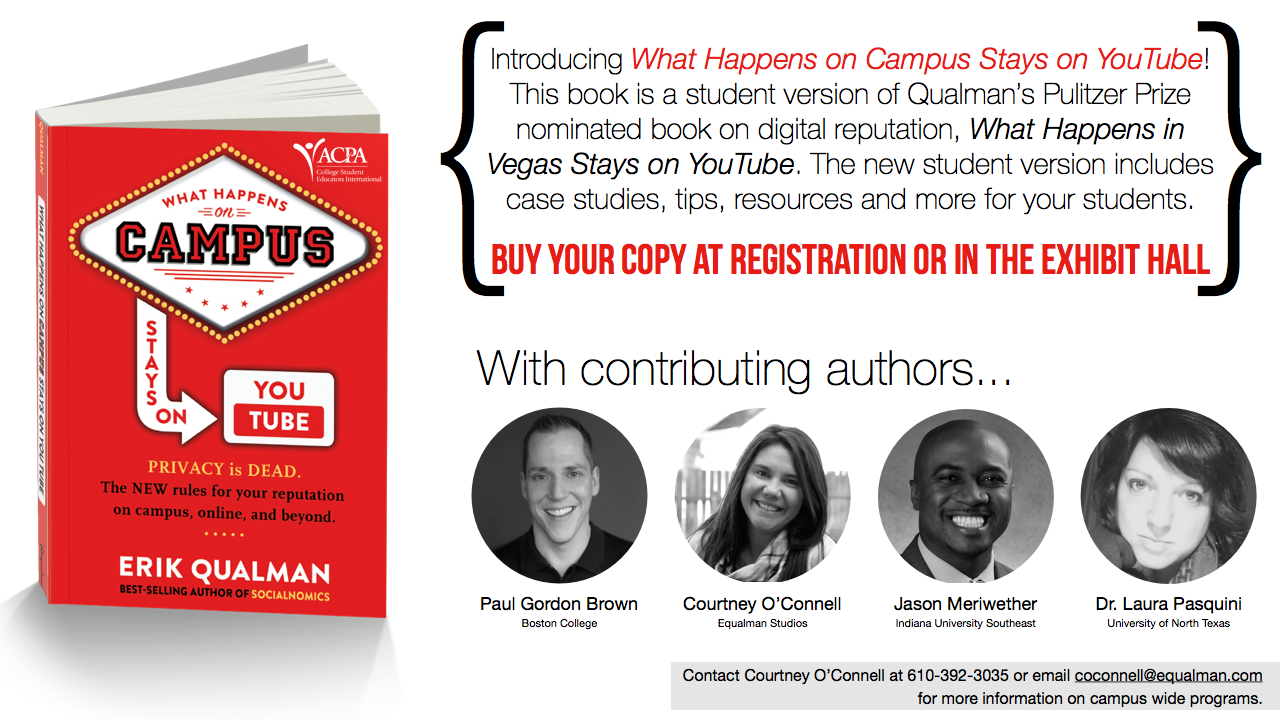
An excerpt from the What Happens on Campus Stays on YouTube book on cyberbullying:

cyberbullyingCyberbullying is defined as teasing, insulting or making fun of another person online. The intent is often to soil the target’s reputation. If you are a cyberbully, STOP! Your bullying could be the byproduct of social anxiety or low self-esteem and it is important that you seek help. Educators, friends, parents and counselors are increasingly aware of the signs of cyberbullying and will eventually confront you.

Cyberbullying is often considered a criminal offense and offline bullying laws apply to online behavior.

  • Cyberbullies leave digital fingerprints and often are easier to prosecute than traditional bullies who do not leave as much incriminating evidence.
  • Bullying can ultimately lead to a victim’s suicide. Victims of cyberbullying are twice as likely to commit suicide as those who have not had a cyberbullying experience.
  • 1 in 4 teens report that they have experienced repeated bullying via their cell or on the internet
  • Over half of all teens that use social media have witnessed outright bullying online, and an astounding 95 percent of teens who witness bullying on social media have ignored the behavior
  • We all must serve as upstanders and not bystanders to cyberbullying.
  • Colleges and universities have their own rules and procedures for dealing with cyber-bullying, cyber-harassment, and cyber-stalking. If you know something that is occurring, tell a faculty or staff member. They can help and give you options.
  • Being harassed or bullied online can be mentally draining. Reach out to others to help you process through it. The counseling services on your campus can also help.

Also in a recent study on cyberbystanders, nearly 70% of respondents who noticed the cyberbullying and who didn’t respond directly to the abuser gave bad marks to the chat monitor and/or didn’t recommend use of the chat room – both of which were classified as indirect intervention. This is happening at your institution and this is an important issue that WE NEED TO TALK ABOUT NOW! 

Sneak Peak of the Book (Preview Copy Only!)

More #ACPATrendingNow Sessions to participate in TODAY from 12:30-1:30 pm (in the Marketplace).

Becoming a Leader in Professional Associations – Facilitated by Cissy Petty
Hate Speech and First Amendment Rights – Facilitated by Kathy Adams Riester
Implications of Systemic Oppression – Facilitated by Tori Svoboda
Working with Undocumented Students – Facilitated by Ray Plaza
Personal Mental Health as Professionals  – Facilitated by Kalie Mason
Media Scrutiny of Higher Education – Facilitated by Gretchen Metzelaars
Supporting Veteran Students – Facilitated by Monica Christensen
Athletes as Students – Facilitated by Markesha Henderson (U West GA)
Title IX and Transgender Protection – Facilitated by Finn Schneider
Reclaiming Language as Means of Peaceful Protest – Facilitated by Dan Sym