Higher Education, Social Media

Guiding Social Media at Our Institutions [ARTICLE]

Remember last fall when Tanya Joosten (@tjoosten), Lindsey Harness (@LindseyHarness) and I asked for your input on how your institution guides social media? No? Too long ago to remember? 🙂 Well regardless, we appreciated those who could respond as it helped us gather information on what we are (or are not) doing to direct social media use in higher education.

The results from the research are in, and published! Here is the recently published, peer-reviewed article for the Society for College and University Planning (SCUP).

Access the article in PDF form here.

This article expands on Chapter 6 from Social Media for Educators to understand how higher education is guiding social media use. Through our open-ended questions, we learned more about how institutions are supporting and guiding social media. Often we see social media used a broadcast medium and there has also been a shift to designate new roles or responsibilities to support its use on campus.

Thanks to the SCUP Change-Disruption Mojo for featuring some of the findings as this week’s topic, specifically to Alexandria Stankovich (@thinkstank) for sharing both sides of the issue:

  • Concerns: monitoring online behavior, identity thief, privacy, FERPA/FIPPA, maintaining university image, control, ownership, required trainings

  • Benefits: interaction and engagement beyond the formal learning environment

Want to learn more about the research and/or article findings?

Key takeaways:

  • Social media is often used as a “broadcast channel”
  • We should engage and develop a culture through the use of social media tools
  • Institutions need fluid access to information regardless of the technology
  • Simplicity principle to build capacity for the social web
  • We need to develop models of effective practice for LEARNING!
  • Trust the faculty you hire – they have some great ideas
  • Recognize that learners are MORE than sponges
  • Match technology with task & building digital literacy opportunities
  • Is social media in your strategic plan? Is social media or technologies part of your learning outcomes on campus? THIS is where your efforts need to be
  • Institutional encouragement is needed for collaboration ON YOUR CAMPUS to identify how to best guide social media models & effective practices
“The pedagogical benefit of social media use beyond its application as a motivational technique continues to be unaddressed by many universities.”

This study was just the tip of the iceberg. There is definitely more research on learning, social media use, and higher education to be done. Time to get at it! Back to the dissertation proposal grind…

Reference:

Joosten, T., Pasquini, L. A., & Harness, L. (2013). Guiding social media at our institutions. Society for College and University Planners – Integrated Planning for Higher Education, 41(2), 1-11.

G*STEP

Using Verbs for Specific Learning Outcomes

Verb Wheel

Student learning outcomes is a very common term in education. For many of my k-12 colleagues we have used this term from graduate course work, to teaching practicum, and for curriculum planning. The challenge in writing student learning outcomes happens when you have to find actionable items and SPECIFIC methods for learning assessment.

Last week I attended “Writing student learning outcomes and the GSTEP teaching template:  How they inform your teachingfor the G*STEP program presented by Shana Cole & Nancy Fire from CLEAR.

We talked about components of a teaching strategy, which included:

A. Context for your teaching strategy
B. Selecting learning challenges to address with your teaching strategy
C. Objectives for this experience
D. Foundational knowledge necessary for students to participate in teaching strategy
E. Step by step planning
F. Ground rules (if needed for you strategy)
G. Assessment: How do you plan to assess the effectiveness of your learning strategy?
H. Anticipated Challenges: Indicate how you plan to deal with any of these challenges that may apply. Describe.
I. Journal Reflection

The three level model for student learning outcome development, which included the following levels:

  1. Goal
  2. General Learning Outcomes (GLOs)
  3. Specific Learning Outcomes (SLOs)

The last step – Specific Learning Outcomes (SLOs) – is where we focused our attention. Specific learning outcomes are highly measurable and possess detailed requirements. As an instructional designer who is often involved in program evaluation or course design, I appreciated the cross-disciplinary conversations on how to meet various subject matter content issues with the needs of the learner. A helpful resource to keep us on the same page and to guide our SLOs discussion was the Bloom’s Taxonomy verb wheel. This was a practical tool that helped to focus our planning and here were some of the key points I gleaned from the overall workshop:

  • be clear, specific & measurable
  • identify what the students should be able to do as a result of a learning experience
  • display evidence that learning has occurred at a specified competency level
  • focus shifts from what “I will teach” to “what students will learn”
  • define content, expectations, assessments & creates constructive data i.e. data, percentage, and understanding of student learning

For student learning outcomes to work they have to connect to the learning. A great way to assess your expectations of your SLOs is to share these with other educators,  both inside and outside your discipline or subject matter expertise. Student learning outcomes need to be written at a general level to ensure clear communication, and limit subjective language. By using SLOs you are able to modify course objectives, assess curriculum design, and measure how your instruction impacts learners. By creating 3-7 overall goals in your course, you will want to consider at least 3-5 specific learning outcomes to measure each goal. These goals will help address your teaching strategy and how you assess your learner’s progress.

How do your specific learning outcomes (SLOs) fit into your entire course planning and content delivery?

Learning Technologies

Happy Digital Learning Day! #DLDay – Top 10 Learning Web Tools of 2012

Happy Digital Learning Day (#DLDay)!

digital-learning2 (1)

To celebrate digital learning day today, I thought it would be a good idea to share my belated Top 10 Learning Web Tools list from 2012. As I have read other lists (here and here), I have been meaning to share useful tools that have helped me learn this last year. You may have heard me say “it’s not the tool” but rather how you use the tool – so I thought I would share my top tools that I have put to use for my own productivity and learning.

  1. Twitter – This is my active stream of information that allows me to track on conversations either via search, hashtags or through my Twitter lists. I value Twitter to find information, learn about news/trends, collect articles, read blog posts, and, most importantly, engage with peers on a daily basis. My evolving personal learning network (PLN) is definitely at the top of my learning list.
  2. Google Docs/Drive I have found Google Drive EXTREMELY useful in 2012, as I am often seen with my Chromebook in tow. Daily I can be found using Google Drive, as I typically take notes during a lecture/meeting, brainstorm storm agenda items, crowdsource ideas, collect information (via a Google forms), or store resources i.e. PDFs, presentations, and database files.
  3. Dropbox – Not all of my collaborators of research, work and writing use Google Docs, so I tend use Dropbox as my “go to” cloud storage and sharing with MS Word. I often move in between spaces and devices (mobile, PC, Chromebook, & Mac) both on campus and at home, so Dropbox is easy enough to save and return to any working projects or assignments. As a frequent flyer for with an edu account, I have accrued 23.22 GB of space through referrals, use, and a Dropbox quest. My Dropbox allows for easy work flow, specifically for storing conference presentations, collecting articles for a literature review, archiving tweets through IFTTT, downloading my mobile photos, holding my lesson plans, and editing manuscripts with co-authors.
  4. Google Search – When in doubt…Let Me Google That For You. I would say that Google is typically used as my initial search for information, news, and quick finds probably because I am often working in Google Drive (see #2) and using Google Chrome (see #7). I have learned benefits of refining my power searching skills, and also not having this as my only outlet for knowledge acquisition.
  5. Google Scholar Although I increasingly use the UNT Libraries – Find Online Articles Search more often these days, I can say that Google Scholar has been a helpful tool for finding data, collecting statistics, locating peer-reviewed journal articles, collecting my literature review materials, and retrieving other scholarly resources.
  6. Google + Hangouts The reason I value Google Plus is for the Hangouts. Both for a meeting space or “On Air” live recording, this forum has proven well for meetings, conference calls, presentations, demonstrations, peer-review process, and general catch up with colleagues. I do still use Skype; I have a greater preference for using a video conference space that has live notes, free group (up to 10) calls, connection to my Google Drive, and, of course, the ability to infuse ridiculous Google Effects when meetings run on too long. Side note: I  am curious to see what happens with the Google Plus Communities. I have recently been invited to a few, and I can see some potential with this feature in Google Plus.
  7. Google Chrome As a mobile learner and avid Chromebook-er, I would say that Google Chrome is a user-friendly web browser for productivity and workflow. I appreciate the streamline interface, search ability, extensions  and applications from the Chrome Web Store {which compliments my Android phone apps as well}. Also, it is quite compatible with Google Drive, Google + Hangouts, and easily transferable from my office to home computing life.
  8. WordPress I may have been exhausted from reflecting during my Masters’ program; however I think that having my own space and place for reflection has helped me in 2012. For a fellow researcher, I candidly explained why I blog and more about my blogging history; however I used my blog more this year to document my doctoral progress and process my own educational experiences. Thanks for being an easy space to draft, publish, and share these thoughts, WordPress.
  9. Delicious Although I use Scoopit, Storify, and Paper.li a great deal, I can say that Delicious is still my top curation tool. Since 2007, I have been collecting and organizing resource into my delicious account. When I share a URL on Twitter it automatically archive the link to my delicious account via packrati.us. This is great to return back to my tags and stacks to find notes, information, statistics, or articles that I can use for presentations and publications. Also I appreciate others in my Delicious network who stayed loyal to this tool (even after a few changes) and socially bookmark useful resources.
  10. Flickr This social photo sharing site has provided me with a lot of inspiration and ideas. Whether I have used creative common-licensed images for presentations and blog posts, or just as a tool to document my own PhD adventures, I appreciate being a member of the Flickr community. I often capture a photo of a presentation slide, make a note from class, or document an image on the go to house them on Flickr for future reference and referral.

For 2013, I plan on taking Jane Hart’s (@C4LPT10 Tools Challenge to find out how to use new tools to help for my own professional learning, research, and development as an educator/trainer. For those of you who want to join in the fun, check out the Top 100 Tools for Learning 2012 for inspiration to explore. Happy learning!

#phdchat, Learning Technologies

CFP: Emerging Technologies for Online Learning Conference #et4online

The 6th Annual International Symposium for Emerging Technologies for Online Learning (#et4online) from April 9-11, 2013 (Planet Hollywood Resort – Las Vegas, Nevada) wants YOU to submit a conference proposal. Proposals are DUE by 11 pm CDT on December 10, 2012

The Emerging Technologies for Online Learning International Symposium, a joint Symposium of Sloan Consortium and MERLOT, is designed to bring together individuals interested in the review and evaluation of emerging technologies’ impact on online teaching and learning.

The 2013 Emerging Technologies Symposium chairs know technology for learning is shifting quickly:

“New discoveries in technology happen rapidly and far too frequently. It is difficult to keep up with every new release or innovation.  Advances in technology often become the vehicle for new ways to learn or enhance learner opportunities in our classrooms. As educators we progress forward, gaze back, and aim to bring the best of old and new to create an optimal environment to our students. However daunting this mission is, we tackle the problems and learn best from those who are already building the bridges and taking on the tasks we want to try. The field is advanced by those who share, scrutinize, and study. We invite you to contribute to the progress by presenting and attending this year’s symposium and encouraging your colleagues to join our efforts.” 

The #et4online steering committee is interested in interactive sessions that engage and inform participants for the following areas:

  • Higher Education and K-12 Faculty
  • Future professors and graduate students
  • Educational technology leaders
  • Students
  • Instructional designers
  • Instructional technologists
  • Academic administrators

Sessions can be targeted to all attendees and or specified (novice, intermediate, or expert) levels of proficiency. The committee would like to see a wide range of involvement from various presenters/facilitators – this includes proposed sessions from graduate students TOO!

The #et4online symposium will accept presentations that offer attendees “real solutions,” pioneering practices, and future trends, specifically submissions which emphasize evidence-based practice and the impact of topic tracks on teaching practices and student learning outcomes using a range of research methodologies (e.g. case study, longitudinal comparisons, within group comparisons, quasi-experimental, etc.) and rigorous approaches to the analysis of supporting data, qualitative or quantitative. Here are the #et4online symposium tracks and research areas:

Here is the presenter FAQs and Webinar Recording from 11/29  to help you with your proposal submission: 5 Tips on How to Submit a Successful Conference Proposal

There will be a wide range of emerging technologies for online learning trends, talks, sharing, and more! What happens at #et4online in Vegas will NOT stay in Vegas. And that’s a good thing! Follow @et4online for more updates as well!

LPQ

Published: Learning and Performance Quarterly 1(3)

The third issue of the Learning and Performance Quarterly (LPQ) speaks to the area of facilitation, teams and mobile support systems. This issue discusses theoretical building blocks for researchers that have a renewed interest in teams and their support. The reemergence of this area of study is important as we move further into the age of social media, personal learning networks and global information exchange. Thank you to our authors, editors, and peer reviewers for their contributions to the Learning and Performance Quarterly, Volume 1, Issue 3.

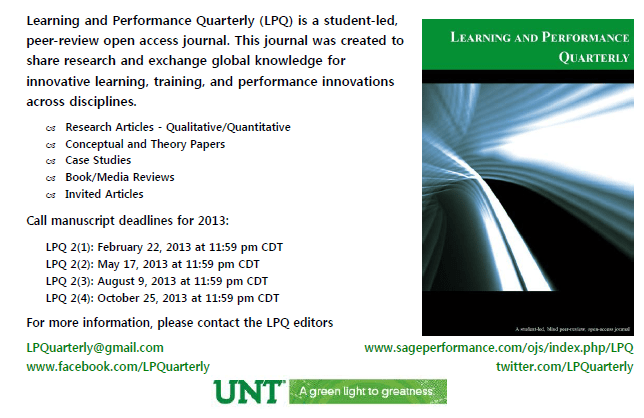
The Learning and Performance Quarterly (LPQ) is an online, open access peer-review journal designed to make research available to the public and to support a greater exchange of global knowledge. The call for submissions for 2013 is now open – here are the deadlines for manuscripts for Volume 2:

Submission can be made online through the LP Quarterly website. For detailed submission guidelines and instructions on how to make a submission please visit Author Guidelines.

Happy reading,

Laura A. Pasquini & Dr. Jeff Allen, Founding Editors
Learning and Performance Quarterly
Like us on Facebook
Follow us on Twitter @LPQuarterly
Email: LPquarterly@gmail.com