MOOC, Web Design

#EDUSprint 3 – Creating the IT Architecture for the Connected Age

Here’s the recap for the last EDUCAUSE webinar of the EDU Sprint series: #EDUSprint 3 – Creating the IT Architecture for the Connected Age. Today’s session talked about the role of IT on campus, technology planning, and the infrastructure of IT services for digital learning.

#EDUsprint 3 - Is IT Creating a New, Connected Age?

The session discussed the processes, management strategies, and governance structures from the following higher education leaders on the panel:

  • Tracy Futhey, Vice President, Information Technology and Chief Information Officer, Duke University
  • Tracy Schroeder, Vice President, Information Services and Technology, Boston University
  • Ethan Benatan, Vice President, Chief Information Officer, and Chief Strategy Officer, Marylhurst University

Many spoke about how their IT unit is thinking deeper about services to connect to learning and the needs on their campus in a holistic manner. Tracy Futhey shared her ideas around IT services, and how we not only need to consider location within the organization, but more about the delivery and methods for our IT units.

IT Services

Although there was talk about campus-wide strategy, I rarely heard much about bringing others around the table for this discussion. Much of higher education still operates in silos, so the full potential of connectedness and planning technology in learning cannot just occur in an IT unit, academic department or business solutions. I think that more administrative leaders need to bring faculty, staff, graduate students, undergraduate students, IT developers, and external shareholders together for these strategy meetings. in higher education. As our campus environments change, so does the IT needs and services to support learning and engagement.

I did appreciate when Tracy Schoeder shared about the Digital Learning Initiative and Technology Planning at Boston University. Although emerging technological trends evolve, I think that planning and assessment need to be part of the regular planning cycle.

Strategic IT Planning - The BU Example #edusprint I also appreciated that BU puts a focus on the human aspect of their planning, and not just the IT solution. Organizational structures should be assessed and reviewed for the IT architecture, to meet the needs and understand the institutional goals for learning.

Human Architecture for Digital Learning @ BU

Finally Ethan Benatan, started with a few predictions on how IT will change, be challenged, and move in the future – which is always a difficult task. I did appreciate that he shared a design process… and that it was just that – A PROCESS. There will not be a single solution to each campus environment, and it takes some agility and insight to move your higher education institution in the right IT direction and continue to assess your needs.

Here are some new links & reads from the session in no particular order:

Did you miss the last of the 3-day #EDUsprint? No worries. Here are a few resources for you:

You’re very welcome. Happy learning!
MOOC

#EDUsprint 2 – How Technology Can Change Pedagogy

The EDUCAUSE EDU Sprints continues, so why not share what I gleaned from today’s session. With a lot of information being shared, it actually feels like more of a marathon, so here’s the breakdown from the #EDUsprint 2:  How Technology Can Change Pedagogy webinar.

How Tech Can Change Pedagogy

The session was lead by the following panelists who shared their thoughts about gong “Beyond MOOCs”:

  • Hank Lucas, Professor of Information Systems, University of Maryland College Park
  • W. Eric L. Grimson, Chancellor, MIT
  • Susan Grajek, Vice President, Data, Research, and Analytics, EDUCAUSE

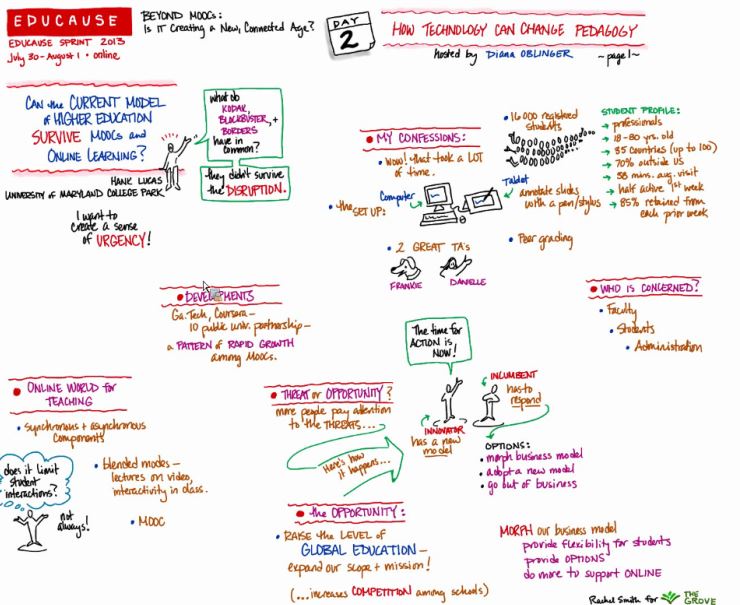
Hank Lucas sees great challenges and opportunities with blended learning, online learning, and MOOCs; however he wants to charge institutions with more than the technological trends. Due to these emerging technologies and social platforms, there are many different ways to connect with our students; however we have to be purposeful and think critically about our instructional design.  

The Survivor Model via Hank Lucas

Lucas shares his concept of ‘The Survivor Model’ (screen shot of slide), that outlines how disruptive technologies will impact higher education and learning. [Side note: You will find “disrupt” on the #sxswEDU 2013 bingo card I made back in March.} The language always seems so doom and gloom, especially when asked what the “threat” for learning technology is on our campus i.e. students, adminstration or faculty. Roll the cliche…

Lucas thinks more institutions need to question where they stand with online learning, blended learning, and MOOCs, as “The schools that compete vigorously with faculty who figure out how to add value to their courses will survive and flourish.” And I would agree with one of the final points he shared:

Eric Grimson gave his 2 cents of higher education and learning technology change, which included ideas around learning techniques, active engagement, suggestions for assessment, and a “new” accronym to add to our campus alphabet soup: SPOC (small private online course)

The second segment seemed to dive into ideas and themes being played out in our schema of learning in higher education. Grimson shared ideas and suggestions to help support online learning, which included:

A number of articles were shared in the streams, so here are a selection reads from today’s webinar:

More resources for online learning, instructional design, flipping, MOOC-ing, and then some:

Unfortunately I had to dip out of this session early and I will have to catch the rest of the webinar via the recording – but here are some interesting takeaways I found on the #EDUSprint Twitter backchannel that should be noted:

MOOC, Professional Development, SocioTech

#EDUSprint 1: Beyond MOOCs – IT as a Force of Change

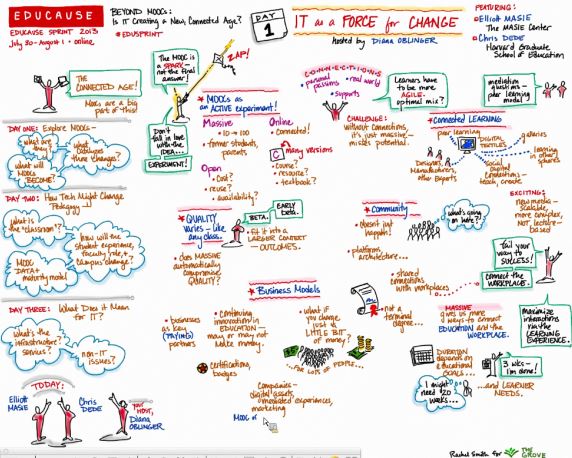
I joined today’s @EDUCAUSE 1st #EDUSprint webinar, IT as a Force of Change, discussed connected learning, technological impacts, educational models, and, of course, MOOCs. For those of us who educate, design, and research these items, not much of today’s session was new; however the speakers highlighted some interesting points and conversations around “where we are and where we need to go with higher education learning?” Today’s session was focused on framing large-scale, online learning programs – which is why MOOCs came to the forefront of the questions and discussion with the featured panel: Elliot Masie (The MASIE Center) and Chris Dede and Timothy Wirth (Learning Technologies, Harvard University). #EDUSprint 1 - Beyond MOOCs

MOOCs were called many things and labels were shared about the role of MOOCs in higher education. Here are a few words/phrases to describe MOOCs: unbundle, four letter word, innovation, change, disruption of education, learning model, same-old pedagogy, digital engagement, connected learning, revenue-maker, the future, and even an EXPERIMENT. If this is true…

In thinking about pedagogy and instructional design, I really hope we are considering the impact to our learners and subject material. Too often we go to the “shiny and new” hype for learning trends, rather than using learning outcomes to align curriculum content and assessments. Sometimes, I think our administration and educational leaders seem to miss the point…

Here are a few resources shared during the session that might be useful for those of you wanting to bone up on large-scale online learning with MOOCs:

Beyond the talk and questions about MOOCs, I thought the central thread for connected learning and meaning-making in education was strong. The fundamental question that needs to be ASKED and ANSWERED by more of our institutions was posed by Elliot.  was posed by Elliot is critical for our institutions to ASK and answer:

“How can we build a connected campus?

More information and a recording of the 1st #EDUsprint session can be found HERE, and, of course, there are a few Twitter notes from other #EDUsprint -ers for you to take a gander at… and perhaps I’ll see you in the #EDUsprint streams tomorrow…

Higher Education, nacada, Professional Development, Training

Passing the Torch: Leadership Transition in Our Professional Organizations

In many professional organizations and associations (both formal and informal), leadership positions are fluid and change frequently. Whether it is an elected position, scheduled appointment, or a professional move, it is important to consider how your organization manages leadership succession and transition to sustain the association.

Passing the Torch

In thinking about transitioning out of my current role with NACADA, I was asked to share my experiences and resources* for incoming leaders for in the association. I figured I might as well share a few of these ideas with others who might be transitioning or transferring of roles in their professional organizations as well:

I. Build Your Professional Posse – No leader can do it alone, nor should they. Surround yourself with some great people who share similar interests and passions in your professional area. You know who they are – you have met them at a conference, attended one of their presentations, connected with them online, or heard about the great work they are doing – so reach out and get these members involved.

  • Recruit members at annual conferences/meetings in-person and online. We used a shared Google Form to invite others, e.g. the  #AdvTech Technology in Advising Commission Sign-up for 2012-13

  • Pass on and share the names, contact information (email, phone numbers, Twitter handles, etc)

  • Find out HOW members want to be involved with your group. Be open to suggestions and areas of interest that you have not thought about.


II. Take Note — Document, Organize & Archive – Be sure to keep notes, capture screenshots, record meetings, and file take notes, take screenshots, record online, and file information in an organized way throughout your elected/appointed term.

  • Save and file emails into folders from the professional association, members, and more – you never know when you will need to refer back to them

  • Organize information by projects, deadlines, and responsibilities

  • Store and save your files in an accessible space for your group to review

  • My “go to” spaces of organization for NACADA included:


III. Mentor While You Lead – Succession planning does not have to start at the beginning or end of your elected/appointed term. Consider involving members in your professional organization early and often.

  • Encourage point people for sub-groups, committees, or projects

  • Recommend collaboration within and outside your specific group

  • Involve participants in activities, presentations, research and development with your interest/commission area (psst you should not do it alone).


IV. Meet with Your Members – You will want to organize a regular meeting schedule with your committee, group or advisory board. Inquire about these at the start of each academic semester or quarter, and try to keep them on a regular schedule. Save the date(s) in advance.

  • Determine when you can meet. Try using a Doodle to sort out your meeting schedule.

  • Find the best space to “meet” for your group as they may not be anywhere near one another geographically:

    • Conference Call? There are a few free ones like http://www.freeconferencecall.com/ out there

    • Professional Association or institutional online web conferencing available? NACADA uses the Adobe Connect platform

    • I also am a fan of Google Plus Hangouts – free group video chat for 10 people and the ability to have IM chat and shared documents from Google Drive and/or screen sharing capability

  • Put out your agenda a week in advance to remind others of meeting, where/how you are meeting, and to give time to prepare/read over meeting information

    • I use Google Docs for shared agendas to encourage members to add discussion topics, questions, or updates


V. Create a Communication Plan – Consider making a communication plan for your professional group. This will help you understand the how, where, when and why for communication. This will also help you to disseminate information, seek out information, ask questions, and engage the members of your professional group.

  • Survey your group to find out WHERE they want to stay connected and informed. This can be at an annual conference/meeting or online. {We asked at the annual meeting, and on the digital sign-up sheet.}

  • Create welcome messages for email, Facebook or other networks to tailor and respond to interested members ASAP, for e.g.

Hello ________________,

Great to hear that you are interested in getting involved in the NACADA Technology in Advising Commission (#AdvTech)! Our #AdvTech Commission would love to have you join in the fun. To help identify your interests for involvement in the commission, please complete the NACADA Technology in Advising Commission Sign-up for 2012-13 {insert URL}

Also, be sure to connect to our commission  Facebook Group: {insert URL} There are a number of great conversations, questions and opportunities to share resources in this space. Finally, we do have an option to sign up to the commission listserv and information on the NACADA Technology in Advising Commission web page

Looking forward to getting you connected and involved soon!

Best,

Laura Pasquini

NACADA Technology in Advising Commission Chair 2011-2013

  • Get SOCIAL (media) – find an online, connected space that works for your group. Our group was interested in a moderated/closed Facebook Group; however I have seen Google Plus Communities, organizational listservs, Facebook Pages, LinkedIn groups (e.g. Advising Veterans), or hashtags on Twitter (e.g. #firstgen) to bring professional groups together. Just be sure to keep up with the conversation in whatever space you choose to use.

  • Be open for members to reach out to you for questions, ideas, suggestions, and getting involved. I often connected with members via email, Skype, on the phone, Google Plus, or another social network. Keep the conversation going, and consider hosting “office hours” or regular ways to connect with you.
  • Think outside the communication box. Consider offering different means for sharing member information and updates. We tried out the NACADA Tech Talks of 2012, and after the NACADA 2010 conference members of our group initiated the the #AcAdv Chat weekly Twitter conversations.


*There are a number of different tools and online resources to help with professional organization workflow. I am just sharing the specific ones I used with my NACADA Technology in Advising Commission the past couple of years. Figure out your purpose, then find the appropriate tool that will work for you.

PhD, Reflections

#sxswEDU: Thoughts, Reflections & Then Some…

Time sure flies when you’re conferencing, volunteering and travelling… so my thoughts on South By South West Edu (#sxswEDU), are delayed by exactly 2 weeks. My bad.

Due to my love of Austin and enjoyment of SXSW, I thought SXSW Edu would be a great conference to engage with other educators and expand professionally. There were a number of things I liked – such as being on public transit, new perspectives on learning, and connecting with tweeps (Shout out to: @tjoosten, @gsiemens, @veletsianos@audreywatters & more #iamEDU friends!). I also appreciated the lively banter our Social Media in Higher Ed (#smHE) panel had on the topic, and the great follow up conversations with other instructors, practitioners, and researchers. 

Essentially, I got what I wanted out of the #sxswEDu conference – connect, social, interact and learn. I sort of expected something else from this conference, specifically with regards to the education (K-12 and Higher Ed) involvement. I was a bit disappointed to see that the Panel Picker selected more sessions with industry, rather than any educators. It was odd. I was not alone in noticing the tensions were felt between the industry and educationWhy were the instructors, teachers, principals, faculty, higher education professionals, and educational administrators not sitting in these #sxswEDU seats?

Let's get ready to MOOC-off! Where art thou @gsiemens?

Although the education presence was not the “sage on the stage” approach, I am glad I was present to listen to what industry and technology leaders think the “future of learning” will be. I know that many of these sessions were challenged and talked about outside the formal #sxswEDU program, and I was curious as to how other educators interpreted the conference message(s). 

One thing that was very noticeable = the repetitive rhetoric being shared from room to room. To mix it up I, jokingly, initiated the  #SXSWedu Terms to Know, Use, Love & Hate Google doc to note the key words, terms or phrases I heard at the conference. Some might say I was being jaded (*cough* Siemens *cough*), but really I was just having fun with the common language of the conference. After curating this list, I decided to create a game (…which had multiple players, I might add): 

#sxswEDU BINGO Card #3

Note: Another suggestion was to draft a blog post with the complete list of terms. I decided to respectfully decline said challenge; however I will stay alert to the language and context of these words. It’s not a bad idea to keep your ears open and listen every once in a while… Thanks for reminding me of that #sxswEDU.