AcAdv, Learning Technologies, NACADA Tech

Going Mobile for Academic Advising: Tablets, iPads & Protocols on Campus

Mobile computing is all around us. You don’t just have to read the EDUCAUSE Mobile IT in Higher Education 2011 report or glance over the Cell Internet Use 2012 from the Pew Internet & American Life Project to see the rise of mobile technology on campus. More of students, faculty, and staff in higher education are plugged into smartphones, using tablets, and access more online through their mobile device.

Like other entities in higher education, our advising office is considering what it would be like to use a tablet (iPad or Nexus 7 seem to be the front runners) in our daily working lives. I was charged with the task to identify potential uses and reasons why a tablet would be helpful for supporting students and our professional lives on campus – and also things to consider when implementing mobile technologies.
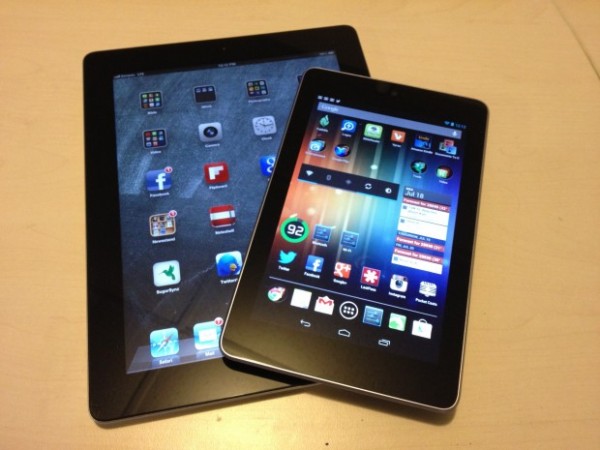
Image c/o EdTechMag

With the quick response from the fantastic NACADA Technology in Advising Commission Facebook Group, we crowdsourced helpful resources and ideas around using mobile technology. Here are few* potential uses of mobile technology for academic advising – the WHY & HOW we would use tablets :

  • Navigation of Online Campus Resources – share for students & others at appointments, events, for recruitment, resources fairs & more!
  • Increased Web Resources – more of our advising resources & job aids (systems, notes, etc) have moved online. The access to information and systems is critical for our daily work environments in higher ed.
  • Sustainability – Increasingly our advising materials are moving online and our campus is moving to a paperless environment. Instead of printing an agenda, file or document – you can view it on your tablet.
  • Improvement to Advising Process – Currently using a PDF advising document – to transition to an online web form that can be completed and emailed to the student & tracking
  • New Student Orientation – providing current information when advising, catalog, etc. as you are on the go and at different events & happenings on campus during the summer
  • Instruction & Presentation Needs – able to plug & play notes, PPT, web resources, & applications during a class, conference session or training
  • Ease of Registration – sometimes the process for online registration and class search needs some show & tell – advisors could help students waiting for appointments or reach out to students to enroll during peak times in other spaces on campus
  • Collaborative Communication – shared notes, capturing information  from meetings & reporting back on events, webinars, or training on/off campus
  • Getting Social [Media]: ability to capture events on video, record audio for podcasts, get others connected to these social spaces (show them) &  the ability to post, archive, save & share with the campus community in real time. Have you thought about your social media management lately?
  • Assessment – surveys, evaluations, on-the-spot feedback, or other ideas for review to collect student information and campus data.
  • Marketing & Promotion – create magazine style brochures, design better promotional materials & share presentations which are all electronic => ability for direct marketing at events/fairs/appointments that can be sent to other mobile devices or email accounts. [Here’s a video with a few examples from our Career Services friends as well & a great NACE article on the topic from @garyalanmiller.]
  • There’s An App for That – web applications can be used from the current Apple or Android market OR you can create your own app that shares helpful resources.
  • Creativity – inspires staff to consider other means, methods, and practices for better serving our students, getting their administrative tasks accomplished, and then some!

*This list is not extensive or all-inclusive. I appreciate and welcome any and all ideas for other uses for tablets for academic advising or other higher education functions on campus.

For those of you who are already using a mobile device, here are some “procedure/protocols” for iPads in Office shared by the current NACADA President, Jennifer Joslin [Thanks!!]:

iPad Procedures and Things to Know

How to set up your iPad:

There are instructions inside the box; open the iPad box and get everything out.

You will need an iTunes account. And you’ll need to make sure iTunes is installed with the latest version on your computer. {Insert Your Office Supply Purchaser’s Name Here} can help with the approvals you need for this. (If you already have an iTunes account for personal use, you can just use that. You do not need a separate account unless you want one.)

Follow the on-screen instructions. Do register your account under your name, but use the {Insert Your University E-mail Address} in the contact information. Do not download the “Find my iPad” app.

You can now sync your apps, music, etc., as desired.

Please set up the passcode security feature (in Settings > General > Passcode). For extra security turn off the Simple Passcode option on this page, which permits the use of longer (i.e. more secure) passcodes. It is also recommended to turn on the Auto-Lock feature on this page. This makes it so you will need to enter the passcode after the iPad is idle for a preset period of time. Shorter times are more secure.

{Insert Your IT Support Area Here} can help you sync your {Insert Your Preferred Client’s name} email, calendar and contacts to your iPad.

Important things to keep in mind:

The iPads are intended for work purposes. Please use them appropriately. There are many apps you can use for work that are free. Some good examples of this are iBooks, Evernote, Dropbox, Big Calc Free, the Oregon App, Facebook or Flipboard for Facebook, and either Twitter or Hootsuite for Twitter. If you would like additional apps on your iPad, it is your responsibility to pay for your own apps.

It’s important that we are careful about use of data. Sometimes you will use the VPN to access {Insert CRM/CMS, degree tracking, campus portal, and/or advising notes software of your campus here} to access a student’s record. It’s important to delete those screens when you finish for the day. Since accessing the web is very easy on the iPad (and there is no further security), it’s important not to leave student data readily available.

To set up the VPN follow this link: {Insert Your VPN URL Here}

{Insert Your Office Supply Purchaser’s Name Here} will assist us with labeling each iPad for inventory and tracking purposes. We have ordered cases and clear protective screen covers for daily use. We have also ordered a few of the attachments that will allow us to use the iPad for presentations.

If you have an iPad 3G (Directors), you must purchase your own data plan.

Do you have tips for using mobile technology on campus? Suggestions for protocol and use in the office for your staff/faculty? Ideas on how to use tablets for your work area in higher education? Please share your ideas and how you use your mobile technology on your college/university campus.

CCK09, EC&I831, eduMOOC, PLN, Professional Development

Online Learning: More Than Just a MOOC

As a life-long learner, I have appreciated engaging and interacting with a wide variety of educators in a few Massively Open Online Courses (MOOCs). The concept of a MOOC is has been around for a while. In previous blog posts, I have shared the definition of a MOOC and my participation and experience. I have appreciated learning from the #eci831 and #CCK09 MOOC facilitators, such as Alec Couros, George Siemens & Stephen Downes. Even more,  I appreciate the knowledge shared by invited speakers and the connected learning participants who I continue to engage and exchange with beyond the course structure. MOOCs are now on the tip of everyone’s tongue due to recent education technology start-ups who are now designing MOOC-like courses and creating partnerships with many accredited higher education institutions. What’s all the MOOC about if the concept of a MOOC is not a new innovation?

#jiscwebinar What Is A MOOC? @dkernohan @mweller @jonathan_worth @loumcgill @daveowhite [visual Notes]

Image c/o Flickr user guilia.forsythe

In a recent CBC radio interview and blog post, George Siemens discusses more about the good and bad aspects of Massively Open Online Courses are for online learning. There are different sides of the camp on this topic. Some believe MOOCs will either kill or transform the academy as we know it. Here are some interesting points that were shared in the interview from George and callers to the show:

Current Learning & Development = #AltProDev

If there is an interesting alternative professional development (#AltProDev) opportunity available – I’m there! Part of the reason why I have connected to podcasting with BreakDrink.com or participation in Twitter Chats (#AcAdv Chat, #SAchat or #PhDchat) can be attributed to my early learning experiences with MOOCs. I enjoy engaging in PD to improve my skills and add to my knowledge repertoire. Across various personal and professional spheres, I have learned a great deal at formal conferences, workshops and education sessions; however, I am also proud to say I learn a great deal from my informal training and development environments that are primarily cultivated online. I think that MOOCs provide a set time period for professionals to learn about a specific topic and engage with others in a similar informal fashion. What is neat about this classroom is, that although the course might end, your network and learning artifacts continue to thrive outside the specific learning environment.

Teaching locally but accredit widely.

As a current student in higher education (I’m in process of working on my doctoral degree in learning technologies at UNT), I tend to research, read, archive, and share online to keep on top of the trends and happenings. I think my involvement in MOOCs have connected me to new concepts, research ideas, learning networks, and continue to support my formal education goals. My intention when signing up for this type of free, online learning was to support my own professional development and expose myself to new learning concepts. I reflected my MOOC experiences to my faculty advisor and he believed that participation in any one of these classes could be an added elective for my doctoral degree plan since this informal learning environment was contributing to my research design. How would this type of learning be looked like at your institution for degree requirements? Here is one suggestion for earning college credit from MOOCs if interested.

Sustainable model? Or Just Branding?

The MOOC talk seems to be all the rage as start-up companies, such as Coursera, edX, and Udacity, partner to “reshape online learning” with well-known higher education institutions. Will the massive hype of these MOOC types lead to effective use and sustainable funding models? Or is this just another method for marketing and propagation of the university brand? I do not know. I agree with George’s thoughts – we will see after the dust settles and the MOOC hype levels off in higher education.

Types of MOOCs

As the online learning trend grows there will be various types, targets and tiered offerings of MOOCs. Some of the MOOCs I have reviewed have included areas for digital competence, open education and technical resources. The content, subjects, platforms and learning environments will vary from MOOC to MOOC – and will most likely depend on the partnering institutions influence as well. Online learning will continue to be part of higher education curriculum at many institutions, but as George says “open and online courses is not going to be what cures the ails of online education.” I concur.

Incomplete = Failure?

Does a lack of commitment or completion mean that a MOOC failed? In looking at the retention and completion rates of MOOCs, the numbers vary from start to finish of a MOOC. Audrey Watters wrote a great about dropping out of MOOCs last week. She questioned if it was the content, instructor, platform or learner themselves. Good questions. If this was a multiple choice test, I might even select (E) Any of the above. Or perhaps our MOOC participants would commit more if they paid to learn – even $2 Would the freemium model commit participants more if there was a certification, badge, or accreditation for courses attached? Does extrinsic motivation trump the intrinsic goal for learning and self-fulfillment? I’m not sure.

Dynamics of MOOCs vs. Organic Classroom Experience

There are many pedagogical and theoretical underpinnings for MOOCs. If designed well, a number of online education opportunities allow for discussion, problem-solving, reflection, and unique dynamic interactions. A question from one of the callers to the CBC radio program asked (paraphrased) – can online education and MOOCs really replace the organic interactions in a face-to-face classroom environment? My initial response = it depends. I have always thought good teaching and solid learning outcomes is what drives the course. That being said it is important to note that technology is “not just a tool.” As a student, I have been in both fantastic and terrible courses both online and in class. Depending on the course purpose and objectives, instructors have the POTENTIAL to engage learners in a truly immersive and participative online learning environment. Technology is the instrument; the students are the musicians – it is up to the instructor to orchestrate and guide the collaborative instrumental play in online education.

What are your thoughts about MOOCs? Have you participated in a MOOC? Are you planning to participate in a MOOC in the near future? Please share.

Career, Higher Education, Learning Technologies, Social Media

Using LinkedIn with First Year Students #UGST1000

For many of my career and employment friends in higher education, LinkedIn is often a great professional networking website that many students explore later in their academic careers. Since “career development” is a process, a couple of instructor from UNT thought it might be helpful to expose our first year students to this learning network earlier in their degree programs.

Image c/o Melissa Venable’s Blog

This fall term, at least one section of the UGST 1000 – First Year Seminar will be using LinkedIn to help explore major and career options. This small seminar class is part of a learning community, where these same students are also classmates in two larger business classes: ECON 1100 – Microeconomics and BUSI 1340 – Managing the Business Enterprise. This UGST 1000 instructors (Allyson & Roxanne) thought using LinkedIn as a social networking website might provide more help for this group of undecided/undeclared students as  they research career/occupation options, understand the skills needed in the business industry, and connect to helpful ideas while exploring their majors in the first semester.

Here is the information about LinkedIn for the UGST 1000 class syllabus:

About LinkedIn: We are using LinkedIn as it is an important form of social media for business professionals. LinkedIn operates the world’s largest professional network on the Internet with 161 million members in over 200 countries and territories.  Additionally, LinkedIn counts executives from all 2011 Fortune 500 companies as members and its corporate hiring solutions are used by 82 of the Fortune 100 companies.  Basic LinkedIn accounts are free and can be created by visiting www.linkedin.com. By default, all information on your LinkedIn account will be public.  All information on our group’s page will be set to private; only members in our group will be able to read them. 

Here are some ideas of HOW students will use LinkedIn over the course of the term:

  • Build a Professional Student LinkedIn Profile – complete with a photo, information headline, listing educational/work experience, identify specialties, and establish a unique URL
  • Understanding the Value of Their Network for Learning & Experience – ability review their current network and identify how they want to grow their personal/professional connections on campus, online and within industries of interest to help support effective major/career decision-making.
  • Job Search – aware of the current job markets and trends in LinkedIn vs. how they compare to the O*NET and US Bureau of Labor Statistics.
  • Groups and Associations – Connect to a variety of LinkedIn Groups and associations related to their potential major/career interests.
  • References – Collect LinkedIn recommendations from previous instructors, employers or affiliations.
  • Understand LinkedIn Netiquette – updating your profile, posting appropriate status updates, acceptable ways to connect with others, asking for introductions, understanding what groups to join
  • Get Social – Connect any social outlets where they include professional work artifacts, thoughtful blog posts, personal or work websites, or avenues potential employers might like to see.
  • Group Discussions in LinkedIn Groups – private group discussion where students will lead the topic with an article, resource and question for their peers to respond.
  • Roadtrip Nation Group Project – outreach to professionals and companies to interview for the RTN project.
  • Major/Career Research Paper – informational interviews are part of this final paper assignment so LinkedIn will be able to provide students with potential interview contacts

We are currently collecting helpful links, articles, and information about LinkedIn use for learning and networking HERE, and we would LOVE to add MORE resources to our list. Please leave a comment and share your thoughts below. Thanks!

AcAdv, Learning Technologies, nacada, NACADA Tech, Professional Development

Hosting the @NACADA TechTalks in August – #AdvTech

For those of you interested in advising and technology – let me share with you an online, professional development opportunity that is on the horizon. At the beginning of August @NACADA is hosting an #AdvTech Summer Special Web Events. The week will have five FREE 60-minute virtual sessions sponsored by the NACADA Technology in Advising Commission to offer you ideas and resources for technology in advising.

Here’s the line up:

August 6: The Speech that Was Never A Blog Post: The Trends and Future for Technology in Advising 

August 7: What the Tweet?: @AcAdvChat & the #AcAdv Chat Community Using Twitter for Professional Development and Sharing 

August 8: Advising Technology Myth-busting: Guidance and Challenges for Using Social Media on Campus

August 9: Advising Reflections & Sharing: Blogging to Support Our Profession & Student Learning Outcomes

August 10: Technology Adoption & Life Cycle: From Implementation to Evaluation of Technology in Advising

During the NACADA TechTalks, I will do my best to be the host with the most for each panel by following the #AdvTech Twitter stream and comments in Adobe Connect. With the help of @NACADA we will post the recorded webcasts and archive the conversation for those who cannot attend. For more information about the sessions, #AdvTech panelists, and how to connect – visit the @NACADA Blog post about the TechTalks.

If you have further questions or things YOU want to ask any of the panelists during the week, be sure to let me know.

#AcWri, #phdchat, Book Review, PhD, Professional Development

Book Review: How to Write a Lot #SummerReading For #AcWri

In working on my research and dissertation proposal, I have been spending time with literature and #SummerReading. My #SummerReading book stack contains some theoretical works, #acwri support books, #phdchat guides, instructional design tips, and using the social web better for training, learning and development. [There are others, but they are loaded on my Kindle – more to come soon!]

Part of my summer away from course work is also dedicated beyond just reading, and is also focusing on my academic writing (#acwri). This turns my attention to the next book on my stack I’m currently reading = How to Write a Lot by Dr. Paul J. Silvia.

How to Write A Lot #SummerReading {hint, hint to me}

With travel time and holidays, there is plenty of time to both read and write. It’s nice to be away from the daily grind. This time away from the office and regular routine provides space for me to think about ideas and write. Since I finished this book, and I am motivated to write – I thought I might share it with other academic researchers who may need a little puss for their own writing practice.

I would agree with the author who defined this short text as “a practical guide to productive academic writing.” Dr. Silvia shares specious barriers to writing, and a few motivational tools to avoid “writer’s block” – which he thinks is bunk for most academic writers. There are a number of other hints and strategies shared for becoming a regular writer in graduate school and beyond in terms of writing style, manuscript submissions, and managing editorial responses. I also appreciated the helpful suggestions on how to create habitual writing practices for different types of projects, such as grants, books, journal articles, etc. The most helpful section in this sort read that might be useful for graduate students or junior faculty is the section on developing an agraphia group to keep you motivated and on track. Here are the five components suggested by Dr. Paul Silvia for a successful agraphia group for those of you who might need constructive source of social pressure to write:

  1. Set concrete short-term goals and monitor the group’s progress – proximal goal setting
  2. Stick to writing goals, not other professional goals – it’s not about professional development or reading about writing
  3. Big carrots can double as sticks – have informal social rewards for good habits; intervention required for those who are not meeting writing goals; check and balance for writing
  4. Have different groups for faculty and students – each group will have different writing priorities (see Chapter #3) and different writing struggles
  5. [Optional] Drink coffee – or tea, smoothies, etc. Meeting outside the department or office can be a good thing for this writing group.

Reference:

Silvia, P.J. (2007). How to write a lot: A practical guide to productive writing. Washington, D.C.: American Psychological Association.