#phdchat, Learning Technologies, LPQ

Announcement: Learning and Performance Quarterly First Issue Published & Call For Submissions for Issue No. 2

THE LEARNING AND PERFORMANCE QUARTERLY (LPQ), 1(1) FIRST ISSUE IS NOW PUBLISHED!

Thank you to the number of authors, reviewers and editors who helped contribute to the first open, access online Learning and Performance Quarterly journal. Please read and share with colleagues and researchers who might be interested:

Learning and Performance Quarterly, 1(1)

CALL FOR PAPERS: LPQ, 1(2)

The Learning and Performance Quarterly (LPQ) is currently accepting submissions for the second issue. Deadline for submissions is Friday, June 15, 2012 at 11:59 pm CSTSubmission of manuscripts can be made online through the LP Quarterly website via the Open Journal System.

TYPES OF MANUSCRIPTS ACCEPTED

Research Papers :

Papers that are concerned with the various approaches to learning and performance impact. These papers should discuss the literature related to the approach employed and include a measure of the learning and performance impact of the approach employed.

Case Studies:

Case studies that highlight a particular learning, training, performance or instructional setting in which learning and performance resources were used to address a particular challenge. They present a discussion of the challenge from current literature, what was done to solve or explore it, and the results of the project. They often offer suggestions for others interested in addressing similar challenges.

Concept/Theory Papers:

Papers that present new concepts or contribute to existing theory for learning and performance. This should offer a discussion of the literature related to the concept/theory along with a discussion of the major issues for future research needed to validate the concept/theory.

Book Reviews:

Book reviews of publications 2011 or later will be accepted to highlight a issues and resources relevant for learning and performance and offer a suggested solution or direction. The position is supported with both a logical argument and a review of the pertinent literature. Preference will be given in the review process to book review essays that comment on two or more related books.  Book review essays should not exceed 3,800 words and should include city, state, publisher, and year of the book’s publication.  An abstract of 150 words or less and keywords are required for book review essays.  Reviews of single books should not exceed 1,900 words.  At the beginning of the text please include title, author, publisher, city, date, and page numbers of the book(s) under review.

The deadline for submissions is Friday, June 15, 2012 at 11:59 pm CST. For detailed submission guidelines and instructions on how to make a submission please visit Author Guidelines.

CALL FOR LPQ REVIEWERS

Interested in reviewing articles for the LPQ Journal? The LPQ journal is looking for reviewers to conduct peer reviews and evaluations of submissions.

Please identify your reviewing interests, substantive areas of expertise, and preferred research methods when completing the LPQ journal registration online.

We look forward to receiving your submissions. Please pass this post onto other colleagues and researchers who might be interested in publishing, reviewing or editing for the Learning and Performance Quarterly journal.

Thanks!

Laura Pasquini & Jeff Allen, Founding Editors

Learning and Performance Quarterly

Like us on Facebook

Follow us on Twitter @LPQuarterly

Email: LPquarterly@gmail.com

Higher Education, Learning Technologies, Web Design

Backward Design with TED-Ed

Beginning with the end in mind. This is the philosophy of instructional design method backward(s) design.  A few weeks back Kevin Guidry shared his thoughts on backward design, and it got me thinking about how I approach my curriculum and lesson plans.

Image c/o <http://www.recordholders.org/images/backwards-cycling1.jpg>

For the Office for Exploring Majors, I am currently reviewing/updating modules for our first-year seminar class – UGST 1000. The goal is to offer an “engaged” format (we cannot use the term blended or hybrid, but there will be mixed components of online, in-class and active requirements) for Fall 2012.  Last semester our department offered a couple of sections of the NextGen course; however, the class focus was on “well-being.” Since our office t works with undecided students, the engaged sections for Fall 2012 will need to be directed towards major/career exploration and academic success.

Image c/o <http://kids.esc13.net/curriculum/3stages.gif>

In reviewing the current curriculum, it was apparent that a backward design approach would be the most effective method for this instructional design project. In Understanding by Design, Wiggins and McTighe (2005) identify three key stages for  backward design:

  1. Identify desired results (learning outcomes) – What should your learners know, understand, and be able to do?
  2. Determine Acceptable Evidence (means to assess if learners have learned) – How will you know if learners have achieved the desired results, achieved those learning outcomes, or met the standards? What is the evidence of learner understanding and proficiency?
  3. Plan learning experiences and instruction – What will be the procedures or methods to reach these outcomes? This includes a definition of knowledge; definition of skills and procedures learners need to master; definition of materials; and definition of learning or instructional activities.

Here is an example of an engaged learning module that I will include for the Time Management unit. This session will have the backward design steps and one of three classes that students will be required to complete outside of the in-class meeting time.

1. Learning Outcome(s)

Learners will be able to:

(a) identify the differences between tasks, objectives, and goals.

(b) create a smart and effective to-do list of tasks.

(b) assess their weekly schedule to identify how time is being utilized.

(c) select priorities, understand where time is lost, and accurately adjust for effective time management.

2. Evidence of Learning

Learners will demonstrate their understanding of learning by:

(a) drafting a to-do list of tasks for the day/week and identify 5 top priorities.

(b) mapping out a one week schedule of their activities to identify where their 168 hours are allocated.

(c) creating a visual representation of how the 1 week period time is accounted for in terms of activities and responsibilities.

 (d) writing a 250 word minimum blog post/online journal about their 168 hours and weekly schedule. This reflection will include the visual representation of 168 hours, account for time wasted, and offer ideas how to effectively manage time to balance their schedule.

3. Learning Experiences & Instruction

This section of the time management unit will be housed online. We have some modules created on Blackboard Learn; however, I thought I would also create a mock up on the new TED-Ed website. This is a rough draft of a module (to be edited) I designed by “flipping the video” from YouTube into a lesson. [Side note: there are already a number of lessons available for educators to use for the experience section of lessons. Instructors can use the same module or “flip” it.]

TED-Ed | Time Management: How to Write a To-Do List & Know Where Your Time Goes

College Success – Chapter 2: 2.3 Organizing Your Time

References:

Beiderwell, B., Tse, L., Lochhaas, T.J., & deKanter, N.B. (2010, August). College success. Flatworld Knowledge. Retrieved from http://catalog.flatworldknowledge.com/catalog/editions/54

Wiggins, G. & McTighe, J. (2005). Understanding by design (2nd ed). NJ: Prentice Hall.

BreakDrink, CTCX, Higher Education, K-12, Learning Technologies, Social Media

#SocialMedia & #HigherEd – Policy vs. Guidance

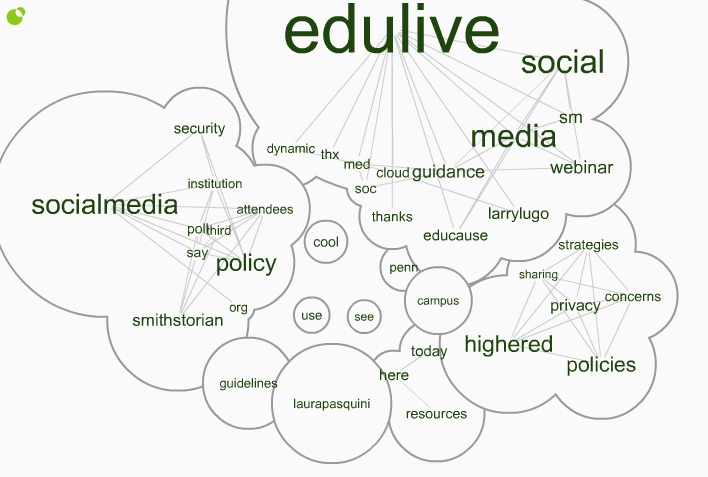
Last week, I attended the free @EDUCAUSE #EDUlive Developing Social Media Guidance in higher education with respect to #Privacy and #Security concerns. The presenters, from the University of Pennsylvania, shared ideas for how to promote safe usage of social media and detailed how to  draft guidance for addressing issues in teaching, research, administrative, and other functions.

Click here for the Twitter Cloud interactive image =>  http://www.infomous.com/node/15059

If you missed the #EDUlive event, you can check out the webinar recording and archives posted on the EDUCAUSE website, Developing Social Media Guidanceand you can also read through the Storify of #EDUlive tweets I collected.

During the webinar, I shared the Social Media: Sharing Strategies, Policies &  Privacy Concerns in Higher Education open & shared Google Doc that was 1st created for a @BreakDrink Campus Tech Connection (CTCX) Show in September 2010. This document has been circulated around and curated for a while by myself and high ed professionals and faculty. Since there were a number of social media guidelines/policy examples shared during the webcast, I added  them to this doc. For others interested in developing guidelines, I think there are a few solid examples I like in here, and I know that @EricStoller shared some of his favourite #SM guidelines from the list on InsideHigherEd recently as well.

Before diving into creating rules, guidelines or policies for social media, it is important to consider how this emerging technology is being used on your campus. In Chapter 6 of Social Media for Educators, Tanya Joosten (2012) shares her thoughts around institutional considerations for social media policy and practice [which we chatted with Tanya about on #CTCX Episode No. 61 as well]. There are often concerns about the use of social media at educational institutions, since these social and  connected resources impact student behavior, online interactions, privacy concerns, and communication practices. When developing a social media policy, Joosten (2012) offers a few helpful suggestions for educators:

  • review current technology use at your institution
  • do not link policies to specific tools
  • revise current student conduct and institutional policies
  • use policy to address behaviors and activities, rather than focus on the technology
  • learn about FERPA (or FIPPA in Canada) issues and privacy of student information at your campus
  • develop best practices on campus for use by students, faculty, and support units

When thinking about the language of policy vs. guidelines, I am partial to establishing guidelines. There are probably already policies that address the actions and outcomes of student, staff, and/or faculty behavior on your campus. I think that it is important to review your home institutional policies and/or guidelines to best understand what is already being “regulated” on campus. It is also helpful to chat with your institutional office who deals with policy development, legal concerns, and/or questions you might have around privacy legislation.

Have you searched the terms “social media+policy” or “social media+guidelines” on your institutional website? Go on. See what shows up. If you find something, then start connecting and collaborating with that unit. If there is nothing to be found, then gather your peers and start the conversation.

References:
Joosten, T. (2012). Social media for educators. San Francisco, CA: Wiley/Jossey-Bass.

BreakDrink, Learning Technologies, Reflections

My Prolegomenon to Technology

A few weeks ago, @JenniferKeegin posted to the #SAWTT Blog with the prompt – What got me interested in Technology?

I think that my prolegomenon to technology was definitely the Commodore 64. I was introduced to this machine at a young age, thanks to my father.

For those who do not know, my father taught high school economics, business, and computers. Beyond having a great collection of books in his office, I was often drawn to his Commodore 64 and I am fortunate that I was able to dabble with device at home. The black screen and green text provided me with the backdrop to my first writing drafts, school projects, pong quests, and weather war game battles.

Around the time this prompt was posted, we sadly said our RIPs to Jack Tramiel, the father of the Commodore 64.  Although I have no personal connection to him, this made me sit back and reflect. I felt very fortunate to be introduced to Mr. Tramiel’s machine, and how lucky I was as a child to have the opportunity to tap these keys (along with a few typewriter keys) when technology might not have been as common at home. Of course, I owe a debt of gratitude to  my father for exposing my siblings and me to computers at a young age. He challenged us to be curious and explore with technology early on. Thanks the introduction and challenging us to think beyond the possible, Dad.

Learning Technologies, Needs Assessment

Talking to Tech Vendors

 Technology and tech vendors are all around us. Whether at a conference or reading a blog, you cannot help but stumble upon the many enterprise solutions or ed tech start ups that are flooding the higher education market. I don’t think that this is necessarily a bad thing; however I have had a number of professionals and faculty ask me  how to “talk the tech talk” with vendors. Many want to know that they are asking the “right” questions, determining if this IT resource is the best solution, and understanding what the product/software/application can be utilized for at their institution.  Often, I inquire if technology is the right solution to the problem and what the needs assessment indicated – but I will leave that topic for a follow up post.

Photo by AmyGaines on Etsy

 Last year my consulting skills class shared ideas for effectively partnering with clients to  support their interest in design, development, or external enterprise solution interests. I was discussing a few ideas with the instructor of that course this weekend, and I was reminded about a great article I read from Campus Technology – 13 Secrets of the Deal. Here are a few highlights and suggestions from the article that I know I have used when talking to vendors. What are your tips? Please share!

Tips for getting the most out of your vendor search and selection in higher education:
  1. Talk to all stakeholders on campus before you go shopping.
    • all three groups need to be at the discussion  table: users (faculty/staff/students), IT, and the purchasing department
  2. Spend time on the needs assessment, business analysis and strategic plan for implementation.
    • avoid picking a system that looks like one that is owned; instead step back and review for an ideas system
    • encourage stakeholders to be invested in the process/decision-making – more helpful for implementation
  3. Participate in your local (state/province/region/country) purchasing consortium.
    • In the US, some institutions belong to volunteer on a technology committee/group on campus or in the region
    • Have the expertise of the consortium /group help you move forward with your decision
  4. Only buy what you need – make just-in-time purchases. 
    • the price of hardware will decrease and the performance of it will increase
    • buy what you need and grow into it; add later to avoid paying maintenance on something not being used
  5. Encourage competition. Ask for bids from at least two competitors.
    • firms tend to work harder when in a competitive situation
    • advise everyone at a product demonstration to put on their “poker faces”
    • complete comprehensive evaluations; however do not ask for final decisions
  6. R-E-S-P-E-C-T. Vendors are people too. 
    • good working relationships with vendors can lead to price breaks
    • treat them as you would like to be treated – be conscious of timeline, deadlines & holidays
    • ask vendors where trouble dealing with your group lies
  7. Opt for a demo instead of a lengthy request for proposal (RFP).
    • ability to guide vendor through business process & current practices to allow for vendor to take notes & tailor specs
    • vendors will show you their capabilities & interests based on your questions and what you want to see in a demo
  8. Considering the contract. Negotiations are not all about pricing.
    • consider deals on the little stuff that adds up, i.e. shipping, longer warranties, multiple address for shipping, training, faster delivery, support, etc.
    • collective purchasing – talk with existing customers to participate in the deal – ASK FOR REFERENCES!
  9. Avoid signing a contract straight from the vendor. They protect the vendor more than they protect you.
    • a good reason to work with a buying consortium and other organizations who negotiate vendor contracts & take the customer interests into account.
    • alternative: hire an independent consulting firm to help you understand the terms and to represent your own interests
  10. Long term investment costs. Limit and control escalation factors.
    • usually an escalation clause in a maintenance contract that specifies how much fees will increase each year – think long term on % increases
  11. How much support is needed? Determine training and consulting needs.
    • the purchase of new technology frequently needs to cover additional vendor services
    • additional vendor services are often either over or underbid – includes travel costs, cancellation,
    • talk with other institutions who have purchased the same technology/software/hardware/system to get a realistic expectation of service & support required
  12. Look at alternative service providers.
    • you do not need to purchase services from the same company you purchased gear/software from
    • by not committing to services upfront, you can tell the company you are going to another vendor for support
  13. Should I stay or should I go now? Walk away if you do not find the right deal.
    • if things do not mesh or the terms are not in the same range of your budget – let it be
    • wait  6 to 18 months from now, as something more suitable might come along or your budget may change