
AcAdv, Learning Technologies, NACADA Tech

Going Mobile for Academic Advising: Tablets, iPads & Protocols on Campus

Mobile computing is all around us. You don’t just have to read the EDUCAUSE Mobile IT in Higher Education 2011 report or glance over the Cell Internet Use 2012 from the Pew Internet & American Life Project to see the rise of mobile technology on campus. More of students, faculty, and staff in higher education are plugged into smartphones, using tablets, and access more online through their mobile device.

Like other entities in higher education, our advising office is considering what it would be like to use a tablet (iPad or Nexus 7 seem to be the front runners) in our daily working lives. I was charged with the task to identify potential uses and reasons why a tablet would be helpful for supporting students and our professional lives on campus – and also things to consider when implementing mobile technologies.
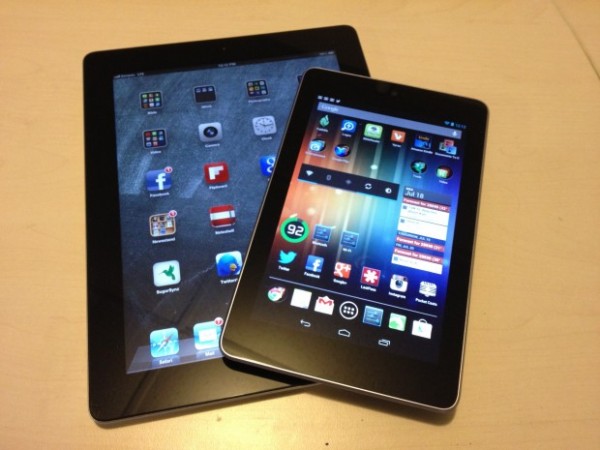
Image c/o EdTechMag

With the quick response from the fantastic NACADA Technology in Advising Commission Facebook Group, we crowdsourced helpful resources and ideas around using mobile technology. Here are few* potential uses of mobile technology for academic advising – the WHY & HOW we would use tablets :

  • Navigation of Online Campus Resources – share for students & others at appointments, events, for recruitment, resources fairs & more!
  • Increased Web Resources – more of our advising resources & job aids (systems, notes, etc) have moved online. The access to information and systems is critical for our daily work environments in higher ed.
  • Sustainability – Increasingly our advising materials are moving online and our campus is moving to a paperless environment. Instead of printing an agenda, file or document – you can view it on your tablet.
  • Improvement to Advising Process – Currently using a PDF advising document – to transition to an online web form that can be completed and emailed to the student & tracking
  • New Student Orientation – providing current information when advising, catalog, etc. as you are on the go and at different events & happenings on campus during the summer
  • Instruction & Presentation Needs – able to plug & play notes, PPT, web resources, & applications during a class, conference session or training
  • Ease of Registration – sometimes the process for online registration and class search needs some show & tell – advisors could help students waiting for appointments or reach out to students to enroll during peak times in other spaces on campus
  • Collaborative Communication – shared notes, capturing information  from meetings & reporting back on events, webinars, or training on/off campus
  • Getting Social [Media]: ability to capture events on video, record audio for podcasts, get others connected to these social spaces (show them) &  the ability to post, archive, save & share with the campus community in real time. Have you thought about your social media management lately?
  • Assessment – surveys, evaluations, on-the-spot feedback, or other ideas for review to collect student information and campus data.
  • Marketing & Promotion – create magazine style brochures, design better promotional materials & share presentations which are all electronic => ability for direct marketing at events/fairs/appointments that can be sent to other mobile devices or email accounts. [Here’s a video with a few examples from our Career Services friends as well & a great NACE article on the topic from @garyalanmiller.]
  • There’s An App for That – web applications can be used from the current Apple or Android market OR you can create your own app that shares helpful resources.
  • Creativity – inspires staff to consider other means, methods, and practices for better serving our students, getting their administrative tasks accomplished, and then some!

*This list is not extensive or all-inclusive. I appreciate and welcome any and all ideas for other uses for tablets for academic advising or other higher education functions on campus.

For those of you who are already using a mobile device, here are some “procedure/protocols” for iPads in Office shared by the current NACADA President, Jennifer Joslin [Thanks!!]:

iPad Procedures and Things to Know

How to set up your iPad:

There are instructions inside the box; open the iPad box and get everything out.

You will need an iTunes account. And you’ll need to make sure iTunes is installed with the latest version on your computer. {Insert Your Office Supply Purchaser’s Name Here} can help with the approvals you need for this. (If you already have an iTunes account for personal use, you can just use that. You do not need a separate account unless you want one.)

Follow the on-screen instructions. Do register your account under your name, but use the {Insert Your University E-mail Address} in the contact information. Do not download the “Find my iPad” app.

You can now sync your apps, music, etc., as desired.

Please set up the passcode security feature (in Settings > General > Passcode). For extra security turn off the Simple Passcode option on this page, which permits the use of longer (i.e. more secure) passcodes. It is also recommended to turn on the Auto-Lock feature on this page. This makes it so you will need to enter the passcode after the iPad is idle for a preset period of time. Shorter times are more secure.

{Insert Your IT Support Area Here} can help you sync your {Insert Your Preferred Client’s name} email, calendar and contacts to your iPad.

Important things to keep in mind:

The iPads are intended for work purposes. Please use them appropriately. There are many apps you can use for work that are free. Some good examples of this are iBooks, Evernote, Dropbox, Big Calc Free, the Oregon App, Facebook or Flipboard for Facebook, and either Twitter or Hootsuite for Twitter. If you would like additional apps on your iPad, it is your responsibility to pay for your own apps.

It’s important that we are careful about use of data. Sometimes you will use the VPN to access {Insert CRM/CMS, degree tracking, campus portal, and/or advising notes software of your campus here} to access a student’s record. It’s important to delete those screens when you finish for the day. Since accessing the web is very easy on the iPad (and there is no further security), it’s important not to leave student data readily available.

To set up the VPN follow this link: {Insert Your VPN URL Here}

{Insert Your Office Supply Purchaser’s Name Here} will assist us with labeling each iPad for inventory and tracking purposes. We have ordered cases and clear protective screen covers for daily use. We have also ordered a few of the attachments that will allow us to use the iPad for presentations.

If you have an iPad 3G (Directors), you must purchase your own data plan.

Do you have tips for using mobile technology on campus? Suggestions for protocol and use in the office for your staff/faculty? Ideas on how to use tablets for your work area in higher education? Please share your ideas and how you use your mobile technology on your college/university campus.

Career, Higher Education, Learning Technologies, Social Media

Using LinkedIn with First Year Students #UGST1000

For many of my career and employment friends in higher education, LinkedIn is often a great professional networking website that many students explore later in their academic careers. Since “career development” is a process, a couple of instructor from UNT thought it might be helpful to expose our first year students to this learning network earlier in their degree programs.

Image c/o Melissa Venable’s Blog

This fall term, at least one section of the UGST 1000 – First Year Seminar will be using LinkedIn to help explore major and career options. This small seminar class is part of a learning community, where these same students are also classmates in two larger business classes: ECON 1100 – Microeconomics and BUSI 1340 – Managing the Business Enterprise. This UGST 1000 instructors (Allyson & Roxanne) thought using LinkedIn as a social networking website might provide more help for this group of undecided/undeclared students as  they research career/occupation options, understand the skills needed in the business industry, and connect to helpful ideas while exploring their majors in the first semester.

Here is the information about LinkedIn for the UGST 1000 class syllabus:

About LinkedIn: We are using LinkedIn as it is an important form of social media for business professionals. LinkedIn operates the world’s largest professional network on the Internet with 161 million members in over 200 countries and territories.  Additionally, LinkedIn counts executives from all 2011 Fortune 500 companies as members and its corporate hiring solutions are used by 82 of the Fortune 100 companies.  Basic LinkedIn accounts are free and can be created by visiting www.linkedin.com. By default, all information on your LinkedIn account will be public.  All information on our group’s page will be set to private; only members in our group will be able to read them. 

Here are some ideas of HOW students will use LinkedIn over the course of the term:

  • Build a Professional Student LinkedIn Profile – complete with a photo, information headline, listing educational/work experience, identify specialties, and establish a unique URL
  • Understanding the Value of Their Network for Learning & Experience – ability review their current network and identify how they want to grow their personal/professional connections on campus, online and within industries of interest to help support effective major/career decision-making.
  • Job Search – aware of the current job markets and trends in LinkedIn vs. how they compare to the O*NET and US Bureau of Labor Statistics.
  • Groups and Associations – Connect to a variety of LinkedIn Groups and associations related to their potential major/career interests.
  • References – Collect LinkedIn recommendations from previous instructors, employers or affiliations.
  • Understand LinkedIn Netiquette – updating your profile, posting appropriate status updates, acceptable ways to connect with others, asking for introductions, understanding what groups to join
  • Get Social – Connect any social outlets where they include professional work artifacts, thoughtful blog posts, personal or work websites, or avenues potential employers might like to see.
  • Group Discussions in LinkedIn Groups – private group discussion where students will lead the topic with an article, resource and question for their peers to respond.
  • Roadtrip Nation Group Project – outreach to professionals and companies to interview for the RTN project.
  • Major/Career Research Paper – informational interviews are part of this final paper assignment so LinkedIn will be able to provide students with potential interview contacts

We are currently collecting helpful links, articles, and information about LinkedIn use for learning and networking HERE, and we would LOVE to add MORE resources to our list. Please leave a comment and share your thoughts below. Thanks!

AcAdv, Learning Technologies, nacada, NACADA Tech, Professional Development

Hosting the @NACADA TechTalks in August – #AdvTech

For those of you interested in advising and technology – let me share with you an online, professional development opportunity that is on the horizon. At the beginning of August @NACADA is hosting an #AdvTech Summer Special Web Events. The week will have five FREE 60-minute virtual sessions sponsored by the NACADA Technology in Advising Commission to offer you ideas and resources for technology in advising.

Here’s the line up:

August 6: The Speech that Was Never A Blog Post: The Trends and Future for Technology in Advising 

August 7: What the Tweet?: @AcAdvChat & the #AcAdv Chat Community Using Twitter for Professional Development and Sharing 

August 8: Advising Technology Myth-busting: Guidance and Challenges for Using Social Media on Campus

August 9: Advising Reflections & Sharing: Blogging to Support Our Profession & Student Learning Outcomes

August 10: Technology Adoption & Life Cycle: From Implementation to Evaluation of Technology in Advising

During the NACADA TechTalks, I will do my best to be the host with the most for each panel by following the #AdvTech Twitter stream and comments in Adobe Connect. With the help of @NACADA we will post the recorded webcasts and archive the conversation for those who cannot attend. For more information about the sessions, #AdvTech panelists, and how to connect – visit the @NACADA Blog post about the TechTalks.

If you have further questions or things YOU want to ask any of the panelists during the week, be sure to let me know.

#AcWri, #phdchat, Learning Community, Learning Technologies, PLN, Social Media

Personal Connections in the Digital Age – A Book Review

Speaking of book reviews… there are a few texts I’m reading now that I will be submitting for #acwri projects and there are others I will blog about from my #SummerReading list, such as Personal Connection in the Digital Age by Nancy K. Baym

Personal Connections in the Digital Age #summerreading

This book was published in 2010 as part of the digital media and society series to share how new technologies are impacting our lives and altering our communication. As I research and compile information on digital media and its impact for learning and training for my literature review I thought this academic work provided a solid overview of digital relationships. By sharing the evolution of technology, mediated communication, and online community development, Nancy Baym presents both theoretical frameworks and historical perspectives about digital media’s influence on our society and personal relationships.

Baym provides an overview of interpersonal communication, and she threads both academic research and societal practices of digital media use in this book. As an academic text, there are a number of detailed references and theoretical underpinnings that I have flagged to follow-up as I edit my own literature review. For others who might not be researching and writing in this area, I think this book is still accessible and an interesting read as digital and social media consumes our lives. The technical jargon is kept to a minimum and the writing flows well with research, examples, and anecdotes intertwined in the text.

As I read this book, it was easy to reflect on my personal connections and how digital media shapes my PLN. I thought about how great it is to have peers and communities that I can interact with and play in – without being geographically close to them. I thought fondly of those relationships that have been either been initiated online or mediated digitally from a distance, and I am thankful for how digital media as evolved. I am able to communicate  and enage with a variety of networks/communities beyond e-mail, discussion forums, and IM (Thanks VoIP, video, web conferencing, photo-sharing, social bookmarks, blogs, Twitter, social networks, and much more!).

For anyone who is interested in personal digital connections and what it means to be “connected” to a learning network, I think you will enjoy this book. As  digital identities and online communities grow, it will be critical to consider the issues Baym introduces in each chapter:

  1. New forms of personal connection – identity of the self online and offline, interactivity on the internet, and reviewing social context for digital media
  2. Making new media make sense – emerging technology reflection, social construction, technological determinism, and how technology shapes the social
  3. Communication in digital spaces – how digital media influences communication and personal expression; digital mediums and modes; context of communication
  4. Communities and networks – online networks, shared practices online, social integration, relationship development, lurkers, virtual “space” and community engagement/civic action; networked individuals vs. the collectivism
  5. New relationships, new selves? – meeting new connections, digital identity development, authenticity, socially mediated/constructed relationships
  6. Digital media in relational development and maintenance – building relationships with those you met online, mediated relationship development – influences & effects, social norms and information sharing
EC&I831, eduMOOC, Higher Education, Learning Community, Learning Technologies, Open Education, PLN, Virtual Communities, Web Design

#mtmoot Opening Keynote: Digital Pedagogy to Engage

This morning I will be joining the Mountain MoodleMoot at Carroll College in Helena, MT to share some thoughts and ideas around engaged digital pedagogy. Our learners are connected; however  I think more educators and instructional designers need to support our students in developing effective learning skills to navigate this new culture of learning. For those of you interested in following along, be sure to tweet with hashtag  #mtmoot, check out my slides (below), and feel free to scope out the digital handout http://bit.ly/mtmoot12 I compiled for this session.


Today’s learners operate in a world that is informal, networked, and filled with technology. Connectivity and digital access is an increasing need for our students and a vital requirement to excel beyond structured learning environments. Our learners are now able to interact with information, learning materials, and peers from around the globe. There is an increasing need to expand and enhance our learners’ involvement in learning technology to support engagement in online learning environments.

With the emergence of collaborative, online tools, educators can take advantage of multidimensional and engaged participation to reach their learning outcomes. Social media creates a space where “everybody and anybody can share anything anywhere anytime” (Joosten, 2012, p.6). Educational paradigms are shifting to include new modes of online and collaborative learning and student-centered, active learning to challenge our students to connect curriculum with real life issues (Johnson, Adams & Cummins, 2012). As a new generation of learners begin to create and share content, educators need to understand how to effectively utilize social web resources to impact in instructional practice create a culture of online participatory learning.

Emerging technology platforms and devices are beginning to disrupt education as we know it. To coevolve and positively impact learner success, it is critical that instructors and instructional designers consider how digital pedagogy can support learning outcomes. This keynote plenary will share ideas and suggested practices to develop a richer learning experience and thrive in the changing digital learning frontier.

References

Johnson, L., Adams, S. & Cummins, M. (2012). The NMC Horizon Report: 2012 Higher Education Edition. Austin, TX: The New Media Consortium.

Joosten, T. (2012). Social Media for Educators. San Francisco, CA: Wiley/Jossey-Bass.