Conference, Professional Development

Tech Trends from Educause 09

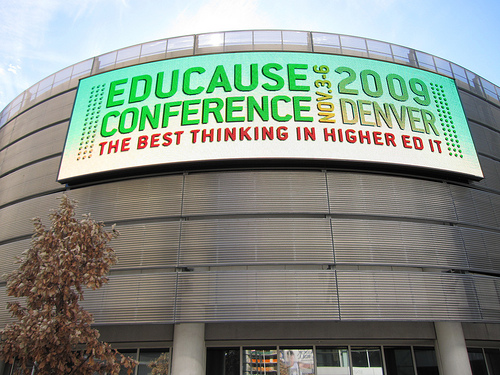
The Chronicle’s Wired Campus released a short video clip about the buzz from the  Educause Conference 09 in Denver, CO. A few attendees were asked about what they thought the top technological trends in higher education & also their concerns at the conference:

4072038913_5f54d15628

Picture c/o educausestaff on Flickr.

Trends:

  • Web 2.0
  • Virtualization
  • Cloud Computing
  • Social Networking
  • Mobile Learning
  • ePortfolios

Concerns:

  • Open Access
  • Transformational Course Management Systems
  • Security Concerns
  • Finances
  • Learners’ Needs
  • Keeping track of connections made at the conference

Whether you’re at the Educause 09 conference or following from afar, you can stay connected to the diolage on Twitter (hashtag #EDUCAUSE09), Flickr, & via the streaming of select conference content online.

Conference, nacada, NACADA Tech Seminar 2009, Professional Development, Social Media

NACADA Conference 09

I’m looking forward to connecting with advisors next week at the NACADA Annual Conference in San Antonio.  I was fortunate get the time off work to travel south, since the conference is being held in my (new) home state of TX. Conferences provide a great opportunity to connect with other  professionals/faculty, share new ideas and learn what is going on in the wonderful world of advising.

Since some of my favourite academic advising friends are not able to make it to the Lone Star state (due to department cut backs and whatnot), my advisor/tech guru friend, Eric Stoller, suggested we continue to use the Twitter hashtag to enable non-attendees the opportunity to virtually follow the conference action. This ideas was quite a success at the NACADA Technology Seminar amongst the seminar attendees. Eric used the hashtag: #nacadatech09 to aggregate all tagged tweets into the NACADA Tech website via a widget from monitter.com. Amazing.

twitter

The hashtag for the NACADA Annual Conference  will be: #nacada09
Now tweet your little hearts out, my friends. [Thanks, EDS. You rock!]

How YOU can participate as either a NACADA Annual Conference Tweeter or as a virtual follower  (c/o @ericstoller):

NACADA Tweeters:

  • Step 1: Sign up for a Twitter account.
  • Step 2: Take your laptop or web-ready cellphone to San Antonio and hope that WiFi is available.
  • Step 3: Post updates on Twitter about the conference: session pointers, take-aways, best practices, key issues, etc.
  • Step 4: In every 140 character post, include “#nacada09″ (without quotes and a space in front of and after the tag)

Virtual followers:

Collaboration, Conference, Learning Community, Professional Development, Social Media

AACE Global U – Social Media Seminars

groupglobalu

AACE Global U will be hosting a series of seminars around “Social Media: Trends and Implications for Learning.” I was able to listen to the archived seminar for July, however I hope to participate in a future monthly online seminar:

August 10, 2009, 9:00 PM Eastern USA
September 8, 2009: 3:00 PM Eastern USA
October 13, 2009: 9:00 PM Eastern USA
November 10, 2009: 3:00 PM Eastern USA
December 8, 2009: 9:00 PM Eastern USA

The seminar series, led by George Siemens and David Cormier, is without fee and will include live interactive sessions, in addition to discussions with guest speakers and participants. All sessions are co-sponsored by and will be archived in the Education & Information Technology Library (EdITLib). And you can join in the discussion on AACE Connect.

During these Elluminate sessions, the conversations will be active in the webinar and recorded for those who cannot participate at these specific times.  By using the #SMTI hash tag you can find conversations on Twitter, archives in blogs and resources in Delicious.

Here were a few key discussion pieces I found useful from the first social media seminar:

Conference, Learning Community, Professional Development

Wiki Summer Camp

Thinking about using a wiki for your learning environment? If so, you might want to head to PBWorks Summer Camp. This interactive, online forum is a great professional development opportunity for educators who wish to engage in discussion, complete assignments, watch virtual presentations and learn from other wiki mentors some best practices in the wiki-world.
happy logoHere is the PBWorks camp syllabus:

Week One: June 22-26

How to set up your wiki:

  • Wiki Structure
  • What lesson plans to wikify and how
  • Upload files – like your syllabus- and make it accessible from the front page
  • Important features used for this course
    • Folders
    • Tagging
    • Tables
  • Beginner tips from our Mentors!

Register for this week’s webinar on June 23rd at 10:00PST: https://www2.gotomeeting.com/register/497735667


Week Two: June 29- July 3

Interactive Media and How to use it: Review the media options on our educator site

  • Chat rooms – when they work and when not to use them
  • Videos – tips on video recording software for teachers, and how to quickly embedd videos on your wiki page
  • Images
  • What video and image services are there for educators to use for free

Round Table Chat with Kristine and the PBwiki Mentors

  • Hear from Mentors and find out where they struggled and where they succeeded with interactive media on their wiki.
  • What to be aware of when using photos, video and podcasts (aka – no personal photos on a public wiki!)
  • Learn step by step how to use the interactive media features.

Homework week two: (This should take 1.5 hours)

-or-

Register for this week’s webinar on June 30th at 10:00PST: https://www2.gotomeeting.com/register/913182851


Week Three: July 6 -10

Security features in PBwiki 2.0 — keep your work private!

  • User Permission levels and how to make changes
  • Folders & Folder security
  • Page level security

Demonstration of the PBwiki Security Features

  • The most important webinar of all — learn how to set security controls BEFORE your students join the wiki.

Homework week three: This should take 20 minutes

  • Create a new homework Week Three page & place it in the Week Three folder.
  • Go to the page on PBwiki Permission levels.  Read over the PBwiki permission levels and answer the questions. Respond to the questions on your week three homework page.
  • Go to the page on Folder Security.  Watch the three short videos and respond to the questions about folder security.  Respond to the questions on your week three homework page.
  • Go to the page on Page Security.   Watch the short videos and respond to the questions about page level security. Respond to the questions on your week three homework page.

Register for this week’s webinar on July 7th at 10:00PST: https://www2.gotomeeting.com/register/333808003


Week Four: July 13 – 17

Three ways to invite your students — including the BRAND NEW Classroom Accounts

  • Request Access
  • Upload email address
  • Automatically create accounts without email address (for students under 13)
  • How to introduce your wiki to students so it works
    • Parent permission forms
    • FAQ page
    • Sandbox
  • What to expect when your students take over
    • Wiki management

Live Discussion on inviting students and the suprising results

Homework week four: this should take 30 minutes

  • Set your notification setting in my.pbwiki.com to make sure you receive notifications of student changes
  • Upload your student email address, or print out your student accounts
  • Determine what invite menthod works for your class and discuss it on the forum

Register for this week’s webinar on July 14th at 10:00PST: https://www2.gotomeeting.com/register/983510451


Final:  Webinar Wrap up on July 21st

  • Review and new features for educators.

No Homework — Just new features for your workspace!

Register for this week’s webinar on July 21st at 10:00PST: https://www2.gotomeeting.com/register/756888211

Sounds intriguing? Then sign up HERE.

Conference, Learning Community, Professional Development, Virtual Communities

Webheads in Action

Looking to engage with other communities of practice online?  Then be sure to check out the Webheads in Action Online Convergence 2009 happening NOW and this weekend (May 22-24, 2009).

webhead

The Webheads are a world-wide, cross-cultural, and vibrant online-community of educators with an open enrollment for anyone who wants to join.

I am going to tune into a bit on UStream, check out the traffic on Twitter (hashtag WiAOC) & then call it a day.

Happy Weekend to all!