Higher Education, Reflections, Teaching

Rethinking Office Hours

Office hours were designed to offer a space and place for learners to meet with their faculty. The practice of holding a “office hours” at every higher education campus, and even within a single department, varies drastically. Some institutions/departments set guidelines, whereas others see this as a service expectation that will automatically be assumed by the faculty member.

silly questions

Image c/o Flame @ KZK

The basic idea of faculty office hours was to carve out time to be available for your students. This set time each was is designated for the instructor to be in a physical, set space to offer support and assistance for courses, research, etc. In reality we know that only “a small number of students take advantage of office hours, [and] typically those who show up are not those who most need to be there (Weimer, 2015a). With increased use of technological communications, our students prefer to send a quick electronic message [email, learning management system (LMS) message, discussion board, text, tweet, etc.], to ask a question, seek advice, or get help.  So how do we “meet and reach” our students who are often juggling more than just school and cannot make the typical “office hour” on campus?  How do we make getting support more convenient for both the instructor and the student?

As an online instructor, I have experimented with a few approaches  the last couple of semesters. Although I work with online, adult learners – I think these strategies could also be useful for other faculty who instruct face-to-face (F2F) or blended learning environments.

A Few Ideas to Rethink Office Hours:

  1. Offer a standard “Office Hour” time slot at least 1-2x per week. This might be the day before assignments are due, or perhaps an evening hour after the typical 9-5 work day. You can indicate availability in your own office, by Skype/phone, IM, or via a web conferencing platform. You decide!
  2. Identify YOUR preferred mode of contact/communication. Let them know HOW and WHEN you will be checking and responding to their messages. Be sure to consider your own communication workflow – then share these expectations for your learners about your preferred protocol for related course communications.  Here are the best ways (in order) for students to contact me:
    • EMAIL: This is BY FAR the recommended method. My students know they will get a response from me within 24-48 hours by e-mail, and they are to include their course name, section, and ID in messages. This also allows me to track and keep a record of our conversations in a student file I save in Outlook.
    • Skype/Google Chat: A few of them have also utilized Skype/Google Chat for a quick instant message (IM) if I am Available (“green”) online.
    • Bb Learn Messaging/Email: I have decided to close the LMS messages on Bb Learn this term, to organize all incoming inquiries from students into my institutional email account.
    • Google Voice: I use a number set up here as my primary office number. Students have used it to leave web voicemails and/or text messages every now and then.
    • Twitter: I have also welcomed the odd Tweet here and there – but often these get tossed into another space for more than 140-characters. More so this is used to share news, information & articles via the course hashtags e.g. #LTEC4440, #LTEC4121, #LTEC4070 and #LTEC3010
  3. Require 1:1 meetings early in the semester (Weimer, 2015b). If possible, have a 1:1 meeting planning in your course schedule to discuss a final project/assignment. You can use this time to check in and allow your students to ask question. This introduces students to your “space” and often encourages them to follow up. Pro Tip: This takes time and organization for your own schedule. Only consider 1:1’s if you can manage it (30 students or less recommended), and if there is a specific purpose within your course design and learning objectives.
  4. Offer class meetings for group advising and support. Provide semi-regular meetings for your students. Ask your learners when a good class meeting time is via Doodle poll to help establish most available times during the semester to host these meetings. My courses often met in the evenings between 6-8 pm and online in a web conference platform (e.g. GoToMeeting, Zoom, etc.) room. These meetings were designed to offer information, updates, and a bite-sized instructional piece for my learners. In previous F2F courses, I had offered this sort of “meet up” after a campus event, in a seminar room, or even an off-campus coffee shop. For my graduate students in smaller classes, we would even conduct peer-review sessions in Google+ hangouts. Include an agenda for the meeting with the topics that will be covered and open discussion. Always solicit questions from your students in advance & leave time for Q & A at the end.
    • Pro Tip: Take questions you received from emails and include them into the class meeting advising sessions. Often learners might be afraid to ask during an open Q & A time, so “plant the question seed.” Students learn from other learner’s questions.
    • My incentives to attend our online (non-required) course meetings = advice on projects/assignments, helpful “how to” or demonstrations, and guest speakers (A BIG thanks goes out to Jess, Josie & Paul this term!).
    • Offer a recording and class notes for those who cannot attend, but want the supplemental information and resources.
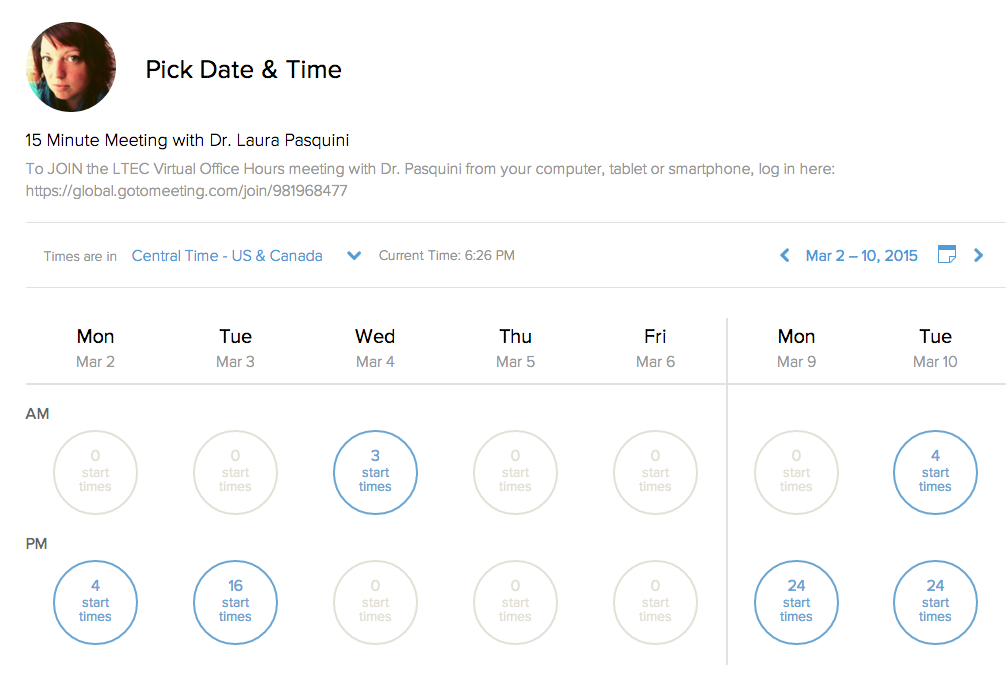
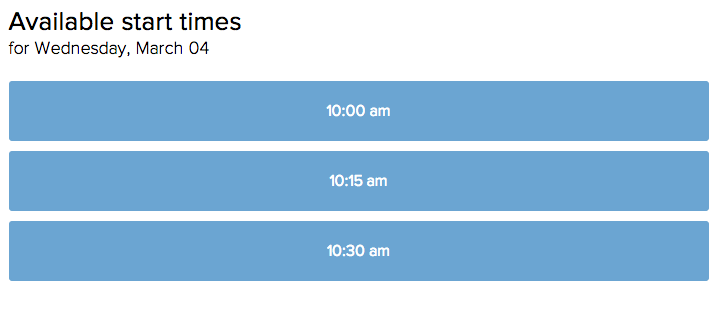
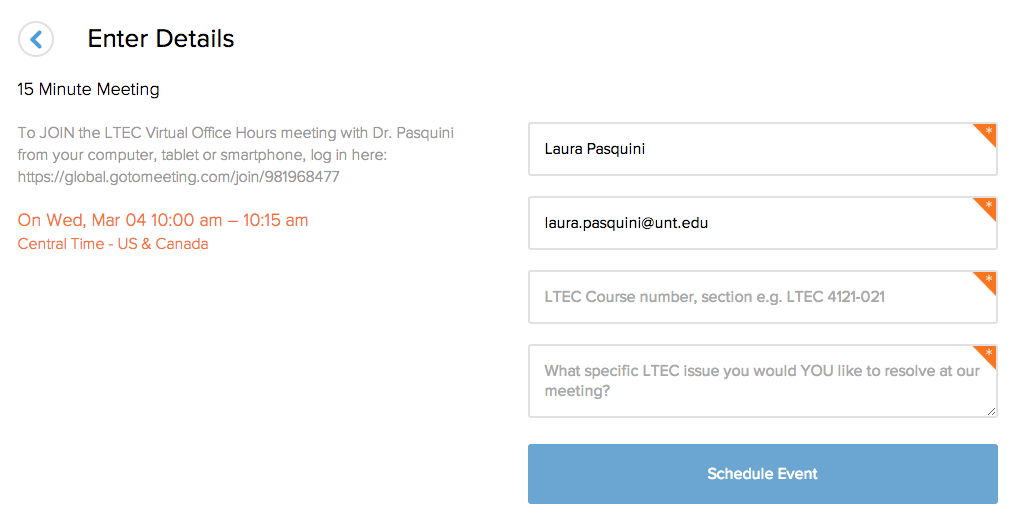
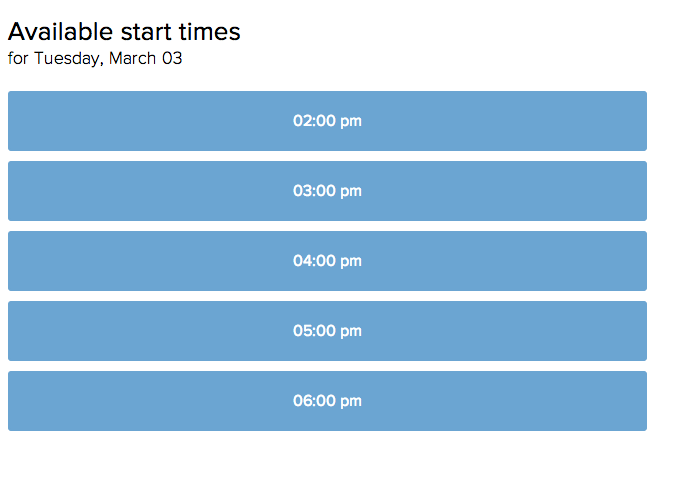
  5. Try offering “on demand” office hours. I use helpful scheduling websites with my Google Calendar to set up student meetings. Both youcanbook.me and calendly offer easy ways for learners to schedule 15-, 30- or 60-minute meetings, depending on my own personal work/travel schedule. Example of the calendly appointment scheduler below:

Step ONE
Screen Shot 2015-02-28 at 6.26.18 PM


Step TWOsched


Step THREE

book
 Step FOUR

Screen Shot 2015-02-28 at 6.51.51 PM

  • ProTip: Be sure have your students identify the purpose of the meeting. E.g. I ask, “What specific issue you would YOU like to resolve at our meeting?
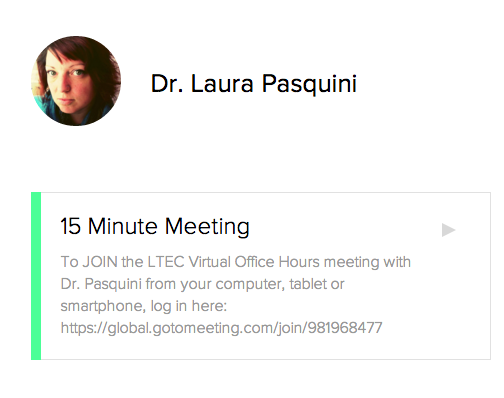
  • Dedicated meeting location: Since I lecture online, I decided to keep all my office hour meetings in a set GoToMeeting space that is standard for all my courses. This is included on the course syllabus, class announcements, and, most importantly, it is an accessible location – students can use their web or phone:

LTEC Virtual Office Hours with Dr. Pasquini” Please join my meeting from your computer, tablet or smartphone. https://global.gotomeeting.com/join/981968477

  • You can also dial in using your phone.United States (Long distance): +1 (213) 289-0012
    Access Code: 981-968-477 

I am still evaluating my own office hour approaches for my distance learners, so please feel free to share your strategies with me. How do you support your learners? What ways have you encouraged your students to connect with you for office hours? Do you have suggestions that I might want to consider for online office hours? Post your suggestions below!

References

Weimer, M. (2015a, February 17). Office hours alternative resonates with students. Faculty Focus. Retrieved from http://www.facultyfocus.com/articles/teaching-and-learning/office-hours-alternative-resonates-students/

Weimer, M. (2015b, February 18). Office hours redux. Faculty Focus. Retrieved from http://www.facultyfocus.com/articles/teaching-professor-blog/office-hours-redux/ 
EdTech, Horizon Report

VOTE for #18: The Technology Test Kitchen #eli2015 #edtech #satech

The ELI Video Competition: 2015 NMC Horizon Report from EDUCAUSE and the New Media Consortium (NMC) is underway. I need your help to cast your VOTE for the Technology Test Kitchen – #18: Michigan State University.

All 23 videos from 18 different institutions are great! Each video focuses on one or two of the six 2015 technologies in the upcoming Horizon Report:

  • Bring Your Own Device (BYOD)
  • Flipped Classroom
  • Makerspaces
  • Wearable Technology
  • Adaptable Learning Technologies
  • Internet of Things

Take a gander a the other videos (each video are 2 minutes each) for what is happening on the ed tech horizon, but then give a digital HIGH FIVE to #18 in your ONLINE VOTE. 🙂

18. Michigan State University

Category: Makerspaces
Contact: Patrice Torcivia Prusko

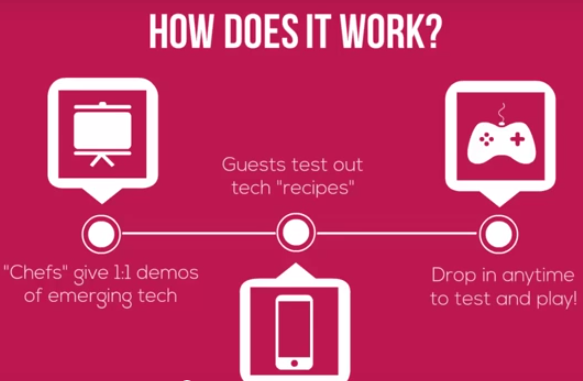
What the heck is the Technology Test Kitchen (TTK)? {you ask}

  1. A makerspace for sharing innovative tools and new media
  2. An open collaborative environment for hands-on exploration
  3. An engaging way to connect with your colleagues over emerging technology

how it works

The TTK ideas was created to bring faculty, instructional designers, researchers, and conferences participants together to get a hands-on experience with a variety of learning technologies. In the Test Kitchen, there are a number of “chefs” (volunteers who love applying media to learning) who are typically available to talk about design, discuss a “recipe” a.k.a. a quick how-to guide for a platform. The kitchen encouraged participants to explore apps, brainstorm teaching strategies, sharing curriculum ideas, and experimenting with new media for learning – both hardware and software. The 1:1, hands-on sharing is shared to you by Creative Commons in this latest compilation TTK Recipe Book:

DOWNLOAD your own Technology Test Kitchen Recipe Book from  #blend14  and #ALN14 to try out some new recipes for learning! Like what you see, check out the next TTK maker space happening with at #et4online in April here in Dallas, TX!

Voting is open from Friday, January 30 – Tuesday, February 10, 5:00 p.m. PST. Winners will be announced at the ELI Annual Meeting, Tuesday, February 10 th (#EI2015). VOTE NOW! {Psst #18}

PLN, Reflections

Semester Reflections & What I’ve Learned [Fall 2014]

Wow. My first semester as a Lecturer and teaching ALL online classes is DONE! First and foremost – I am glad to have all my grades posted. {For real! After 2,400 hours of video watching, I can say I learned a lot from my #LTEC4121 class – and I had a talented group of students this term.}

FinishedGrading

Along with other projects (e.g. research, writing, editing, OLC Certificate, presenting, conference, and consulting), I am glad to see the semester and 2014 come to an end – or at least a pause over the holiday break. This academic term has been fun and challenging for me as I move all my instructional experiences to the online environment. My own teaching philosophy centers on technology-enhanced pedagogies that foster student–centered learning environments. Over this semester, I put a great deal of thought to how I design learning experiences and support my students online in a more meaningful and authentic manner. This term, I constantly made edits and improvements to the online courses I was teaching to help foster real-world experiences and provide opportunities for engagement. I really wanted my students to take what they are learning in the online classroom and apply these concepts to their own workforce learning and performance. With whatever technological platform and, more importantly the planned pedagogy, my primary role in these classes were to facilitate learning by motivating, instigating and supporting my students as they work through their modules and projects.

From this semester, I shared some of my personal reflections for lecturing with the GSTEP program last month:

To be honest – there are more than just 10 lessons I’ve learned. Not everything has been great this semester. There has been a great deal of stress and frustration in lecturing with someone else’s course materials, and considering how to best support the learners’ needs. I have been constantly improving functions of not only the course delivery, but also the content in the modules to consider how to get students to reach the course learning outcomes. Although it has been a busy semester, I have appreciated the hands-on lessons I have learned and applied to my online instruction and support for my students. Learning about learning, and evaluation of the curriculum supports our students. Stay tuned for deeper reflections in an upcoming blog post after I go through my course evaluations, LTEC feedback forms, and review of my course design from Fall 2014 for the next semester.

For time management and scheduling,  I learned a great deal about the need to develop my own personal workflow. Although I have been “working remotely” and I have a great deal of online work experience, my new role has got me thinking about what it means to be productive when working from home. Work-life balance is key. With a number of involvement and projects, I have had to think about how these are managed and prioritized. I believe my scheduling and task-management has improved over the term (when I am not traveling for business/personal obligations #LessonLearned), and I feel as though I have mastered my grading and instructional flow with online teaching. Thanks to some additional motivational tools for time and fitness, I have improved my time-on-task ability for work projects and increased my running/walking mileage (thanks Todoist.com, Asana, #FitBit & RunKeeper).

Most importantly,  I have learned the value of being an active participant in my networks. My mom was concerned about my social contact with others now that I teach online. I laughed – and told her that I still have just as much (or maybe more) contact with others. Although I am not an 8-5 worker on campus, I have made a point to stay connected to UNT and get involved in various things (e.g. UNT Faculty Writing group, GSTEP support,  Alternative Service Break advisor, and LT department meetings/projects). In my online work, there are a number of virtual teaming projects and collaborations that keep me quite engaged and social (e.g. #ACPAdigital task force, NACADA meetings, OLC conference planning, and other community interactions). Finally, I have sought out new opportunities to grow and learn professionally to focus on research scholarship, instructional design, and strategic organizational planning (e.g. RA position with @veletsianos, CLEAR instructional course design work, and external consulting/training initiatives).

Thanks to a number of you who have been there for me this academic term. Your ear, your advice, and your support have been greatly appreciated during my transition period. Thank you!

MOOC

#EDUsprint 2 – How Technology Can Change Pedagogy

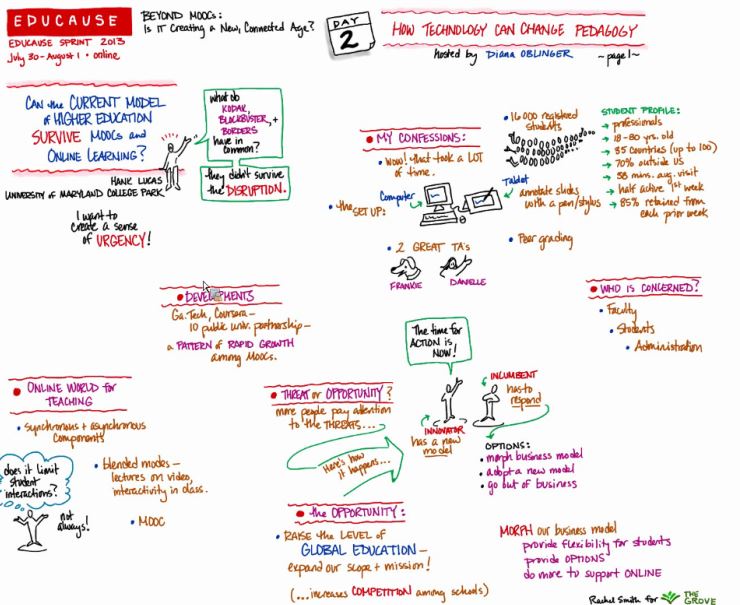
The EDUCAUSE EDU Sprints continues, so why not share what I gleaned from today’s session. With a lot of information being shared, it actually feels like more of a marathon, so here’s the breakdown from the #EDUsprint 2:  How Technology Can Change Pedagogy webinar.

How Tech Can Change Pedagogy

The session was lead by the following panelists who shared their thoughts about gong “Beyond MOOCs”:

  • Hank Lucas, Professor of Information Systems, University of Maryland College Park
  • W. Eric L. Grimson, Chancellor, MIT
  • Susan Grajek, Vice President, Data, Research, and Analytics, EDUCAUSE

Hank Lucas sees great challenges and opportunities with blended learning, online learning, and MOOCs; however he wants to charge institutions with more than the technological trends. Due to these emerging technologies and social platforms, there are many different ways to connect with our students; however we have to be purposeful and think critically about our instructional design.  

The Survivor Model via Hank Lucas

Lucas shares his concept of ‘The Survivor Model’ (screen shot of slide), that outlines how disruptive technologies will impact higher education and learning. [Side note: You will find “disrupt” on the #sxswEDU 2013 bingo card I made back in March.} The language always seems so doom and gloom, especially when asked what the “threat” for learning technology is on our campus i.e. students, adminstration or faculty. Roll the cliche…

Lucas thinks more institutions need to question where they stand with online learning, blended learning, and MOOCs, as “The schools that compete vigorously with faculty who figure out how to add value to their courses will survive and flourish.” And I would agree with one of the final points he shared:

Eric Grimson gave his 2 cents of higher education and learning technology change, which included ideas around learning techniques, active engagement, suggestions for assessment, and a “new” accronym to add to our campus alphabet soup: SPOC (small private online course)

The second segment seemed to dive into ideas and themes being played out in our schema of learning in higher education. Grimson shared ideas and suggestions to help support online learning, which included:

A number of articles were shared in the streams, so here are a selection reads from today’s webinar:

More resources for online learning, instructional design, flipping, MOOC-ing, and then some:

Unfortunately I had to dip out of this session early and I will have to catch the rest of the webinar via the recording – but here are some interesting takeaways I found on the #EDUSprint Twitter backchannel that should be noted:

#phdchat, ATPI, PhD, Professional Development, Reflections

ATPI Doctoral Portfolio Reflection

This weekend will involve the usual researching, writing, and editing of projects – however I have one more item to polish up before it’s time to be thankful in the U.S. – my doctoral portfolio.

For the Applied Technology & Performance Improvement Doctorate (ATPI) program, the doctoral portfolio is a new requirement for us young, budding scholars. Rather than sit in a room for two 8-hour days or respond to a set of questions over a period of time, ATPI doctoral students will need to complete our departments Ph.D. portfolio to officially become a Doctoral Candidate and move forward with dissertation work. Some students in our program are still opting to take the comprehensive exam route while they still can, only because the requirements include research, teaching, and service scholarship experience that is akin with academics who might be seeking tenure/promotion. I think that this portfolio makes sense, professionally it helps to document my PhD Journey and encourages students to gain scholarship experience before being launched into a dissertation or even the academic job search.

Here are the ATPI Doctoral Portfolio Requirements [DRAFT] that I have been using to guide my portfolio development. {I say draft as this document is subject to change since our department will have myself and another student defend in December for the 1st time.}

I promise to share my ATPI doctoral portfolio, after I review it and put the finishes touches on it. I learned a great deal from our “dry-run” on Friday, and I was reminded about some of the key things to highlight in my 15-minute presentation. I am also pleased to say that I will be sharing my digital PhD journey (blogging, tweeting, and then some) with my doctoral committee for my portfolio defense. My faculty advisor and another committee member thought it would be valuable to discuss my philosophy and experience as an open educator/scholar/researcher.

In thinking about how to “show case” some of this, I am looking through my blog for musings and what I have been up to over the last 3 years of my doctoral course work. So far my TechKNOW Tools Wordle reflects this:

TechKNOW Tools Blog Wordle

I also know that my digital footprint can be found in my Google Docs (or now Drive), YouTube channel, Dropbox, shared on my SlideShare account, posted on my Flickr account in photos, and even among my 23, 926 tweets (good thing I auto-send these into Delicious with hashtags for easy searching). Time to mine my own digital data, review what I’ve created, and compile my professional development and scholarship.

Grad Students & PhD Friends: How do you track your progress? Professional development? Teaching, service, and research scholarship? Please share!