#AcWri, LPQ

Learning and Performance Quarterly, 1(2) is Published

As the founding student editor for the Learning and Performance Quarterly, an open, online peer reviewed journal, I am excited to share with you the second issue. This publication has an eclectic mix of ideas and research for a wide array of academic disciplines in the learning, training, development and performance industries. As, indicated in my editorial, I think that there is great value to be shared outside of our professional silos.
I hope that you enjoy reading this issue as much as I did during the production phase. There are a number of concepts and resources shared within these articles for professionals in education, instruction, leadership planning, and training and development. Many thanks to the contributing authors, peer reviewers and section editors who made great efforts to produce this publication over the summer months. I appreciate the attention to details and edits during the summer months.

For those who want to contribute, review, or follow along — be sure to check out the LPQ Website, Follow @LPQuarterly on Twitter, or “Like” the LPQuarterly on Facebook. We are always interested in adding to our repertoire of peer reviewers and editors – please register for the LPQ journal and let us know how you would like to contribute to this open, scholarly publication.

Here is the Learning and Performance QuarterlyVol 1, No 2 (2012) — Table of Contents and Abstracts for the current journal contributions.

Editorial
Leadership, Training, Mentoring, and Instructional Design (1) [PDF]
Laura A. Pasquini

Abstract: The second issue of the Learning and Performance Quarterly (LPQ) is filled with submissions that span a wide scope of interests.

Case Studies
Developing a student leadership retreat using instructional design
techniques (2-29) [PDF]
Dr. Melissa L. Johnson

Abstract: The purpose of this paper is to describe how the Morrison, Ross, and Kemp (2007) instructional design model was used to design a student leadership retreat. An overview of instructional design and the Morrison, et al. model is provided. The application of the model to designing the retreat is then described in detail, including the learner and task analysis, development of instructional objectives, sequencing and materials, and formative evaluation. Finally, the implementation of the actual retreat, including summative evaluation procedures is provided.
Research Articles
Mentoring and Middle School Teachers: Using Subjective Affective Measures as
Performance Indicators (30-46) [PDF]
Dr. Ray K. Haynes

Abstract: This paper presents findings from a research study examining mentoring, organizational commitment, work alienation, and job satisfaction, among middle school teachers (n = 352) in large urban school district. Survey data obtained using a quantitative research design suggest that  formal and informal mentoring is occurring within middle schools and middle school teachers perceive both types of mentoring to be effective. Results of regression analyses suggest that ratings of formal mentoring effectiveness had stronger relationships to organizational commitment, work alienation, and job satisfaction than effectiveness ratings of informal mentoring.   Further analysis suggests that the predictor variable, as measured by ratings of mentoring (formal /informal) effectiveness, had statistically significant positive associations with the mediator and dependent variables. Implications are discussed along with suggestions for future research.

Concept/Theory Paper
Cross cultural training and success versus failure of expatriates (47-62) [PDF]
Ashwini Esther Joshua-Gojer
Abstract: The past few decades has seen an explosion in research on expatriates and cross-cultural training. There has been controversy and an unending debate on the goals, effectiveness, implementation and processes of CCT. There are very few reviews that have condensed literature detailing the best practices of CCT. This review also details the success and failure of expatriates. The antecedents or moderators that play a role in the evaluation of success and failure have been outlined in this literature review. It also brings to light certain solutions that will make CCT more effective and provides directions for future research.

Creative Leadership: Does It Clash Across Cultures? (63-82) [PDF]
Seogjoo Hwang
Abstract: As international competition, technology advancement, and the knowledge-based economy increases, creativity is becoming increasingly critical for the success of organizations all around the world. While leadership or support of individuals’ immediate leaders is one of the most potent factors impacting individual creativity, the majority of previous studies examining the relationship between leadership and creativity were conducted in Western contexts and only few studies investigated the cross-cultural aspects of leadership and creativity.

This study explores the connection between traditional creativity research and cross-cultural leadership research, building toward a conceptual framework proposed for further discussion and ultimately testing. Conceptual links between participative leader behaviors, individualism-collectivism, power distance, and creativity are examined. Implications for leadership development in order to enhance organizational creativity in an international HRD context bring this article to a close.

Book Review
Social Media for Educators (83-84) [PDF]
Laura A. Pasquini

Abstract: Social Media for Educators is an excellent book that interweaves theory, applications, and current pedagogical experiences for learning environments. For those in the learning and performance industry, this book provides insights and ideas to help guide social media use for both educators and learners. Joosten provides current examples, benefits, and considerations throughout each chapter. Whether educators are beginning to design their learning curriculum or learners are considering social media for organizational development, this book presents helpful insights and experiences that will potentially influence and shape effective engagement and learning with social media.


Career, Higher Education, Learning Technologies, Social Media

Using LinkedIn with First Year Students #UGST1000

For many of my career and employment friends in higher education, LinkedIn is often a great professional networking website that many students explore later in their academic careers. Since “career development” is a process, a couple of instructor from UNT thought it might be helpful to expose our first year students to this learning network earlier in their degree programs.

Image c/o Melissa Venable’s Blog

This fall term, at least one section of the UGST 1000 – First Year Seminar will be using LinkedIn to help explore major and career options. This small seminar class is part of a learning community, where these same students are also classmates in two larger business classes: ECON 1100 – Microeconomics and BUSI 1340 – Managing the Business Enterprise. This UGST 1000 instructors (Allyson & Roxanne) thought using LinkedIn as a social networking website might provide more help for this group of undecided/undeclared students as  they research career/occupation options, understand the skills needed in the business industry, and connect to helpful ideas while exploring their majors in the first semester.

Here is the information about LinkedIn for the UGST 1000 class syllabus:

About LinkedIn: We are using LinkedIn as it is an important form of social media for business professionals. LinkedIn operates the world’s largest professional network on the Internet with 161 million members in over 200 countries and territories.  Additionally, LinkedIn counts executives from all 2011 Fortune 500 companies as members and its corporate hiring solutions are used by 82 of the Fortune 100 companies.  Basic LinkedIn accounts are free and can be created by visiting www.linkedin.com. By default, all information on your LinkedIn account will be public.  All information on our group’s page will be set to private; only members in our group will be able to read them. 

Here are some ideas of HOW students will use LinkedIn over the course of the term:

  • Build a Professional Student LinkedIn Profile – complete with a photo, information headline, listing educational/work experience, identify specialties, and establish a unique URL
  • Understanding the Value of Their Network for Learning & Experience – ability review their current network and identify how they want to grow their personal/professional connections on campus, online and within industries of interest to help support effective major/career decision-making.
  • Job Search – aware of the current job markets and trends in LinkedIn vs. how they compare to the O*NET and US Bureau of Labor Statistics.
  • Groups and Associations – Connect to a variety of LinkedIn Groups and associations related to their potential major/career interests.
  • References – Collect LinkedIn recommendations from previous instructors, employers or affiliations.
  • Understand LinkedIn Netiquette – updating your profile, posting appropriate status updates, acceptable ways to connect with others, asking for introductions, understanding what groups to join
  • Get Social – Connect any social outlets where they include professional work artifacts, thoughtful blog posts, personal or work websites, or avenues potential employers might like to see.
  • Group Discussions in LinkedIn Groups – private group discussion where students will lead the topic with an article, resource and question for their peers to respond.
  • Roadtrip Nation Group Project – outreach to professionals and companies to interview for the RTN project.
  • Major/Career Research Paper – informational interviews are part of this final paper assignment so LinkedIn will be able to provide students with potential interview contacts

We are currently collecting helpful links, articles, and information about LinkedIn use for learning and networking HERE, and we would LOVE to add MORE resources to our list. Please leave a comment and share your thoughts below. Thanks!

Learning Community, Social Media, Training, UGST1000

Facebook for Learning Communities: Groups vs. Pages

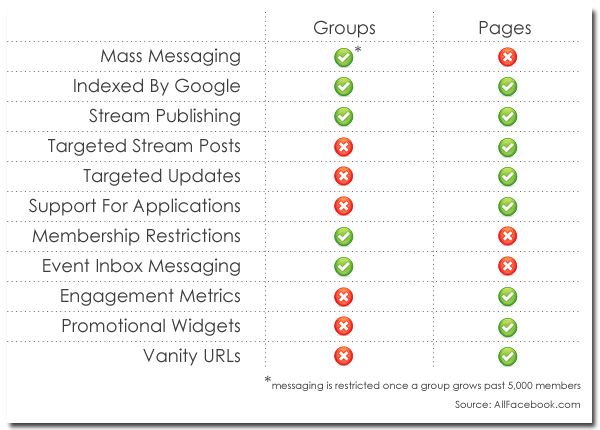
Image c/o Interactyx.com

In supporting and creating instructor resources for our 30 or so first year seminar classes, one areas I’m currently working on is our social media for learning (quel supris!). There are a number of resources, “how to” guides, and instructional case studies to support digital learning pedagogy. In curating content for our #UGST1000 (formerly UCRS 1000) Blackboard Learn Instructor site , I realized that the area of using Facebook and other social networks for our learning communities was lacking. Sure there are a few of us out there using these spaces, but it was rare to see any information available for suggested practices let alone understand how our campus social media beliefs impact our Facebook for learning.

Below is the quick guide I created to introduce Facebook Groups & Pages for our first year seminar instructors. I welcome and encourage others to post your ideas and share resources to the comments section – so we can enhance our #edusocmedia learning practices.

What Are Facebook Groups?

Facebook states that groups are designed “for members of groups to connect, share and even collaborate on a given topic or idea.” Groups have been used to market, promote or share group happenings. The key feature behind Facebook groups is the ability to make them “invite only” or limit these spaces to specific groups, i.e. like your seminar section of UGST 1000. These groups can be private or closed for only your students. Although this is a closed feature, you will need to “friend” students in your course to a closed or secret group; however an “open” group option will allow you to add anyone from Facebook.

WARNING: You may (gasp!) not have students who are on Facebook or wish to be “added” to a private group. Keep this in mind. Also, I would encourage you to work with your Peer Mentor in your class to support the cultivation and development of this online learning community.
Instructor perspective:
Ryan: They all REALLY liked our class Facebook group and participated in that quite a bit. I’m considering just using Facebook this time around rather than try to get them all onto a new social network.

Laura: Peer mentors a great support & can often set up these Facebook groups and “friend” students for the instructors. I would encourage this and support the peer mentors as they develop community in your UCRS 1000 Group (ours from Fall 2011) online and in class.

What Are Facebook Pages?

In contrast to Facebook groups, which are focused on organizing around specific topics or ideas, Facebook Pages “allow entities such as public figures and organizations to broadcast information to their fans.” If you are looking to set up your class’s “official Facebook presence” you would opt for a Facebook Page. Students just need to “Like” the page for the semester and they can always opt out when the semester is over. Students who like this page will need to remember to check and monitor their Facebook stream to ensure that they are reading updates posted for the course so they do not miss out on any happenings, announcements or updates.

Simply put, Facebook Pages is a simpler tool for instructors and peer mentors to maintain and use for UGST 1000 Learning Communities. Students, staff, and faculty can view an open Facebook Page even if they opt to not have their own personal account on Facebook. Pages are an easy medium to put out content, share updates, and keep your learning community informed. As the administrator for this page, I would strongly encourage interaction to encourage 2-way conversations by using polls, asking questions, and encouraging comments, pictures or videos to be posted to the course page. You will want to enable sharing features for your community and talk about the purpose or standards for your social space.

Instructor Perspectives:
Laura: I like how you can share ideas, post comments and have others follow along with the discussion – it is a great way to connect to student in the social space of Facebook without having to add them to my own personal/professional “friend” list. The Pages can also be integrated with other features such as Twitter, blogs, photo sharing & videos. Here is the Office for Exploring Majors Facebook Page https://www.facebook.com/ExploringMajors

Do You Want to Have a Facebook Group or Page for YOUR Learning Community?
If you are trying to determine whether to use a Facebook Page or a Facebook Group for your UGST 1000 class there are a number of other resources posted in the reference section below to help you best understand the features.
There are a number of other seasoned  instructors who might want to share their ideas or thoughts on the use of both Facebook Pages and Groups (or other social networks) for UGST 1000. Take a look at the handy chart below that breaks up and compares the features; however with other social media things change and are always subject to change.

Facebook Groups & Pages Learning Resources:


10 Reasons Why Facebook is Ideal for Managing Social Learning

The Ultimate Guide for Using Facebook in Education

Facebook Groups Vs Pages: The Definitive Guide

Facebook Groups Vs. Pages: What’s The Difference

Facebook Tips: What’s the difference between a  Facebook page and group?

Pros and Cons of Facebook Groups vs. Pages

Facebook Group vs. Facebook Fan Page: What’s Better?

BreakDrink, CTCX, Higher Education, K-12, Learning Technologies, Social Media

#SocialMedia & #HigherEd – Policy vs. Guidance

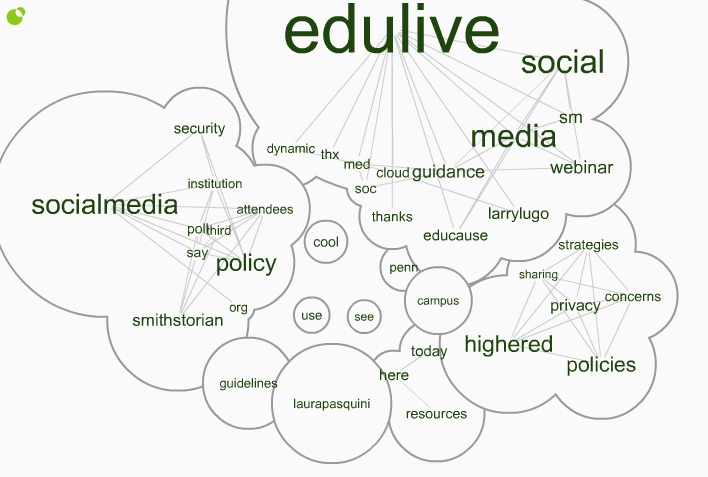
Last week, I attended the free @EDUCAUSE #EDUlive Developing Social Media Guidance in higher education with respect to #Privacy and #Security concerns. The presenters, from the University of Pennsylvania, shared ideas for how to promote safe usage of social media and detailed how to  draft guidance for addressing issues in teaching, research, administrative, and other functions.

Click here for the Twitter Cloud interactive image =>  http://www.infomous.com/node/15059

If you missed the #EDUlive event, you can check out the webinar recording and archives posted on the EDUCAUSE website, Developing Social Media Guidanceand you can also read through the Storify of #EDUlive tweets I collected.

During the webinar, I shared the Social Media: Sharing Strategies, Policies &  Privacy Concerns in Higher Education open & shared Google Doc that was 1st created for a @BreakDrink Campus Tech Connection (CTCX) Show in September 2010. This document has been circulated around and curated for a while by myself and high ed professionals and faculty. Since there were a number of social media guidelines/policy examples shared during the webcast, I added  them to this doc. For others interested in developing guidelines, I think there are a few solid examples I like in here, and I know that @EricStoller shared some of his favourite #SM guidelines from the list on InsideHigherEd recently as well.

Before diving into creating rules, guidelines or policies for social media, it is important to consider how this emerging technology is being used on your campus. In Chapter 6 of Social Media for Educators, Tanya Joosten (2012) shares her thoughts around institutional considerations for social media policy and practice [which we chatted with Tanya about on #CTCX Episode No. 61 as well]. There are often concerns about the use of social media at educational institutions, since these social and  connected resources impact student behavior, online interactions, privacy concerns, and communication practices. When developing a social media policy, Joosten (2012) offers a few helpful suggestions for educators:

  • review current technology use at your institution
  • do not link policies to specific tools
  • revise current student conduct and institutional policies
  • use policy to address behaviors and activities, rather than focus on the technology
  • learn about FERPA (or FIPPA in Canada) issues and privacy of student information at your campus
  • develop best practices on campus for use by students, faculty, and support units

When thinking about the language of policy vs. guidelines, I am partial to establishing guidelines. There are probably already policies that address the actions and outcomes of student, staff, and/or faculty behavior on your campus. I think that it is important to review your home institutional policies and/or guidelines to best understand what is already being “regulated” on campus. It is also helpful to chat with your institutional office who deals with policy development, legal concerns, and/or questions you might have around privacy legislation.

Have you searched the terms “social media+policy” or “social media+guidelines” on your institutional website? Go on. See what shows up. If you find something, then start connecting and collaborating with that unit. If there is nothing to be found, then gather your peers and start the conversation.

References:
Joosten, T. (2012). Social media for educators. San Francisco, CA: Wiley/Jossey-Bass.

BreakDrink, CTC, Higher Education, nacada10, SAchat, Social Media

Social Media Strategies in Student Affairs

Last night, the Break Drink Campus Tech podcasting crew decided to tackle the hot topic of Social Media Strategies in Student Affairs. During the Campus Tech #14 show, the three of us shared some thoughts and ideas that are currently being put into practice for many higher education institutions, and discussed how social media is impacting our university and college campuses.

Photo c/o http://www.policytool.net/

The hot topic included the following discussion points:

  • digital citizenship
  • education and awareness of Student Affair practitioners and students
  • the evolution of social media on campus
  • questions & concerns for best practices of social media in higher ed
  • examples of current social media policies & guidelines
  • resources for developing social media strategy for your campus

Image c/o The Advanced Human Technologies Group

Here are a few great resources to check out if you are designing your own social media strategy on campus:

In thinking about this grand topic, the Campus Tech posse realized that it was a daunting issue to tackle in a 60 minute podcast. The discussion about emerging technology and social media in higher education will not be over soon. To help continue the conversation and support best practices using social media, I initiated a digital archive of resources we hope other Student Affairs practitioners will contribute to:

Social Media Strategies in Student Affairs Google Doc

If your campus has a social media strategy or you have further resources for best practices, please share them in the above document. The Campus Tech show would love to know what you think about social media on campus, and we will be sure to talk about updates or comments we receive.

NEXT WEEK on the Campus Tech Podcast:  Speaking of Social Media in Higher Education….

Stay tuned for the show next Monday (8/4/10) at 7 pm CDT as we connect to the LIVE happenings of the 2010 NACADA Annual Conference for Academic Advising professionals. This year is the first year @NACADA has recruited a team to support social media and a backchannel for participants near & far.  Here’s the NACADA Social Media Guide & be sure to follow the hashtag #nacada10.