There are a growing number of learning networks, online communities, educational resources, and openly shared learning & development (L&D) created for and by higher education professionals. Over the years I have personally discovered a wealth of thoughtful and creative resources that have helped me improve, learn, and grow in the work I do. These open artifacts and digital items are openly shared by a brilliant group of colleagues who work in and around in higher education. This past summer, a course I as enrolled in as a learner prompted me to start this side passion-project to think about how I can best gather these professional L&D resources that best inform my own teaching, research, and practice. This led me to create the Open Higher Ed Learning & Development (HELD) digital library.
The Open HELD digital is designed to showcase and display open educational resources (OER), specifically resources that provide professional L&D for peers and colleges working in the postsecondary education (staff, faculty, and graduate students). This space is a digital library is always a work “in-progress” as I will continue to edit, update, and add to the collections — you know, all the metadata fun.
Open Higher Ed Learning & Development (HELD) Library
This digital library shares open L&D materials with an open license as an OER object via Creative Commons, the Public Domain, and/or via permission of the creators/authors/editors for each item. As you browse this digital collection, you will find open L&D items to enhance your instruction, help with student support/advising, and improve your scholarly work with teaching, research, and service. I hope this digital library is helpful for you to find and learning with these resources. I encourage you to share this digital library with other postsecondary peers and colleagues.
Do you have an OER L&D item to add to a collection? Please feel free to submit your contribution to the Open HELD library here: https://forms.gle/SF8LCPVJ3ehS6XnQA
Also, as the Open HELD collections are a living and evolving library, I welcome your questions, comments, feedback, and suggestions for how to improve current collections and or corrections for an items already housed in this library — please feel free to send me an email at: techknowtoolsllc@gmail.com Thanks!
For my Introduction to Digital Libraries course I enrolled in this summer, our final project was to create a digital library with at least one collection containing at least ten cataloged items. The secret librarian in me was excited to put together a comprehensive repository of the higher education learning & development items I have been studying in my research. Both the project and course have concluded, but I am still working on editing and updating this digital library. There are a few more things I want to organize and catalog before I share it; however you can get an idea of what I’m compiling from this call for resources tweeted below. (p.s. I promise to blog about this digital library for higher education colleagues soon, so others can add and contribute to it.)
What has me STILL working on this digital library project are two things:
Rights – This requires me to identify what is the copyright or rights OR to get permission. A number of items I found are accessible online; however few have explicitly listed it’s copyright (e.g. Creative Commons, Public Domain, or other) to designate the “rights” and permission to use for library cataloging standards; and
Metadata – adding the required and recommended descriptive, administrative, and structural information for each digital object/resource I’m adding to the collections in this digital library.
There are no shortage of standards, acronyms for these standards, and protocols required to guide the shared use of these metadata standards. I’m not planning to launch a full lesson on ALL of these metadata standards, but rather share what I am working with and learning about for my digital library “in progress.” If you’re interested in checking out this full glossary and visuals about metadata, have at it with these brilliant Creative Common metadata maps/visuals created by Jenn Riley & Devin Becker:
First, let’s define the term, metadata. It’s all around us! Some say it’s “data about data,” however this simplistic definition does not explain the complexity of what metadata does and how it operates in the world today. Monson (2017, pp. 88-89) better defines metadata as
“structured data that is associated with an information resource. It may be either created by hand or captured by a computer system… [and] can be described in terms of its functionality, which includes finding, identifying, sorting, selecting, gathering obtaining, and navigating items within collections of resources because it is structured according to certain sets of rule – purpose for search, discovery, browsing ,and collocation, identification and access.”
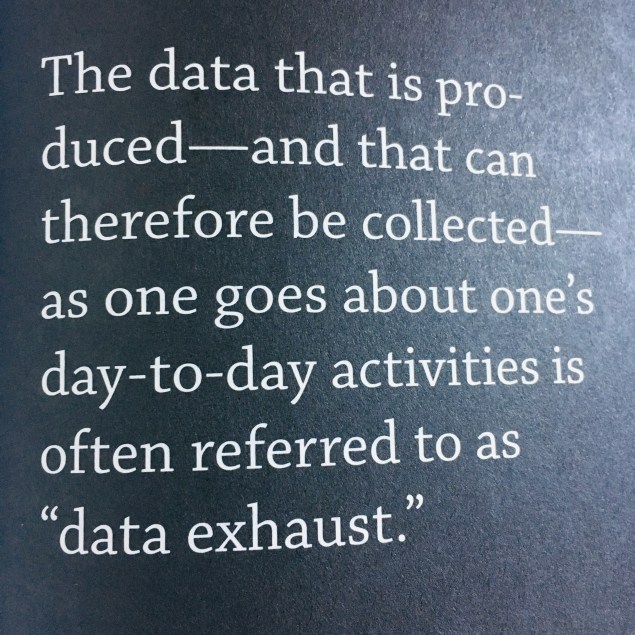
With ubiquitous technologies and connected systems of information metadata is all around us. Metadata helps us to buy books, find photos, and search for ALL THE THINGS! Formally known as “information in the library catalog” we now see metadata on a number of digital objects and things we use every day – music, podcasts, videos, books, phone calls, text messages, articles, websites, magazines, files, documents, and more. That being said, I don’t even want to think about the amount of data and metadata even being produced at this given moment — it IS exhausting (Pomerantz, 2019):
From cataloging digital objects, I have learned that metadata work should NOT be a solo project. Metadata creation should be a collaborative effort of people working together — just like we work today (Baca, 2016). This metadata creation process not only contributes to identifying items for a collection or to provide information for individual resources, but it also provides other perspectives and input as to how items will be found and shared. Monson (2017, pp. 89-90) shares the types of metadata required for each resource or object I have be cataloging:
Descriptive metadata: data that describes and objective. This is closely associated with the functionalities of searching and browsing to find the item, e.g. creator or author, title, data of creation, type of object, and subject or keyword associated with the object.
Administrative metadata: data that contributes to the management and administration of objects within a collection; this includes data such as data of digitization, type of equipment used to digitize, file name, and name of the organization that created the digital object e.g. pdf, mp4, mp3, jpeg, png
Structural metadata: how the items within a collection re logically grouped and presented on the screen; it provides information about the internal or “physical” structure of a digital resources, tied to components to form a whole. e.g. text, image, internet media type, StillImage, MovingImage
Metadata provides meaning as it offers explicit information about indexing, accessing, preserving, sharing [rights], and discovering digital resources. As we accrue a growing volume of digital information and objects, both online and offline, it is critical to have standards that offer ways for users to find, retrieve, and manage within our digital networks and overwhelmingly, complex information in our own evolving world. This might be from how things are classified to how the end user will find, navigate, and utilize this resource. I am using the Consortium Academic and Research Libraries in Illinois (CARLI), specifically this best practice for descriptive metadata in these CARLI Guidelines for the Creation of Digital Collections [PDF]. These were the suggested metadata standards recommended to guide our work from the original project, so I’m continuing to follow these protocols. This guide also follows a commonly used standard in many academic libraries, that is, the Dublin Core metadata scheme: https://www.dublincore.org/ which is similar to what is currently utilized at my own institution => UNT Libraries Quick-Start Metadata Guide. For each element that is “required” and “recommended” by CARLI (2017) that I am searching, imputing, and cataloging for EACH resource for my digital library, and a few of the “optional” elements that are available for each object:
Element
Definition
Example
Title
(required)
A name given to the resource; this would describe or identify the file name or object
The OER Starter Kit
TOPcast: Teaching Online Podcast
Research Shorts
Creator
(recommended)
An entity primarily responsible for making the resource; this can be an individual, group of people, or organization/institution
Pasquini, Laura
TechKNOWtools, LLC
University of North Texas
Contributor
(optional)
An entity responsible for making contributions to the resource; good if there is a team or group(s) making this item
Austin, Jane
Pixar Productions
US Department of Education
Description
(recommended)
An account of the resource; this might be the table of contents, abstract, overview, or “about” page/section of the object detailing what this resources is about
The Academic Advising (#AcAdv) Twitter Chat discussing advising and student support issues on Twitter every other Tuesday from 12-1 pm CST. We tweet with the hashtag: #AcAdv
YouTube Channel to disseminate and share scholarly work using whiteboard animations.
Publisher
(optional)
An entity responsible for making the resource available; could be a publisher, platform, group, or individual.
A point or period of time associated with an event in the life cycle of the resource; created, valid, available or issued, copyright date, or date accepted/submitted
2001-11-24
2018-05
1999
Subject
(recommended)
The topic of the resource; general information about the item, object, or resource
Indie band posters
Sustainable eating practices
The Global Community for Academic Advising (NACADA) — History
Language
(required)
A language of the resource (if applicable)
eng
spa
fre
Type
(required)
The nature or genre of the resource; this would identify the DCMI type of vocabulary from the Dublin Core
Image, SillImage, MovingImage
InteractiveResource, Sound
Dataset, Event, Physical Object
Format
(recommended)
The file format, physical medium, or dimensions of the resource; extent
wav, mp4, mp3, jpeg, png
csv, doc, pdf
Coverage
(optional)
The spatial or temporal topic of the resources, the spatial applicability of the resource, or the jurisdiction under which the resources is relevant
Texas (state)
Niagara Falls (waterfall)
1999-01-31
Source
(optional)
A related resource from which the described resource is derived, e.g. IBSN for books, or URL for websites
An unambiguous reference to the resource within a given context; might be part of a bibliographic citation with a unique number scheme or code to the file.
A related resource; it has version, is replaced by, replaces, is required by, requires, is part of; OR has part, is referenced by, references, format of, has format, etc.
Information about rights held in and over the resource; access rights; license pertaining to copyright and permission; open education resources will typically share with a Creative Commons license.
Permission is granted under a Creative Commons Attribution License to replicate, copy, distribute, transmit, or adapt this report freely provided that attribution is provided as illustrated in the citation below. View this license: http://www.creativecommons.org/licenses/by/4.0
We interact and create digital objects every day and with increased digital/information structures, we need to think about how we are naming, storing, and cataloging resources, especially in the digital. That being said, metadata also carries some consequences for that create a digital shadow to follow and track. With increased privacy and personal data concerns, it’s not just what the metadata information says, but also what and who is attached to this information.
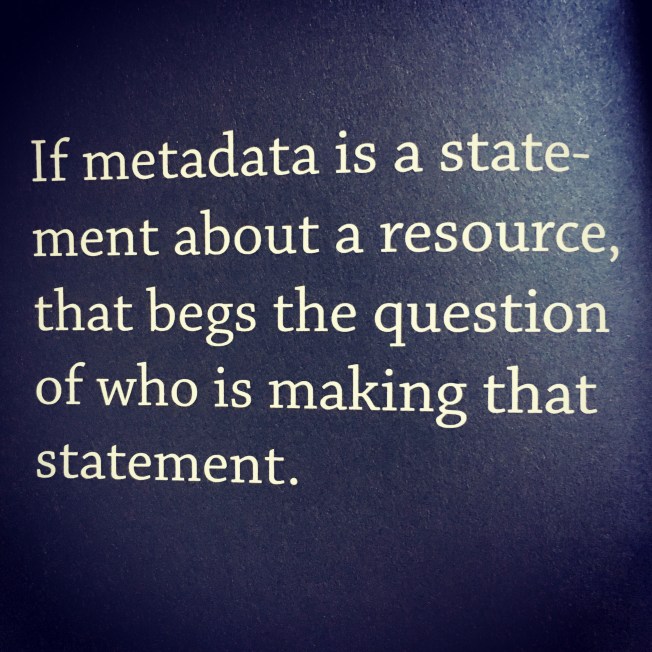
It’s critical to consider what the metadata says about a particular collection. To make digital resources shareable, metadata gives these objects meaning in terms of the proper context, content coherence, standard vocabularies, and consistency (CARLI, 2017). Digitization and digital content does not necessarily mean equal access for all. Digital copies or making materials digital does not make these objects “findable, understandable, or utilizable to our ever-expanding audience of online users. But digitization combined with the creation of carefully crafted metadata can significantly enhance end-user access” (Baca, 2016). It is essential for metadata creators to consider how these classifications within the descriptive metadata is formed. We need to think about who is saying what about particular resources with the metadata schemes we use (Pomerantz, 2015):
This side project of mine is making me think more about metadata and how we classify information, data, resources, and objects in the digital age (or even how many of us do not). Don’t be surprised if you get a DM, email, or e-nudge from me asking you about permission/rights AND to give me some feedback on what I am creating. Knowing that the best digital libraries require collaboration, I will be reaching out soon to get your input, feedback, advice, suggestions, and contributions for this digital library. Back to my metadata descriptives and digital library cataloging for now, as I continue to learn and absorb these concepts.
In my previous blog post on Creative Commons, I shared a bit about copyright and the rights users can apply when sharing/licensing their work. This is often a common practice for those who create “works” (e.g. media, photos, designs, writing, songs, etc.); however, more educators need to consider how they actually share in open ways. Opening up your practice in higher ed is not a new concept – but sadly, open licensing is not a commonly used practice among my peers who teach, publish, and support learners. I think we could do better go get even postsecondary educators (graduate students, staff, faculty, and administrators) to join this open movement by educating and informing them about open licensing and OER practices.
“Teaching, learning and research materials in any medium – digital or otherwise – that reside in the public domain or have been released under an open license that permits no-cost access, reuse, repurpose, adaptation, and redistribution by others.”
Openness in higher education is often used by librarians, instructors, and a handful of other professionals around campus. Storing, archiving, and sharing artifacts from our work in academia is often left to those publishing, authors, and academic librarians. I think we could do better as individual professionals, at our institutions, and even within our professional organizations/associations. For example, when is the last time a conference or workshop suggested you share your presentation, paper, etc. with a given license on it for it to be reused, remixed, or adapted?
For those of you who are interested and want to get acquainted with the land of the OER, have I got a resource for you! There is an excellent OPEN toolkit on the topic of open licensing recently released by the National Forum Teaching & Learning (NF T&L) in Ireland,
The National Forum Open Licensing Toolkit outlines the National Forum’s commitment to open licensing, which enables the creation and sharing of open educational resources. The toolkit provides a detailed description of Creative Commons (CC) licenses, the global standard for open licensing, as well as a 4-step guide to choosing, creating and adding CC licenses to resources in order to make them OER, i.e. able to be shared, reused and adapted in different institutional, disciplinary and program contexts.
This webinar and toolkit offers some great ways to start thinking about and applying OER into your daily work in higher ed. I have been a big fan of The 5 R’s for OER (from The Power of Open Educational Resources by @opencontent) for a while as I always appreciate an open educational remix. The 5 R’s offer ways to have control of rights, accessing others work, and updating works for your own projects and work (if permitted, and licensed):
Retain: make and own a copy
Reuse: use in a wide range of ways
Revise: adapt, modify, and improve
Remix: combine two or more
Redistribute: share with others
Professionals using OER are not just limited to higher education (e.g. libraries, faculty, students, researchers or administrators), but a number of businesses, NGOs, publishers, museums, government, galleries, and more are finding open licensing helpful in their occupational domains. Beyond the CC Search (https://search.creativecommons.org/), there are OER repositories that house openly licensed materials, images, media, files, lessons, books, etc. Here is a short list (not exclusive) of OER repositories mentioned in the NF T&L webinar and a few others I like to use for teaching, learning, and projects:
As you search, find, and perhaps use one of the 5 R’s, you can then choose to share your work by selecting the appropriate open license. This continues the cycle of openness as you disseminate your practices and scholarship openly for others to access. If you search and find an OER object for your teaching, learning, and/or services on campus, you will want to include TASL with the open license for attribution:
Title: name of item, object, media, or work
Author: who created said “thing”
Source: this is the URL or website where it was found or retrieved from
License: include the CC BY open license label
In the @CreativeCommons regularily updated Frequently Asked Questions (FAQs) list, there is a wealth of information and resources, regarding the legal and use copyright laws. These are the typical questions you might have and seek answer for to understand more about CC BY licenses. Two shared in the webinar, were the following questions (with linked/URL responses):
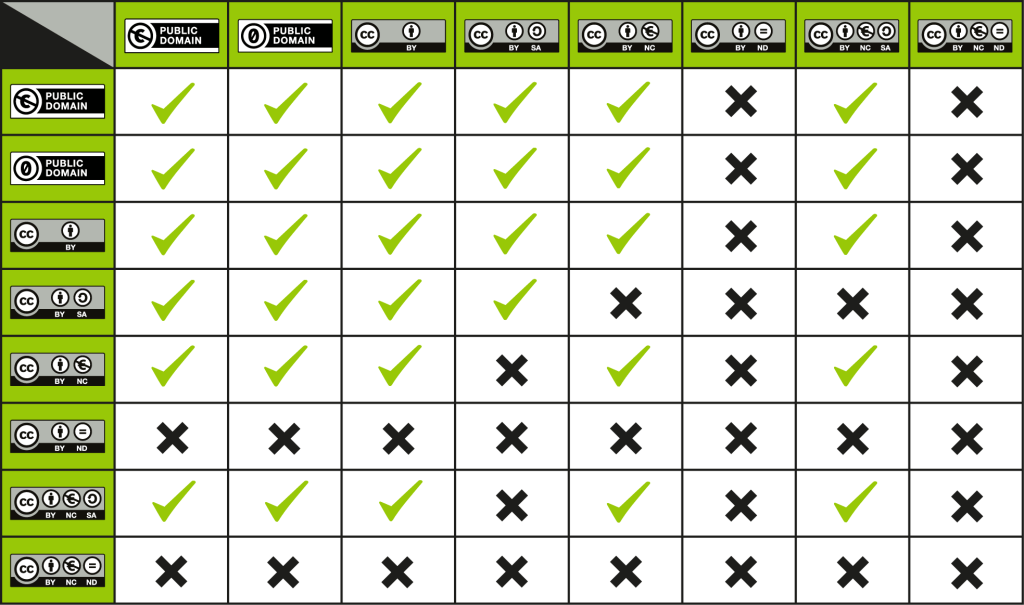
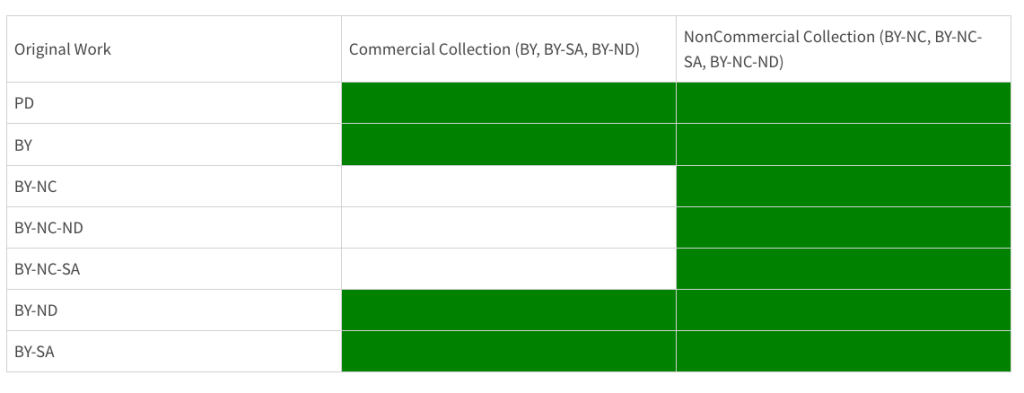
Answered in the URL connected to the question, but I thought I’d share this visual. This chart offers a helpful crosswalk of how you can use CC BY work, and how you can remix and license your work after using a particular CC BY object. This is very useful for when you might want to remix or reuse OER content for teaching, learning, and support services AND redistribute this updated version of your work:
This chart identifies what licensing can and cannot be use commercially if utilizing any Creative Commons licensed materials. Beyond attribution and use, it is important to note the legal* rights and protections of works with CC BY licenses.
Thanks for a helpful 101 for open licensing and OER resources NF T&L: http://bit.ly/NF-OER — I look forward to following along with your educational offerings and I will definitely share these with my colleagues to expand openness in postsecondary education.
*I am not a lawyer, nor should you consider this specific legal advice when it comes to copyright. Just overarching advise and direction of where to get started. Get a copyright lawyer and/or campus attorney to inquire more about intellectual property and copyright. Thanks!
We have a few publications coming out soon, a few under review, a couple recently revised/resubmitted, and a couple more in development. In addition to the traditional scholarly outlets (e.g. journal articles or conference proceedings), we’re also working on sharing more about the two-year investigation into the lived, digital/social experiences of higher education professionals (e.g. graduate students, staff, and faculty) in other ways. .
One project this summer from this study, is to broaden the impact of our work to disseminate the research findings, practical implications, data sets, and networked practices/communities through non-academic, digital avenues. We hope to offer ways to find and use the data archives (e.g. open data sets, communities, etc.) and provide professional development resources for others to connect to these learning networks.
During our search, discovery, and conversations with participants, we have discovered a number of professional learning networks, online communities of practice, and a wealth of training resources to share with postsecondary educators in a digital collection. Specific digital objects and born digital items can be organized and itemized for others to gain access and utilize. Materials within this digital library (DL) are only able to include public domain, fair use, and open educational resources (OER), that is, Creative Common licensed objects. I am in the midst of reaching out and educating a few communities for how they can digitize and effectively share (based on copyright permissions) how to best share their work or groups archives via this DL project.Here are a few proposed digital objects I hope to include in my collection:
Artifacts from previous conferences (e.g. presentations, handouts, etc.)
That being said. Just because you upload, post, and share about your networked learning, practice, or community — does NOT make it an eligible digital object for inclusion in this digital library project. I hope to support individuals, groups, organizations, and communities who might want to be included in this archived library resource — especially if they do not have any license on their work and may want to be part of this digital collection.
Basically, I have been singing in my head: “If you want me to share your work, community, or professional learning resource — you will have to put a Creative Commons license on it!” Point of information, based on the copyright Beyoncé in this video, I would not be able to include this in my digital library:
To review and offer more information about this process, I thought give a few definitions of what can be included in this digital library collection.
Copyright
The copyright details how to share material while still respecting the rights of the content creators. This itemizes the permission of use and designates rights for protected materials. Copyright law applies to all works, including print, media, and electronic formats. For example, books, magazines, online articles, songs, screenplays, choreography, art, software, work, software, podcasts, and photos are all protected under copyright law. Those items that are not covered under copyright include ideas, facts, some data, and government items. When in doubt, get permission or determine if it is required or not. Don’t believe the big copyright myths, especially when it comes to digital collections and objects. Here are a few helpful copyright guides/resources from UNT:
The public domain refers to creative materials or works that are not protected by intellectual property laws, including copyright, trademark, or patent laws. These materials are owned by the public, not an individual author, artist, or creator. Public domain materials and work may be used without obtaining any permission; however, no one is permitted to claim ownership for it. More information about the Public Domain, “Collective Works,” and when copyright expires can be found at the Copyright & Fair Use Website via Stanford Universityand Teaching Copyright via the EFF.
Fair Use
As defined by the US Copyright Office (2019), “Fair Use is a legal doctrine that promotes freedom of expression by permitting the unlicensed use of copyright-protected works in certain circumstances. Section 107 of the Copyright Act provides the statutory framework for determining whether something is a fair use and identifies certain types of uses—such as criticism, comment, news reporting, teaching, scholarship, and research—as examples of activities that may qualify as fair use.” When considering if objects or materials are under fair use, you should examine the four requirements:
The purpose is for nonprofit, noncommercial educational use (typical cases).
The nature of the copyrighted work is consistent with the proposed use.
The amount and substantial of the original work involved some small uses can be considered an infringement, that is, a small portion involves the core idea in the copyrighted work.
The effect of using the copyrighted work is not likely to deprive the copyright holder of sales or market interest.
Creative Commons
Creative Commons offers copyright licenses and tools to allow for content to be shared beyond the traditional “all rights reserved” setting and decide on the best form of attribution for their work. The goal is to refine how copyright works and allows content creators to choose if they want to retain copyright while letting others copy, distribute, and make use of part of their work. You can decide what the copyright is and how others may use your photo, music, or works. In a video, Grigas (2017) describes how Creative Commons licenses provide:
“everyone from individual creators to large companies and institutions a simple, standardized way to grant copyright permissions to their creative work. The combination of our tools and our users is a vast and growing digital commons, a pool of content that can be copied, distributed, edited, remixed, and built upon, all within the boundaries of copyright law.“
To enhance your learning, training, and/or presentation materials, you may want to find creative commons and public domain images, videos, music, or media. Certain websites, such as Flickr Creative Commons, even offer users content with specific attribution for use. There is even a Creative Commons Searchto aggregate even more content to share, use and remix, including media, images, video, audio, music, photography, and web resources. Besides Flickr, there are a number of other helpful sites to locate Public Domain or Creative Commons images. Additionally, there are ways to attribute and provide CC by licenses via other online accounts including YouTube, Bandcamp, SoundCloud, Vimeo, Archive.org, and your blog or website. Here are some resources from about copyright and Creative Commons to support your putting a #CC license on your work:
There are six main Creative Commons licenses you can use when you choose to publish your work under CC terms. The six CC licenses are based on four conditions. The four conditions and the six licenses are described below.
License Conditions
When using a Creative Commons license, creators choose a set of conditions they wish to apply to their work.
Attribution (by)
All CC licenses require that others who use your work in any way must give you credit the way you request, but not in a way that suggests you endorse them or their use. If they want to use your work without giving you credit or for endorsement purposes, they must get your permission first.
ShareAlike (sa)
You let others copy, distribute, display, perform, and modify your work, as long as they distribute any modified work on the same terms. If they want to distribute modified works under other terms, they must get your permission first.
NonCommercial (nc)
You let others copy, distribute, display, perform, and (unless you have chosen NoDerivatives) modify and use your work for any purpose other than commercially unless they get your permission first.
NoDerivatives (nd)
You let others copy, distribute, display and perform only original copies of your work. If they want to modify your work, they must get your permission first.
License Types
Creative Commons offers six copyright licenses, based on combinations of the four conditions outlined above.
This summer I’m enrolled in a couple of courses in the UNT Information Science department as part of the Digital Curation and Data Managementcertificate. For those of you who know me as a “secret librarian,” I am now diving into some of the practices, techniques, tools, and concepts in library sciences. Introduction to digital libraries is the first course I am in, and this introduction reminds me how much of the internet has emerged from how we organize, collect, and represent objects for users to access online. I hope to share some of my course work and learning experiences (by blog, of course), and perhaps even put out a few visual examples or request for the new platforms and spaces I am experimenting/creating with this term (e.g. GIMP, Omeka, etc.).
Although information can be gathered and curated online, this does not make it a digital library. Library and information scholars have been thinking about the theoretical foundations, technical infrastructures, digital objects, online collections, and organization/representation of information long before the existence of the web. Today, it might be a simple click to find information online; however, these search engines are built on some of these procedures and considerations involved in digitizing objects and planning for access of these items, services, and systems online.
“Consider a future device … in which an individual stores all his[/her/their] books, records, and communications, and which is mechanized so that it may be consulted with exceeding speed and flexibility. It is an enlarged intimate supplement to his [her/their] memory” (Bush, 1945).
The Digital Library Initiative (DLI) I and II were heavily influenced by a number of computer science and STEM organizations, specifically National Science Foundation (NSF), continued work with the ARPANET with the Defense Advanced Research Projects Agency (DARPA) with ARPANET, and progress of information retrieval systems between 1965 and 1990 from computer/information scientists. The DLI in 1994 launched what digital libraries are today, which also represents the following terms: electronic library, virtual library, hybrid library, and library without walls (Calhoun, 2014). These digital library initiatives were based on the information science infrastructure development to support technical issues for operating these systems on computer networks to include “interoperability, portability, data exchange, scalability, federation, extensibility and open network architectures” (Borgman, 1999, p. 236). The move toward automation and digitization of library institutions and services (e.g. libraries, museums, and archives) could not have been completed without these advancements in computing and development of interfaces to interact with networked technologies.
The Digital Library (DL) offer digital services and distributed knowledge to meet the needs of users in electronic format. Early DL initiatives were initiated within developing nations to offer access and meet the needs of organizations (Isah, Mushewa, Serema, & Kenosi, 2014). Digital libraries (DLs) provide open systems and services to advance knowledge and culture; organize collections of digital content and objects; and use an architecture that supports a repository accessible by search with services to connect users to resources through user-friendly interfaces (Calhoun, 2014). DLs will curate items within a set scope and have specific requirements for items they include within a collection.
One example of a DL is the Digital Public Library of America (https://dp.la/) that hosts a wealth of information, archives, government documents, and primary source sets online. A recent addition to their online collection is the Mueller Report, which is available for all to access digitally. Typically, DLs provide electronic resources that are constructed, collected, and organized by and for a community of users (Borgman, 1999). Based on suggestions from Candela et al. (2007), here are a few of the attributes of a DL:
Virtual organization of electronic resources
Organization of digital library collections
Preservation and management rich digital content
Specialized community support for digital objects/collections
Digitization of library objects in digital format for books, journals, music, art, museum collections, etc.
Access to library resources over a distributed network
World Digital Library. A source for manuscripts, rare books, films, maps and more in multilingual format.
Bartleby. An immense collection of books for consultation, including fiction, essay and poetry.
ibiblio. E-books, magazines, academic essays, software, music and radio.
Google Books. More than 100,000 books for consultation, download or on-line purchase.
Internet Archive: The largest digital library for downloading e-books and audio-books for free.
Open Library: More than one million e-books of classic literature to download.
A library collection is defined as “an accumulation of information resources developed by information professionals intended for a user community or a set of communities” Lee, 2000, p. 1106). A major function of a traditional library collection is to facilitate information seeking by providing its users with convenient access to relevant information resources (Buckland, Gorman, & Gorman, 1992). These resources might be books, reference documents, serials, rare books, government files, special collections/artifacts, and/or media objects. A collection is the complete accumulation of books, materials, objects (physical and digital), that are accessible within the library.
To preserve items within library collections, archives, and museums it is necessary to reformat these objects through digitization, that is, to create digital objects. The 1990s saw the emergence of this digitization standards, principles, and practices for how to digitally reformat texts, books, pictorial images, collections, and other projects and the field of digitization specialization has expanded beyond libraries and into cultural heritage organizations/communities. To ensure a set of principles for the digital libraries’ preservation role, managed collections require that digital objects selected are accessible and available for long-term resource needs (Deegan & Tanner, 2002, p. 22).
Digital objects now broaden this term, as tangibility and ownership offer the opportunity to provide digital collections for library users. Now information and items are directly accessible in electronic format, so the term collections now apply to digital collections. Lee (2000, p. 1106) believes the function of collections needs a fresh examination to determine the access means in context to the user’s point of view to further understand and better support how collections facilitate information seeking. These digital collections are often a set of digital and multimedia resources that can be owned, accessed, curated, and/or shared within a digital library, that have organized digital object using metadata to describe the individual objects and the overall collection details. Based on technological advancement and possibilities with digital collections, a library collection often reflects the characteristics and interconnectivity of the information world to ensure information-seeking as contextual and interactive with a user-centered design approach (Lee, 2000, p. 1111).
Collections in Digital Libraries: these are a set of digital and multimedia information resources which are building blocks that consist of an organized assembly of digital information objects, metadata describing those objects, and metadata describing the overall collection. These group of objects that are not necessarily physically owned and sustained by the library in a collection; however, they have “a group of information resources, a defined user community, a collection development policy statement, and an integrated retrieval system” (Lee, 2000, p. 111). The digital collections are a balance of the user and institutional interests that typically reflect the priorities and impact these collections might have for sustainability over time (Miller, 2015). To build a good digital collection with purpose, you need to provide an overview of the major components and activities; identify existing resources that support the development of practices; and encourage community participation for ongoing development to build the collection (NISO, 2007, p. 1).
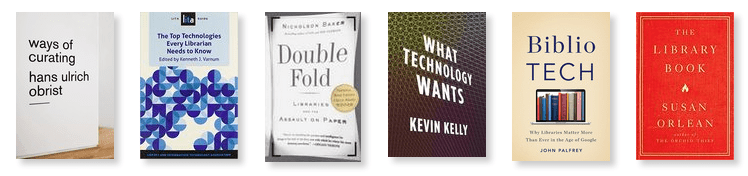
The Top Technologies Every Librarian Needs to Know
Ways of Curating by Hans Ulrich Obrist
The Library Book by Susan Orlean
What Technology Wants by Kevin Kelly
What books about the library or library/information science recommendations do you have for me? Please share!
BONUS LISTEN: from a recent 99% Invisible podcast, Episode No. 354: Weeding is Fundamental, I recently about Collection Management: “Collection size and scope, as determined by holdings counts, particular strengths, and unique materials, were formerly understood in relation to institutional mission and programs” (Horava, 2010, p.142). Johnson (2009) notes how collection management was designed to include the development practices and support for collections, specifically with regards to the decisions about reviewing, retention, and evaluation of a collection e.g. weeding, cancelling serials, storage, and preservation.
Calhoun, K. (2014). Emergence and definitions of digital libraries. In Exploring Digital Libraries: Foundations, Practice, Prospects. ALA Neal-Schuman.
Candela, L., Castelli, Y. I., Ross, S., Thanos, C., Pagano, P., Koutrika, G., … & Schuldt, H. (2007). Setting the foundations of digital libraries. D-Lib Magazine, 13(3/4), 1082-9873.
Horava, T. (2010). Challenges and possibilities for collection management in a digital age. Library Resources & Technical Services, 54(3), 142-152.
Johnson, P. (2009). Fundamentals of collection development and management, 1st Edition. Chicago, IL: American Library Association.
Isah, A., Mushewa, A., Serema, B., & Kenosi, L. (2015). Analyzing digital library initiatives: 5S theory perspective. New Review of Academic Librarianship, 21(1), 68-82.
Lee, H. (2000). What is a collection? Journal of the American Society for Information Science, 51(12), 1106-1113. doi: 10.1002/1097-4571
Mills, A. (2015). User impact on selection, digitization, and the development of digital special collections. New Review of Academic Librarianship, 21(2), 160-169.

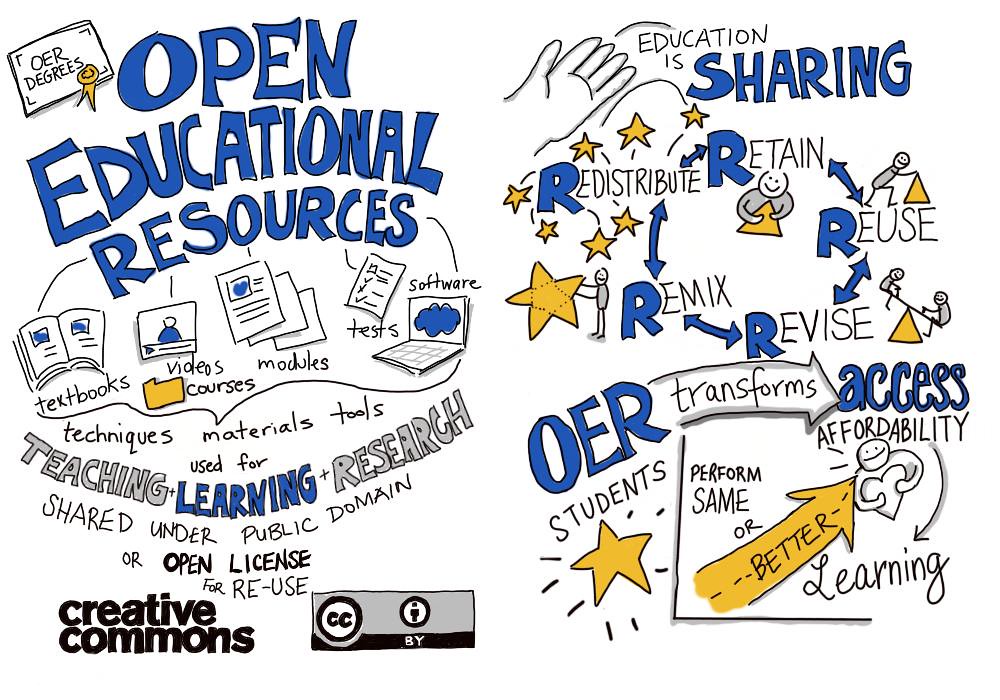 OER is sharing is a Flickr image/drawing shared in the Public Domain by Giulia Forsythe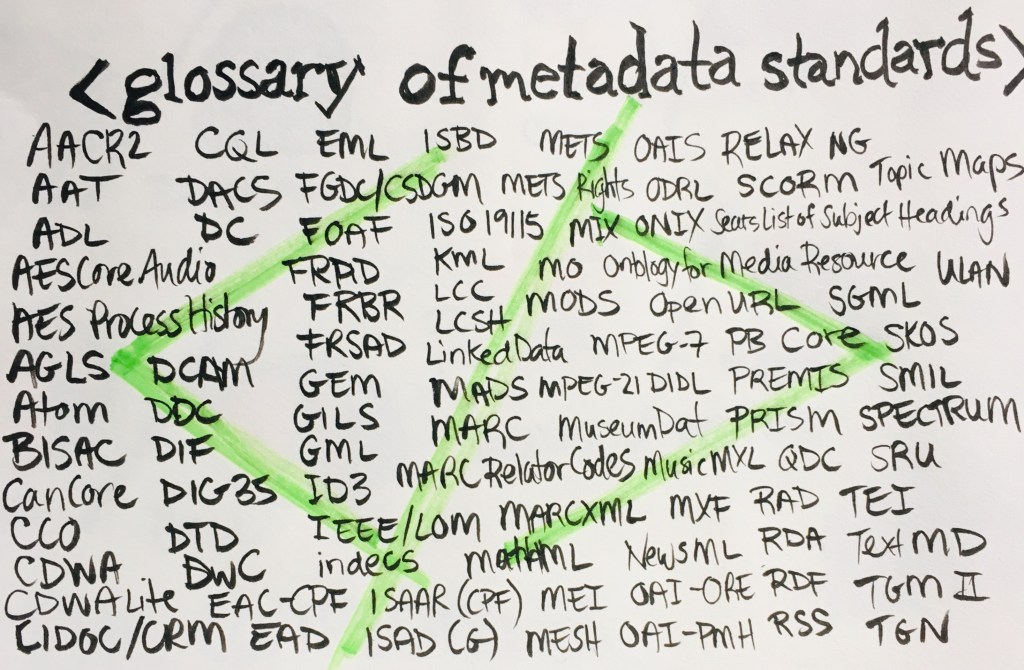
 Attribution (by)
 ShareAlike (sa)
 NonCommercial (nc)
 NoDerivatives (nd)
 techKNOWtools
You must be logged in to post a comment.