Collaboration, Professional Development

How Do You Cultivate Mentoring Opportunities?

During our session at the #UNTAdv12  Conference last week, our panel hosted a discussion on the topic of mentoring in higher education. We talked about what formal and informal mentoring looks like on our college and university campuses, specifically to support our faculty, develop our staff members and engage our students students. Here are the key words that were shared during the discussion:

It is important for campus communities to consider the potential of mentoring. There are a number of benefits to supporting mentoring at a college or university. Some might be interested in connecting our students to their learning environment, while other institutions might be interested in helping new faculty transition. A number of mentoring programs provide return on investment for employees, which includes increased retention, career development, and professional engagement. By developing a culture of mentoring, organizations have the ability to increase collaborative learning and support sustainable leadership.

What sort of mentoring is happening on your campus or within your organization? Please feel free to add your mentoring program or resources to the open google doc: http://bit.ly/MentoringMatters

AcAdv, Collaboration, Higher Education, Learning Community, SAchat, StudentAffairs, Virtual Communities

Creating Digital Communities of Practice to Enhance #StudentAffairs & #HigherEd

Last year, I wrote a piece for the NASPA Technology Knowledge Community (TKC) after responding to a post made by the TKC Chair @JedCummins via the TKC Facebook Group. I was just noticing that the Summer 2012 call for submissions is coming up and Osvaldo is looking for submissions (due June 8/12 – see the Facebook Page for further details). Although the TKC publication is geared towards a newsletter format, I think it provides Student Affairs professionals an opportunity to write and share about their technology trials, tribulations, and accomplishments on campus.

Little did I know that my submission would go into the #NASPA12 Knowledge Communities publication (my piece can be found on pages 50 & 51) that was distributed at the conference. Thanks for sharing it beyond and sending me copies via “snail mail,” Jed! I appreciate it.

The overall just of this piece describes how the social web and emerging media is  coevolving with the changes and developments of higher education and the Student Affairs profession. New learning environments and networks allow higher education professionals and faculty to connect, curate, and collaborate beyond on our college campus. It is exciting to see how online networks afford new joiners in the field of student affairs, advising, and MORE to access information, contribute to the conversation, and develop a digital footprint. Whether you call it a PLN, PLE, hangout, community of practice, network, gathering space, or “water cooler” chat — there are great things happening in social, online spaces to enrich the work we do at our institutions with ourselves and our students. I like where this informal learning and development is going. This is probably also why @julieclarsen and I decided to share our “Developing Your Network” presentation one last time at today’s #UNTAdv12 Conference for the advising professionals as well:

There are amazing things that lie ahead for these informal networks in higher education. This is an exciting time. I look forward to participating and learning where these digital communities of practice, including as #SAchat, #SAtech (hoo-ray for the new chat!), #AcAdv Chat and others go. With this fine group of educators and practitioners, I am sure these networks have the potential to move mountains. I would challenge and encourage participants in these communities to use these spaces to think critically, solve problems, create innovative ideas, develop effective practices, share knowledge, and support one another.

blogs, PhD, Professional Development, Reflections

What Prompts You To Blog?

Blog prompts are all around me. I started blogging in 2006 to share travel tales and I continued to blog to tell a different story and share my academic journey and musings. I typically blog to share ideas, research, and reflect on what I’m doing, learning, or experiencing – at least on this blog space.

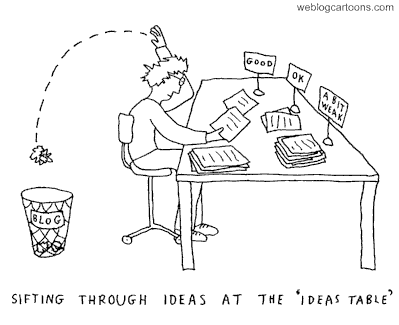
Image c/o <http://www.weblogcartoons.com/cartoons/sifting-through-ideas.gif>

Sometimes my blog ideas get filtered. I don’t always have time to write these thoughts out, so I often have to save this blog-worthy idea for later in my Delicious account, a WP draft post, or, most commonly, in WP, in a Gmail draft or Google Doc. During the crunch time of year, when all academic and professional deadlines seem to merge, my attention tends to drift. I find myself looking for interesting things to read and I seem to be more inspired to write blogs. I consider this digression to be a form of “productive procrastination.”

Inspired by the blog post from @InnovativeEdu, I thought I would share where I get my blog ideas from and what prompts me to blog:

  1. My regular online reading locations – I typically check my Google Reader, Twitter streams/hashtags, Google Alerts, social feeds, Percolate, and regular listservs/news feeds first thing in the morning. Sometimes there is a gem that I want to talk about in greater detail than just sharing it in a 140 tweet.
  2. Things I have to read “for school” – I am sure that no one is shocked to learn that you consume a hefty amount of reading while you’re a doctoral student. Beyond the “required reading” for class, I also stumble upon other finds when researching, compiling articles for my literature review and writing articles. Blogging helps me annotate and remember these theories, articles, and references in a synthesized portion to recall and use later.
  3. From conversations with peers & my PLN – I am fortunate to interact with a number of thoughtful and challenging peers on Facebook, Twitter, G-Chat, my campus, LinkedIn, Skype, and by phone. At least once a week (usually more often) I am fortunate to dialogue about something that makes me think and I want to write about in a blog to share
  4. Great finds for technology, learning ,and engagement I just want to share – Sharing – it was a good lesson I learned in kindergarten and have taken with me along the way.
  5. A photo or video that inspires me – I am a fairly active Flickr user, and  think that there are a great groups and community members that share visual inspirations that create a blogging spark. Lately Instagram, YouTube, Vimeo, and the odd infographic (there are too many of them now) have triggered ideas for blogging projects and shares.
  6. Professional & personal development opportunities – Whether it is a workshop on campus, a webinar online or an open learning session in the community, there are loads of ideas to reflect and bring back to my personal learning network (PLN).
  7. A question or request for advice – Sometimes I get an email, IM or call from individuals who want to talk about an issue or idea. When questions about technology in advising, education challenges, research process, or academic experience advice come up, I think how sharing this information in a blog post could be helpful to others who just have not asked.
  8. A Tweet – 140 characters shared on Twitter from either from me or someone else can inspire a blog draft. A tweet might include a quote, question, argument, Twitter chat, link, or random thought.
  9. Reading other posts & threaded comments – In reading a threaded discussion on someone’s blog, Facebook wall or open discussion in LinkedIn challenges me to consider my own perspective to later process it through a blog post.
  10. My own curiosity – If I want to learn more about a product, tool. vendor, process, or topic, I typically share what I have found on my blog.
  11. Contributions or things I produce – I document things I create for publications, podcasts, and presentations. Part of this is for my doctoral portfolio (ATPI is similar to the ECMP portfolio requirements, so I try to archive my work/experiences) and the other part is to share training and learning sessions. Why not put these ideas out there to extend to the audience that could not attend?
  12. Writing, writing and MORE writing – I write regularly. I started using 750words to keep me writing regularly to keep me writing. This activity helps weave my thoughts and develop new ones. Continuous writing allows me to practice my craft and improve how and what I write about.
  13. Cultivation of resources – My research interests vary and are interdisciplinary, so I collect a load of  resources – this could also be a direct result of #1, 2, 4, 6, & 8. Blogging helps me to  connect and process my thoughts to share with peers in these academic and professional fields.

I am sure there are other reasons, but those were the first few that came to my head. So the question for you is… what prompts YOU to blog? Please share. 

Higher Education, Learning Technologies, Web Design

Backward Design with TED-Ed

Beginning with the end in mind. This is the philosophy of instructional design method backward(s) design.  A few weeks back Kevin Guidry shared his thoughts on backward design, and it got me thinking about how I approach my curriculum and lesson plans.
Image c/o <http://www.recordholders.org/images/backwards-cycling1.jpg>

For the Office for Exploring Majors, I am currently reviewing/updating modules for our first-year seminar class – UGST 1000. The goal is to offer an “engaged” format (we cannot use the term blended or hybrid, but there will be mixed components of online, in-class and active requirements) for Fall 2012.  Last semester our department offered a couple of sections of the NextGen course; however, the class focus was on “well-being.” Since our office t works with undecided students, the engaged sections for Fall 2012 will need to be directed towards major/career exploration and academic success.
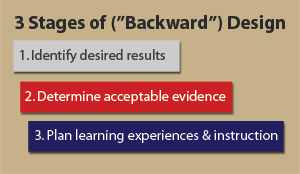
Image c/o <http://kids.esc13.net/curriculum/3stages.gif>

In reviewing the current curriculum, it was apparent that a backward design approach would be the most effective method for this instructional design project. In Understanding by Design, Wiggins and McTighe (2005) identify three key stages for  backward design:

  1. Identify desired results (learning outcomes) – What should your learners know, understand, and be able to do?
  2. Determine Acceptable Evidence (means to assess if learners have learned) – How will you know if learners have achieved the desired results, achieved those learning outcomes, or met the standards? What is the evidence of learner understanding and proficiency?
  3. Plan learning experiences and instruction – What will be the procedures or methods to reach these outcomes? This includes a definition of knowledge; definition of skills and procedures learners need to master; definition of materials; and definition of learning or instructional activities.

Here is an example of an engaged learning module that I will include for the Time Management unit. This session will have the backward design steps and one of three classes that students will be required to complete outside of the in-class meeting time.

1. Learning Outcome(s)

Learners will be able to:

(a) identify the differences between tasks, objectives, and goals.

(b) create a smart and effective to-do list of tasks.

(b) assess their weekly schedule to identify how time is being utilized.

(c) select priorities, understand where time is lost, and accurately adjust for effective time management.

2. Evidence of Learning

Learners will demonstrate their understanding of learning by:

(a) drafting a to-do list of tasks for the day/week and identify 5 top priorities.

(b) mapping out a one week schedule of their activities to identify where their 168 hours are allocated.

(c) creating a visual representation of how the 1 week period time is accounted for in terms of activities and responsibilities.

 (d) writing a 250 word minimum blog post/online journal about their 168 hours and weekly schedule. This reflection will include the visual representation of 168 hours, account for time wasted, and offer ideas how to effectively manage time to balance their schedule.

3. Learning Experiences & Instruction

This section of the time management unit will be housed online. We have some modules created on Blackboard Learn; however, I thought I would also create a mock up on the new TED-Ed website. This is a rough draft of a module (to be edited) I designed by “flipping the video” from YouTube into a lesson. [Side note: there are already a number of lessons available for educators to use for the experience section of lessons. Instructors can use the same module or “flip” it.]

TED-Ed | Time Management: How to Write a To-Do List & Know Where Your Time Goes

College Success – Chapter 2: 2.3 Organizing Your Time

References:

Beiderwell, B., Tse, L., Lochhaas, T.J., & deKanter, N.B. (2010, August). College success. Flatworld Knowledge. Retrieved from http://catalog.flatworldknowledge.com/catalog/editions/54

Wiggins, G. & McTighe, J. (2005). Understanding by design (2nd ed). NJ: Prentice Hall.

BreakDrink, CTCX, Higher Education, K-12, Learning Technologies, Social Media

#SocialMedia & #HigherEd – Policy vs. Guidance

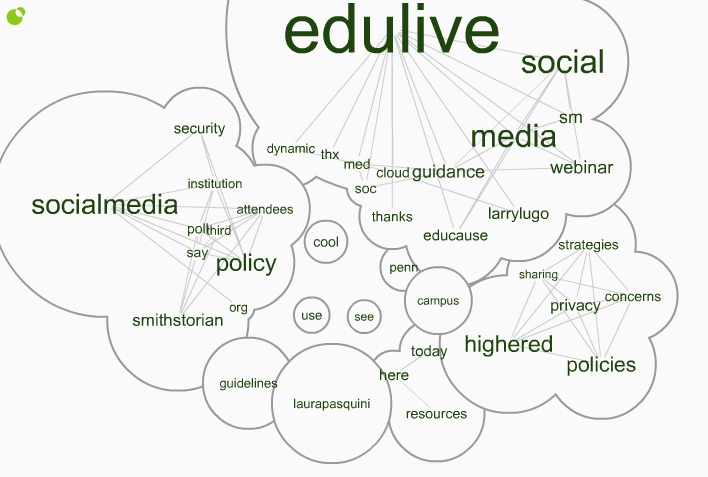
Last week, I attended the free @EDUCAUSE #EDUlive Developing Social Media Guidance in higher education with respect to #Privacy and #Security concerns. The presenters, from the University of Pennsylvania, shared ideas for how to promote safe usage of social media and detailed how to  draft guidance for addressing issues in teaching, research, administrative, and other functions.

Click here for the Twitter Cloud interactive image =>  http://www.infomous.com/node/15059

If you missed the #EDUlive event, you can check out the webinar recording and archives posted on the EDUCAUSE website, Developing Social Media Guidanceand you can also read through the Storify of #EDUlive tweets I collected.

During the webinar, I shared the Social Media: Sharing Strategies, Policies &  Privacy Concerns in Higher Education open & shared Google Doc that was 1st created for a @BreakDrink Campus Tech Connection (CTCX) Show in September 2010. This document has been circulated around and curated for a while by myself and high ed professionals and faculty. Since there were a number of social media guidelines/policy examples shared during the webcast, I added  them to this doc. For others interested in developing guidelines, I think there are a few solid examples I like in here, and I know that @EricStoller shared some of his favourite #SM guidelines from the list on InsideHigherEd recently as well.

Before diving into creating rules, guidelines or policies for social media, it is important to consider how this emerging technology is being used on your campus. In Chapter 6 of Social Media for Educators, Tanya Joosten (2012) shares her thoughts around institutional considerations for social media policy and practice [which we chatted with Tanya about on #CTCX Episode No. 61 as well]. There are often concerns about the use of social media at educational institutions, since these social and  connected resources impact student behavior, online interactions, privacy concerns, and communication practices. When developing a social media policy, Joosten (2012) offers a few helpful suggestions for educators:

  • review current technology use at your institution
  • do not link policies to specific tools
  • revise current student conduct and institutional policies
  • use policy to address behaviors and activities, rather than focus on the technology
  • learn about FERPA (or FIPPA in Canada) issues and privacy of student information at your campus
  • develop best practices on campus for use by students, faculty, and support units

When thinking about the language of policy vs. guidelines, I am partial to establishing guidelines. There are probably already policies that address the actions and outcomes of student, staff, and/or faculty behavior on your campus. I think that it is important to review your home institutional policies and/or guidelines to best understand what is already being “regulated” on campus. It is also helpful to chat with your institutional office who deals with policy development, legal concerns, and/or questions you might have around privacy legislation.

Have you searched the terms “social media+policy” or “social media+guidelines” on your institutional website? Go on. See what shows up. If you find something, then start connecting and collaborating with that unit. If there is nothing to be found, then gather your peers and start the conversation.

References:
Joosten, T. (2012). Social media for educators. San Francisco, CA: Wiley/Jossey-Bass.