AcAdv, Higher Education

The Future of Advising

This week I am at the NACADA’s International Conference, Melbourne, Australia (#NACADAmelb) with The Global Community for Academic Advising. Today our panel (George, Catherine, Jennifer, and myself) started a conversation around the following prompt: “The Future of Advising: Current and Past Predictions to Shape Our Future.” This panel was designed to poke at the issues and uses of technology in higher education for student support, academic advising, and personal tutoring. Much of the discussion was focussed on the Lowenstein’s chapter, Envisioning the Future (as shared in What’s On the Horizon for Academic Advising? recorded lecture), and Steele’s article, Five Possible Future Work Profiles for Full-time Academic Advisors, specifically to address the following issues with advising:

  1. If advising is teaching, how will technology assist in its delivery?
  2. How will technology shape the role of advising as a profession?
  3. How will current trends such as “big data,” “predictive/learning analytics,” and financial support in higher education impact advising? 

Although this international conference holds a variety of perspectives and definitions for academic advising, students support needs and challenges in our post-secondary institutions are very similar. Regardless of geographic location or educational systems, collaboratively we can benefit from our collective experiences just like the innovators who created the digital revolution (Isaacson, 2014).

Themes emerging from our discussions included student support needs, advising responsibility and workflow, peer tutoring/advising roles and models, change literacy, leadership strategy with change, and cultural considerations. Most often people want to talk about the shiny, bullet (technology) solution, but really there are a number of other considerations for the future of advising and students support in higher ed that go beyond a platform or application.  With this panel discussion, we really wanted to provide a springboard to dive into the issues relevant to advising, beyond technological solutionism.
RobotsJob

Fortunately for us, we had a number of brilliant administrators and faculty at our #NACADAmelb session who asked insightful questions and prompts we should think deeper about. I will leave these questions here for you to ponder as you consider what lies ahead for the future of advising and student support in higher education:

    • Will there be a future?
    • Advising is such a personal, developmental relationship. How can technology – any technology – deliver better than a real person?
    • How do we engage and keep students engaged in online advising?
    • Will academic advising ever be part of a strategic plan?
    • Will advising ever be rewarded like research or teaching?
    • How do we effectively support students?
    • How do we use our data to predict future trends and be more proactive in a digital and physical advising environment?
    • How can technology be used to support student advising?
    • What are the best exemplars in the field?
    • How do we keep the pace with the communication styles and needs for our learners?
    • What are the best tips and tricks for distance education advising?
    • How will the status of advising, as a profession worldwide, be valued?
    • What are the pedagogical and theoretical underpinnings the global community of advising (NACADA) should consider?
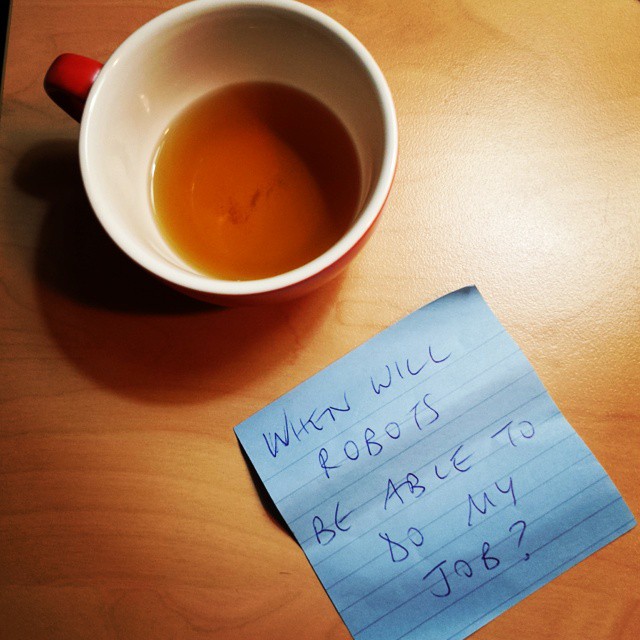
    • When will robots be able to do my job? [Find out.]

References

Isaacson, W. (2014). The Innovators. How a Group of Hackers, Geniuses, and Geeks Created the Digital Revolution. New York: Simon & Shuster.

Lowenstein, M. (2013). Chapter 14: Envisioning the future. In J. K. Drake, P.   Jordan, M. A. Miller(Eds.), Academic advising approaches: Strategies that teach students to make the most of college. (pp. 243-258). San Francisco,  CA: Jossey-Bass

Pasquini, L. A. (2015, February 22). What’s on the horizon for academic advising? [Video file]. Retrieved from https://www.youtube.com/watch?v=vkGgsJrRZMg

Steele, G.E. (2006). Five possible future work profiles for full-time academic advisors, NACADA Journal, 26(2), 48-64.
Higher Education, Professional Development, Training & Development

#SAreads: Students, Ethics, and Online Engagement @ #ACPA15 the #ACPATrendingNow Session TODAY!

Join Courtney O’Connell and myself in a round table discussion about online student behavior in higher education during the #ACPATrendingNow Session (TODAY at 12:30-1:30 pm in the Marketplace):

SAreads #ACPATrendingNow Session @ #ACPA15#SAreads: Students, Ethics and Online Engagement

campus book launch ad.003

An excerpt from the What Happens on Campus Stays on YouTube book on cyberbullying:

cyberbullyingCyberbullying is defined as teasing, insulting or making fun of another person online. The intent is often to soil the target’s reputation. If you are a cyberbully, STOP! Your bullying could be the byproduct of social anxiety or low self-esteem and it is important that you seek help. Educators, friends, parents and counselors are increasingly aware of the signs of cyberbullying and will eventually confront you.

Cyberbullying is often considered a criminal offense and offline bullying laws apply to online behavior.

  • Cyberbullies leave digital fingerprints and often are easier to prosecute than traditional bullies who do not leave as much incriminating evidence.
  • Bullying can ultimately lead to a victim’s suicide. Victims of cyberbullying are twice as likely to commit suicide as those who have not had a cyberbullying experience.
  • 1 in 4 teens report that they have experienced repeated bullying via their cell or on the internet
  • Over half of all teens that use social media have witnessed outright bullying online, and an astounding 95 percent of teens who witness bullying on social media have ignored the behavior
  • We all must serve as upstanders and not bystanders to cyberbullying.
  • Colleges and universities have their own rules and procedures for dealing with cyber-bullying, cyber-harassment, and cyber-stalking. If you know something that is occurring, tell a faculty or staff member. They can help and give you options.
  • Being harassed or bullied online can be mentally draining. Reach out to others to help you process through it. The counseling services on your campus can also help.

Also in a recent study on cyberbystanders, nearly 70% of respondents who noticed the cyberbullying and who didn’t respond directly to the abuser gave bad marks to the chat monitor and/or didn’t recommend use of the chat room – both of which were classified as indirect intervention. This is happening at your institution and this is an important issue that WE NEED TO TALK ABOUT NOW! 

Sneak Peak of the Book (Preview Copy Only!)

More #ACPATrendingNow Sessions to participate in TODAY from 12:30-1:30 pm (in the Marketplace).

Becoming a Leader in Professional Associations – Facilitated by Cissy Petty
Hate Speech and First Amendment Rights – Facilitated by Kathy Adams Riester
Implications of Systemic Oppression – Facilitated by Tori Svoboda
Working with Undocumented Students – Facilitated by Ray Plaza
Personal Mental Health as Professionals  – Facilitated by Kalie Mason
Media Scrutiny of Higher Education – Facilitated by Gretchen Metzelaars
Supporting Veteran Students – Facilitated by Monica Christensen
Athletes as Students – Facilitated by Markesha Henderson (U West GA)
Title IX and Transgender Protection – Facilitated by Finn Schneider
Reclaiming Language as Means of Peaceful Protest – Facilitated by Dan Sym

Higher Education, Learning Technologies, Professional Development

Using Google Apps in Higher Ed #ACPA15

Join me today (3/7) at 9 AM for my  #ACPA15 Genius Labs session on Google Apps for Education (1st Floor West Side of Tampa CC) where I’ll share how I use a few applications to make my workflow more productive and how I’ve used a few of these applications for my educational curriculum and developmental programs on campus. Blog-Post-Image-Google-Apps-Admin-Best-Practices-1024x372 About: Many universities/colleges are turning to Google Apps for Education as a solution, and it isn’t just for email. This 20-minute session will introduce applications provided by Google Apps, and will illustrate easy-to-implement practices for everyday problems. Google Apps to Explore & Use

Examples for Google Docs & Forms

Google Video – YouTube & Hangouts On Air

3 Google Apps to Check Out More Often

  • Google Scholar What it is: Academic search engine for publications of scholarly research Why It’s useful: Search of scholarly literature across many disciplines and sources, including theses, books, abstracts and articles. Pro tip: Identify articles available from your institutional library on campus. Also able to search & preview millions of books from libraries and publishers worldwide in Google Books.
  • YouTube Trends Dashboard What it is: A handy tool to figure out what’s trending on YouTube. Why it’s useful: What are your students watching on campus? What is being shared most often near you? With the Trends Dashboard, you can tap into the zeitgeist quickly and easily. Pro tip: Compare the “Most Shared” (across Facebook and Twitter) with “Most Viewed” to get a sense of what content gets viewed often but shared infrequently. To see what was trending in the past, check out
  • Google Trends. Use the optional forecast checkbox to anticipate whether interest in a particular topic is expected to rise over time. Google Keep What it is: Lets you easily jot down whatever’s on your mind via a beautiful, simple interface. Why it’s useful: Share any one individual note with a collaborator, create to-do lists, drop an image into notes as needed, and organize notes using eight color options. Pro tip: Don’t want to forget to do something? No problem: You can easily turn any note into a date or location-activated reminder.

Resources

How do you use Google Apps for education? Please feel free to share links and resources here: http://bit.ly/acpa15google

Conference, Higher Education, StudentAffairs

Technological Advancements & Considerations for Student Affairs at #ACPA15

This week I will be in Tampa, FL for the 2015 ACPA Convention (Follow #ACPA15 chat on Twitter). Besides getting a chance to warm up from the chilly winter weather, I am looking forward to connecting with a number of student affairs (SA) professionals and faculty who will be attending. This year’s convention holds a number of informative and interactive sessions in the program to support professional development and scholarly research for SA educators. I have a few meetings (#ACPAdigital and #ACPA16, I’m looking at you!); however I am really looking forward to catching up with a number of colleagues who will be in attendance. I suspect a number of hugs and high fives will happen soon.

ACPA Tampa 2015Part of my time in the next couple of days will be spent with the fine folks I have been fortunate to work with on the ACPA Digital Task Force (#ACPAdigital).

digital_report

The association established #ACPAdigital to make recommendations on how student affair educators can best advance the application of digital technology in higher education, specifically through informed scholarship and practice. Being charged with reviewing how ACPA will be a leader in the field, this task force was divided into four working subgroups:

  • Proven Practices
  • Knowledge and Skills
  • Research and Scholarship
  • Informed and Responsible Engagement with Social Technology

While serving on the #ACPAdigital task force this year, I can personally say, the efforts made to evaluate and assess  and how current educators shape student development for digital learning has been impressive. As I review the 49-page report we are sharing with the ACPA leadership this week, I am looking forward to the conversations we will have about our findings, recommendations, questions and proposed research agenda. It is critical that student affairs and learner support entities in post-secondary education consider how technological advancements will impact the work we do with students in face-to-face, blended, and online learning environments. This groups needs to be at the table for discussions on distance education and workforce preparation considerations. I am excited to be part of the discussion and push to move in this direction with student affairs. To learn more about this report and #ACPAdigital’s work, be sure to review the task force website:  http://digitaltaskforce.myacpa.org/

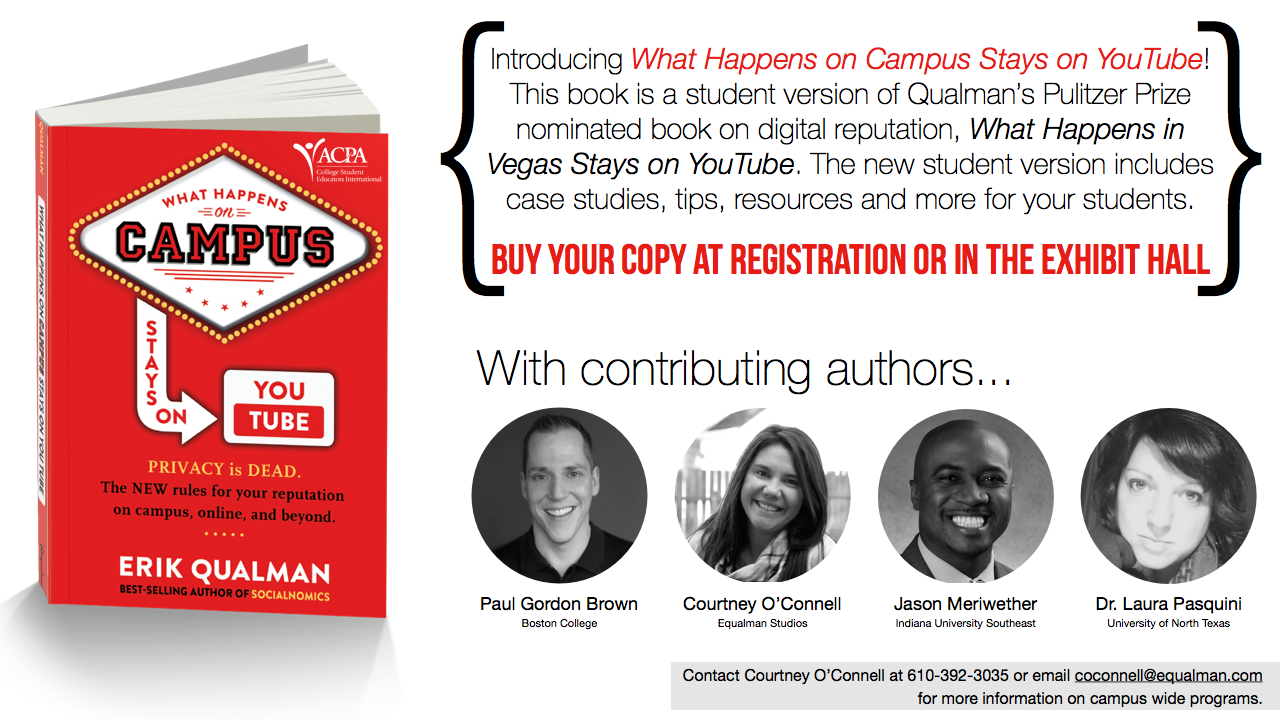
As a member of the Informed and Responsible Engagement with Social Technology (IREST) group, I was part of the collaborative author team who contributed to updating Erik Qualman’s What Happens in Vegas Goes on YouTube. The last few months of swapping ideas, sharing resources, discussing issues, and making edits with Paul, Jason, Courtney, and Erik has been great – and we’re so pleased that we are able to share our efforts this week at #ACPA15:

campus book launch ad.003

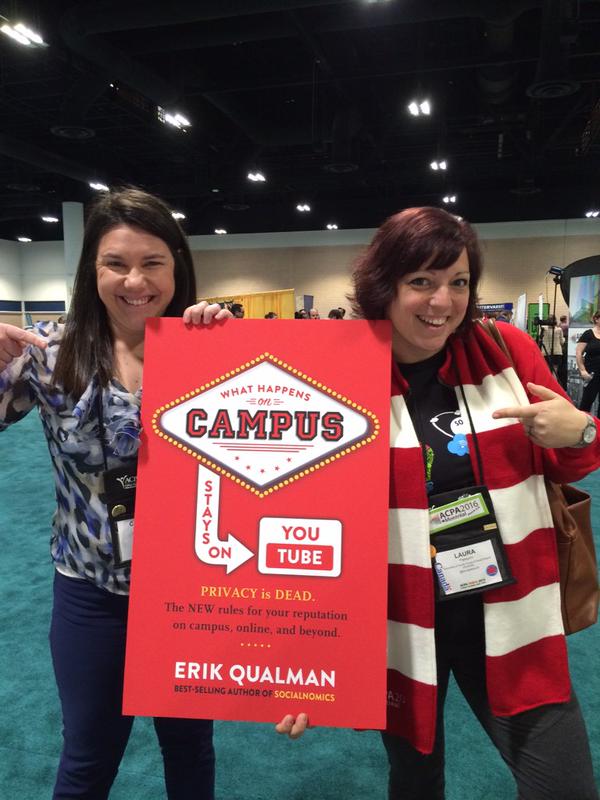
The ACPA co-branded book, What Happens on Campus Stays on YouTube, is designed to have your students reflect on their digital identity, with regards to their college experience and future personal/professional development. For #ACPA15, early release copies of book will be available for sale ($11.99) and the official launch on Amazon/public sale will be in April 2015. If you want to get a sneak peek of the book before everyone else, get your copy at the ACPA Booth in the Expo Hall or join our #SAreads event happening on Saturday (3/7) from 12:30-1:30 pm at the #ACPATrendingNow round tables in the Marketplace with Courtney and myself. If you are interested in bulk orders for your curriculum or campus, please be sure to reach out to Courtney O’Connell so she can discuss options best for your institutional needs.

Will you be found at the harbor front this week for #ACPA15? Let me know – I would love to have a chat and catch up. See you soon!

Higher Education, Reflections, Teaching

Rethinking Office Hours

Office hours were designed to offer a space and place for learners to meet with their faculty. The practice of holding a “office hours” at every higher education campus, and even within a single department, varies drastically. Some institutions/departments set guidelines, whereas others see this as a service expectation that will automatically be assumed by the faculty member.

silly questions

Image c/o Flame @ KZK

The basic idea of faculty office hours was to carve out time to be available for your students. This set time each was is designated for the instructor to be in a physical, set space to offer support and assistance for courses, research, etc. In reality we know that only “a small number of students take advantage of office hours, [and] typically those who show up are not those who most need to be there (Weimer, 2015a). With increased use of technological communications, our students prefer to send a quick electronic message [email, learning management system (LMS) message, discussion board, text, tweet, etc.], to ask a question, seek advice, or get help.  So how do we “meet and reach” our students who are often juggling more than just school and cannot make the typical “office hour” on campus?  How do we make getting support more convenient for both the instructor and the student?

As an online instructor, I have experimented with a few approaches  the last couple of semesters. Although I work with online, adult learners – I think these strategies could also be useful for other faculty who instruct face-to-face (F2F) or blended learning environments.

A Few Ideas to Rethink Office Hours:

  1. Offer a standard “Office Hour” time slot at least 1-2x per week. This might be the day before assignments are due, or perhaps an evening hour after the typical 9-5 work day. You can indicate availability in your own office, by Skype/phone, IM, or via a web conferencing platform. You decide!
  2. Identify YOUR preferred mode of contact/communication. Let them know HOW and WHEN you will be checking and responding to their messages. Be sure to consider your own communication workflow – then share these expectations for your learners about your preferred protocol for related course communications.  Here are the best ways (in order) for students to contact me:
    • EMAIL: This is BY FAR the recommended method. My students know they will get a response from me within 24-48 hours by e-mail, and they are to include their course name, section, and ID in messages. This also allows me to track and keep a record of our conversations in a student file I save in Outlook.
    • Skype/Google Chat: A few of them have also utilized Skype/Google Chat for a quick instant message (IM) if I am Available (“green”) online.
    • Bb Learn Messaging/Email: I have decided to close the LMS messages on Bb Learn this term, to organize all incoming inquiries from students into my institutional email account.
    • Google Voice: I use a number set up here as my primary office number. Students have used it to leave web voicemails and/or text messages every now and then.
    • Twitter: I have also welcomed the odd Tweet here and there – but often these get tossed into another space for more than 140-characters. More so this is used to share news, information & articles via the course hashtags e.g. #LTEC4440, #LTEC4121, #LTEC4070 and #LTEC3010
  3. Require 1:1 meetings early in the semester (Weimer, 2015b). If possible, have a 1:1 meeting planning in your course schedule to discuss a final project/assignment. You can use this time to check in and allow your students to ask question. This introduces students to your “space” and often encourages them to follow up. Pro Tip: This takes time and organization for your own schedule. Only consider 1:1’s if you can manage it (30 students or less recommended), and if there is a specific purpose within your course design and learning objectives.
  4. Offer class meetings for group advising and support. Provide semi-regular meetings for your students. Ask your learners when a good class meeting time is via Doodle poll to help establish most available times during the semester to host these meetings. My courses often met in the evenings between 6-8 pm and online in a web conference platform (e.g. GoToMeeting, Zoom, etc.) room. These meetings were designed to offer information, updates, and a bite-sized instructional piece for my learners. In previous F2F courses, I had offered this sort of “meet up” after a campus event, in a seminar room, or even an off-campus coffee shop. For my graduate students in smaller classes, we would even conduct peer-review sessions in Google+ hangouts. Include an agenda for the meeting with the topics that will be covered and open discussion. Always solicit questions from your students in advance & leave time for Q & A at the end.
    • Pro Tip: Take questions you received from emails and include them into the class meeting advising sessions. Often learners might be afraid to ask during an open Q & A time, so “plant the question seed.” Students learn from other learner’s questions.
    • My incentives to attend our online (non-required) course meetings = advice on projects/assignments, helpful “how to” or demonstrations, and guest speakers (A BIG thanks goes out to Jess, Josie & Paul this term!).
    • Offer a recording and class notes for those who cannot attend, but want the supplemental information and resources.
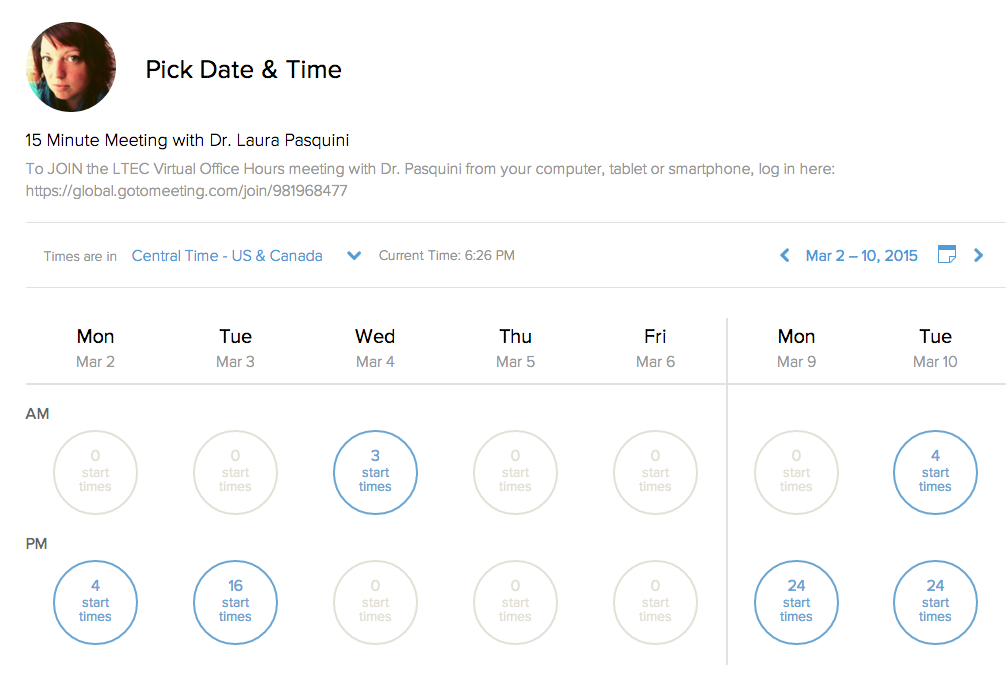
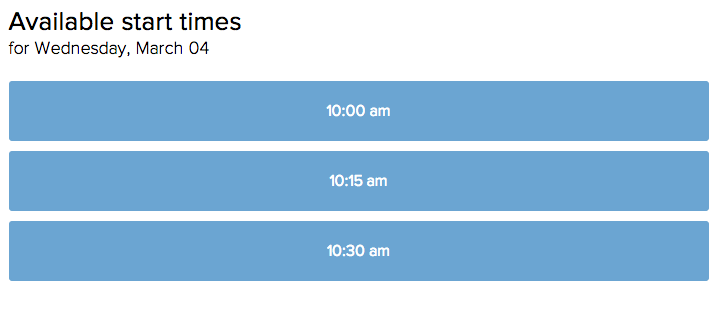
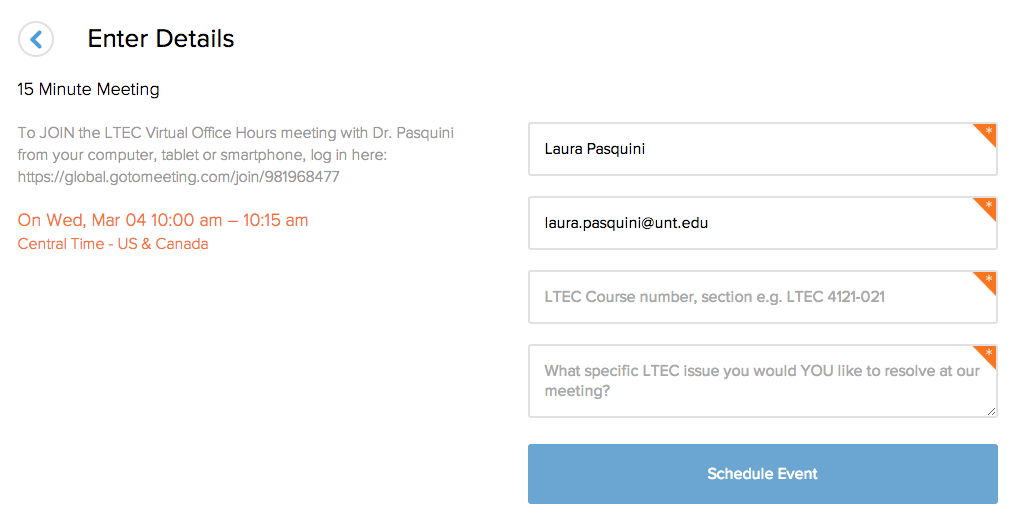
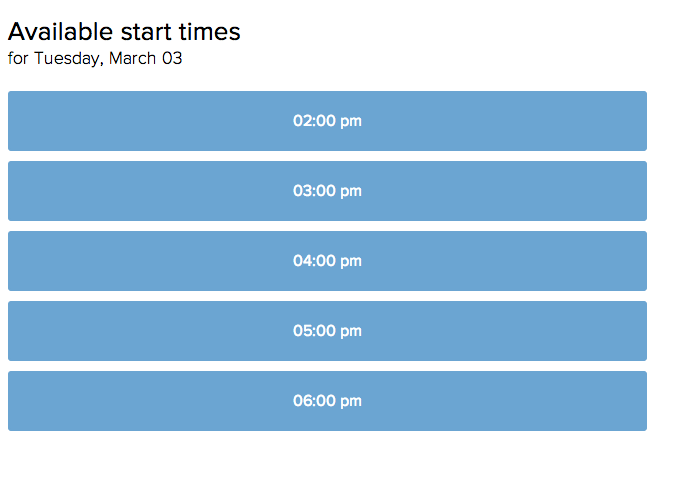
  5. Try offering “on demand” office hours. I use helpful scheduling websites with my Google Calendar to set up student meetings. Both youcanbook.me and calendly offer easy ways for learners to schedule 15-, 30- or 60-minute meetings, depending on my own personal work/travel schedule. Example of the calendly appointment scheduler below:

Step ONE

Screen Shot 2015-02-28 at 6.26.18 PM


Step TWOsched


Step THREE

book
 Step FOUR

Screen Shot 2015-02-28 at 6.51.51 PM

  • ProTip: Be sure have your students identify the purpose of the meeting. E.g. I ask, “What specific issue you would YOU like to resolve at our meeting?
  • Dedicated meeting location: Since I lecture online, I decided to keep all my office hour meetings in a set GoToMeeting space that is standard for all my courses. This is included on the course syllabus, class announcements, and, most importantly, it is an accessible location – students can use their web or phone:

LTEC Virtual Office Hours with Dr. Pasquini” Please join my meeting from your computer, tablet or smartphone. https://global.gotomeeting.com/join/981968477

  • You can also dial in using your phone.United States (Long distance): +1 (213) 289-0012
    Access Code: 981-968-477 

I am still evaluating my own office hour approaches for my distance learners, so please feel free to share your strategies with me. How do you support your learners? What ways have you encouraged your students to connect with you for office hours? Do you have suggestions that I might want to consider for online office hours? Post your suggestions below!

References

Weimer, M. (2015a, February 17). Office hours alternative resonates with students. Faculty Focus. Retrieved from http://www.facultyfocus.com/articles/teaching-and-learning/office-hours-alternative-resonates-students/

Weimer, M. (2015b, February 18). Office hours redux. Faculty Focus. Retrieved from http://www.facultyfocus.com/articles/teaching-professor-blog/office-hours-redux/