Higher Education, Reflections, Teaching

Rethinking Office Hours

Office hours were designed to offer a space and place for learners to meet with their faculty. The practice of holding a “office hours” at every higher education campus, and even within a single department, varies drastically. Some institutions/departments set guidelines, whereas others see this as a service expectation that will automatically be assumed by the faculty member.

silly questions

Image c/o Flame @ KZK

The basic idea of faculty office hours was to carve out time to be available for your students. This set time each was is designated for the instructor to be in a physical, set space to offer support and assistance for courses, research, etc. In reality we know that only “a small number of students take advantage of office hours, [and] typically those who show up are not those who most need to be there (Weimer, 2015a). With increased use of technological communications, our students prefer to send a quick electronic message [email, learning management system (LMS) message, discussion board, text, tweet, etc.], to ask a question, seek advice, or get help.  So how do we “meet and reach” our students who are often juggling more than just school and cannot make the typical “office hour” on campus?  How do we make getting support more convenient for both the instructor and the student?

As an online instructor, I have experimented with a few approaches  the last couple of semesters. Although I work with online, adult learners – I think these strategies could also be useful for other faculty who instruct face-to-face (F2F) or blended learning environments.

A Few Ideas to Rethink Office Hours:

  1. Offer a standard “Office Hour” time slot at least 1-2x per week. This might be the day before assignments are due, or perhaps an evening hour after the typical 9-5 work day. You can indicate availability in your own office, by Skype/phone, IM, or via a web conferencing platform. You decide!
  2. Identify YOUR preferred mode of contact/communication. Let them know HOW and WHEN you will be checking and responding to their messages. Be sure to consider your own communication workflow – then share these expectations for your learners about your preferred protocol for related course communications.  Here are the best ways (in order) for students to contact me:
    • EMAIL: This is BY FAR the recommended method. My students know they will get a response from me within 24-48 hours by e-mail, and they are to include their course name, section, and ID in messages. This also allows me to track and keep a record of our conversations in a student file I save in Outlook.
    • Skype/Google Chat: A few of them have also utilized Skype/Google Chat for a quick instant message (IM) if I am Available (“green”) online.
    • Bb Learn Messaging/Email: I have decided to close the LMS messages on Bb Learn this term, to organize all incoming inquiries from students into my institutional email account.
    • Google Voice: I use a number set up here as my primary office number. Students have used it to leave web voicemails and/or text messages every now and then.
    • Twitter: I have also welcomed the odd Tweet here and there – but often these get tossed into another space for more than 140-characters. More so this is used to share news, information & articles via the course hashtags e.g. #LTEC4440, #LTEC4121, #LTEC4070 and #LTEC3010
  3. Require 1:1 meetings early in the semester (Weimer, 2015b). If possible, have a 1:1 meeting planning in your course schedule to discuss a final project/assignment. You can use this time to check in and allow your students to ask question. This introduces students to your “space” and often encourages them to follow up. Pro Tip: This takes time and organization for your own schedule. Only consider 1:1’s if you can manage it (30 students or less recommended), and if there is a specific purpose within your course design and learning objectives.
  4. Offer class meetings for group advising and support. Provide semi-regular meetings for your students. Ask your learners when a good class meeting time is via Doodle poll to help establish most available times during the semester to host these meetings. My courses often met in the evenings between 6-8 pm and online in a web conference platform (e.g. GoToMeeting, Zoom, etc.) room. These meetings were designed to offer information, updates, and a bite-sized instructional piece for my learners. In previous F2F courses, I had offered this sort of “meet up” after a campus event, in a seminar room, or even an off-campus coffee shop. For my graduate students in smaller classes, we would even conduct peer-review sessions in Google+ hangouts. Include an agenda for the meeting with the topics that will be covered and open discussion. Always solicit questions from your students in advance & leave time for Q & A at the end.
    • Pro Tip: Take questions you received from emails and include them into the class meeting advising sessions. Often learners might be afraid to ask during an open Q & A time, so “plant the question seed.” Students learn from other learner’s questions.
    • My incentives to attend our online (non-required) course meetings = advice on projects/assignments, helpful “how to” or demonstrations, and guest speakers (A BIG thanks goes out to Jess, Josie & Paul this term!).
    • Offer a recording and class notes for those who cannot attend, but want the supplemental information and resources.
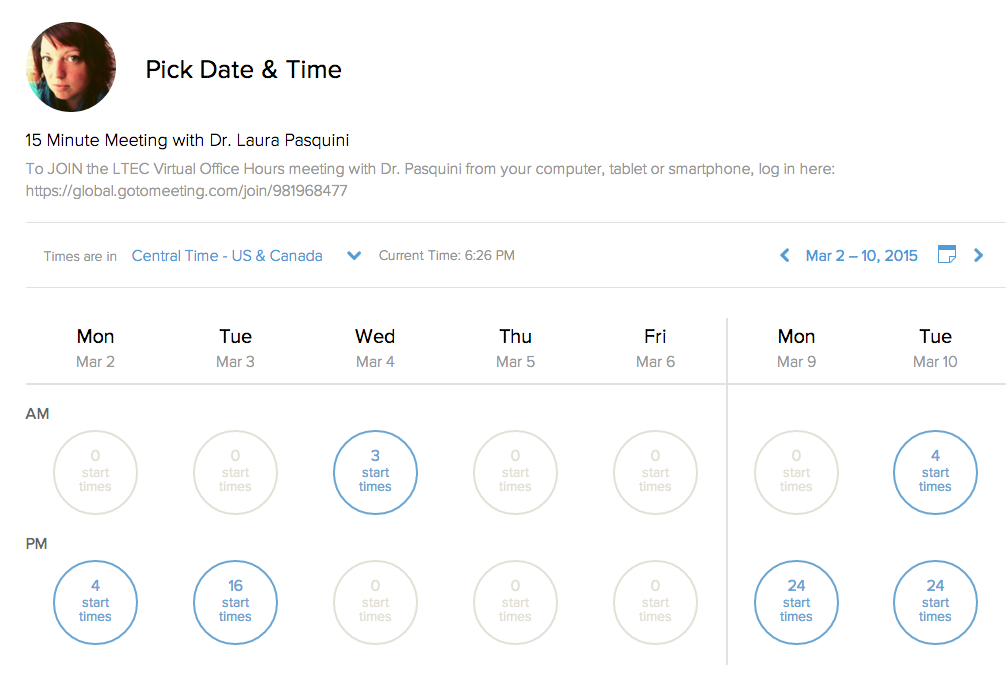
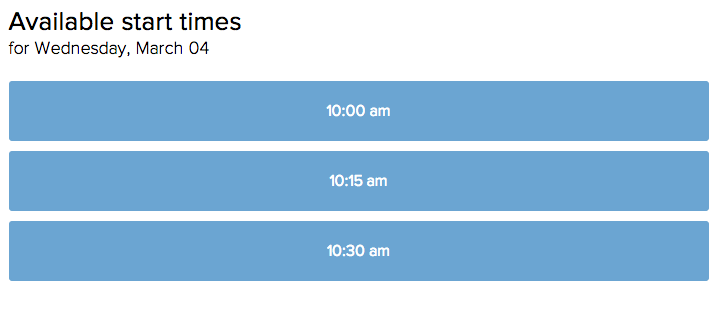
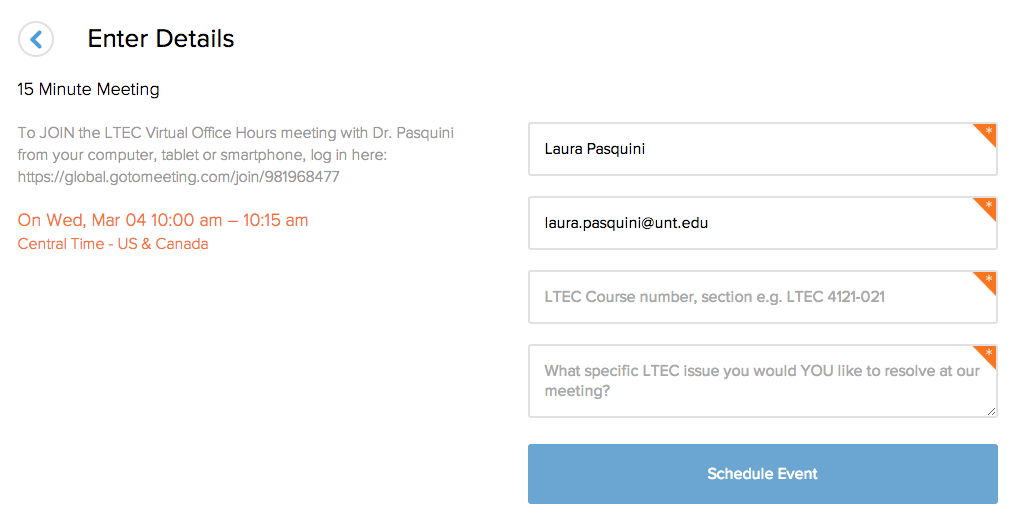
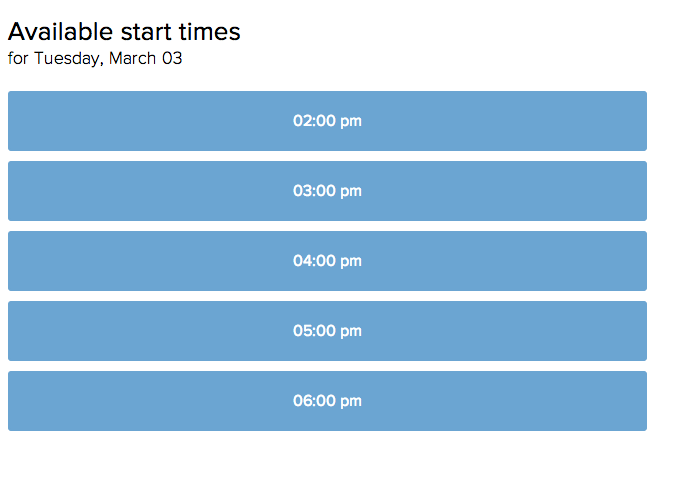
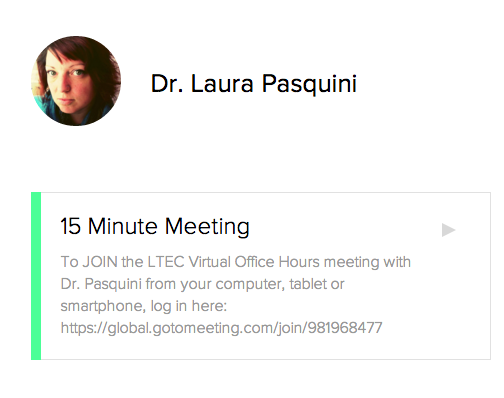
  5. Try offering “on demand” office hours. I use helpful scheduling websites with my Google Calendar to set up student meetings. Both youcanbook.me and calendly offer easy ways for learners to schedule 15-, 30- or 60-minute meetings, depending on my own personal work/travel schedule. Example of the calendly appointment scheduler below:

Step ONE
Screen Shot 2015-02-28 at 6.26.18 PM


Step TWOsched


Step THREE

book
 Step FOUR

Screen Shot 2015-02-28 at 6.51.51 PM

  • ProTip: Be sure have your students identify the purpose of the meeting. E.g. I ask, “What specific issue you would YOU like to resolve at our meeting?
  • Dedicated meeting location: Since I lecture online, I decided to keep all my office hour meetings in a set GoToMeeting space that is standard for all my courses. This is included on the course syllabus, class announcements, and, most importantly, it is an accessible location – students can use their web or phone:

LTEC Virtual Office Hours with Dr. Pasquini” Please join my meeting from your computer, tablet or smartphone. https://global.gotomeeting.com/join/981968477

  • You can also dial in using your phone.United States (Long distance): +1 (213) 289-0012
    Access Code: 981-968-477 

I am still evaluating my own office hour approaches for my distance learners, so please feel free to share your strategies with me. How do you support your learners? What ways have you encouraged your students to connect with you for office hours? Do you have suggestions that I might want to consider for online office hours? Post your suggestions below!

References

Weimer, M. (2015a, February 17). Office hours alternative resonates with students. Faculty Focus. Retrieved from http://www.facultyfocus.com/articles/teaching-and-learning/office-hours-alternative-resonates-students/

Weimer, M. (2015b, February 18). Office hours redux. Faculty Focus. Retrieved from http://www.facultyfocus.com/articles/teaching-professor-blog/office-hours-redux/ 
Conference, EdTech

This Is My Recap of #et4online

Another year at the #et4online conference brings various researchers, educators, practitioners, and then some to talk about the online learning landscape. I presented a session, attended a few workshops & sessions, learned a great deal (see my notes taken on Twitter), and connected to some new ideas and people. Each time I attend #et4online I find myself surrounded by some of the usual #edtech suspects who banter about pedagogy and talk about learning — rather than just the technology… and this is refreshing.

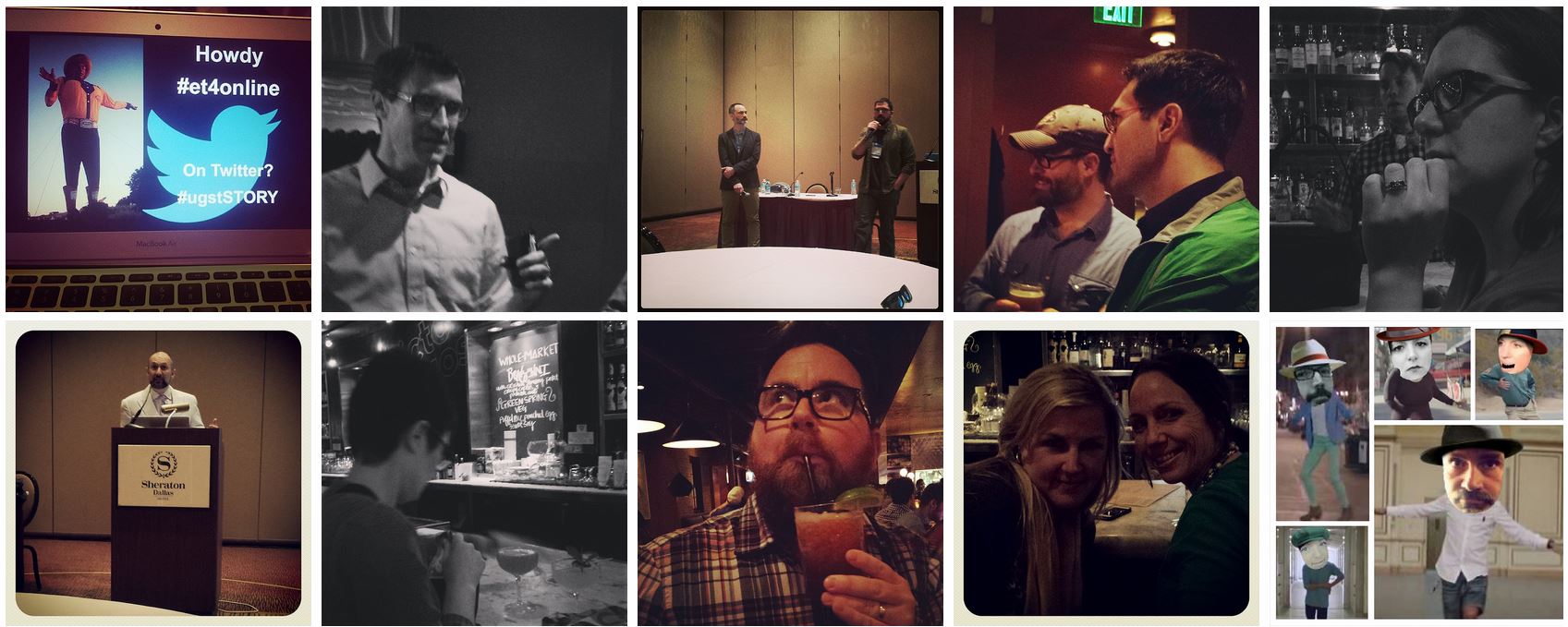
et4online montage

A few of my own #et4online highlights include:


Other reflections and thoughts about #et4online have been shared by George and Jim (#JimOfThings)…and I suspect a few others to follow.


Key takeaways I am still chewing on…


Special shout out to @jlknott for a stellar conference week as my roommate &  partner-in-crime. Here’s to our combined forces (support) to crush (or defend) our dissertations this summer! Go team!

Excited

Until then, I think #et4online should dance it out… Because I’m happy

Happy

Higher Education, MOOC

The State of #OnlineLearning in the US [REPORT]

The 11th annual survey and report of online learning in U.S. higher education was recently released:

Grade Change: Tracking Online Education in the United States”*

=> DOWNLOAD A FREE COPY HERE

Background: From previous studies and reports of online learning in the US, there is a strong belief that  online education is a critical component of post-secondary education institutions’ long-term strategy. In surveying a number of higher education entities, it is apparent that the development in online learning has shown a small but steady increases over the past decade. This report also teases out how PSE institutions are providing online education – blended, hybrid, and others as they experiment with different models of online learning pedagogy.

Screen Shot 2014-01-19 at 10.08.16 AM

The respondents from more than 2,800 post-secondary education institutions in the US, attempted to answer the following overarching questions about online learning in higher ed:

  • Is Online Learning Strategic?
  • Are Learning Outcomes in Online Comparable to Face-to-Face Learning?
  • How Many Students are Learning Online?
  • How are Massive Open Online Courses (MOOCs) faring?

Key findings and highlights from the report: 

  • Around 5.5 (NOT 7.1) million higher education students are taking at least 1 online course (Read more: HERE and HERE)
  • The % of academic leaders rating the learning outcomes in online education as the same or superior to those as in face-to-face instruction, grew from 57% in 2003 to 74% in 2013
  • The 6.1 % growth rate represents over 400,000 additional students taking at least 1 online course
  • The number of students taking at least 1 online course continued to grow at a rate far in excess of overall enrollments, but the rate was the lowest in a decade
  • 90% of academic leaders believe that it is likely or very likely that a majority of all higher education students will be taking at least one online course in 5 year’s time
  • Only 5 % of higher education institutions currently offer a MOOC, another 9.3 % report MOOCs are in the planning stages
  • Less than one-quarter of academic leaders believe that MOOCs represent a sustainable method for offering online courses

For more on the study design, survey administration, analysis,  and report production, check out The BABSON Survey Research Group: http://www.onlinelearningsurvey.com/

*The survey is designed, administered and analyzed by the BABSON Survey Research Group, with data collection conducted in partnership with the College Board, and is sponsored in part by Pearson and the Sloan Consortium

Update – 1/19/14 @ 6:45 pm:

It appears the BABSON survey numbers seem to be off from the IPEDS data for students who have completed online courses – 7.1 vs. 5.5 million. Thanks for the update, Kevin. Here’s a useful article to read.

G*STEP, Professional Development

G*STEP: Graduate Student Teaching Excellence Program

As part of the “Professional Development” section for my portfolio requirements (in lieu of comprehensive exams, I will defend a professional portfolio in order to become a PhD. Candidate before the semester over – I will blog about this in the near future), I am completing a variety of professional workshops, pre-conferences, colloquiums, and training events in my field to enhance my doctoral course work. I was just accepted to the Graduate Student Teaching Excellence Program (G*STEP) program, with approximately 85 other University of North Texas graduate students, who will complete the G*STEP certificate over the next 12 months.

As indicated by the image, the goal of the G*STEP program is to initiate mentoring, encourage personal growth, and support effective teaching and learning practices for graduate students. This non-credit certificate program was developed by the Toulouse Graduate School, the Center for Learning Enhancement, Assessment, and Redesign (CLEAR),the Provost’s office, Undergraduate Studies, UNT Libraries, and the UNT Program of Higher Education to promote effective teaching in higher education at UNT.

UNT would like to reach their FOUR BOLD GOALS for teaching effectiveness, which can be grouped into these three key factors:

  1. Providing organized and clear instruction that contributes to understanding and promotes learning
  2. Creating a learning environment that is inclusive, respectful and engaging
  3. Guiding and encouraging self-directed learning resulting in a wider understanding and contribution to the learning process.

Although I already have teaching experience, in both the K-12 and higher education classroom, I thought the G*STEP program would improve my instructional craft, enhance my pedagogical methods, and connect me to other graduate students in various disciplines – to learn about their teaching practices, challenges and resources. The only cost to the program is purchasing Teaching Tips: Strategies, Research, and Theory for College and University Teachers and committing my time/effort to the program for the duration of the twelve months.  As I plug through the online modules (8 total) and face-to-face meetings (6 total), I will be sure to share my contributions, reflections and progress here.

EC&I831, Learning Technologies, Photo Sharing, Social Media

What’s In A Story?

Everyone loves a good story. Think of your favourite story. What is it? Why do you like it? Tell me more.

rm

Image c/o Scholastic.ca

When asked this question in #eci831 last week, the first story teller I connected to as a child was  Robert Munsch. I fell in love with almost all his books, especially The Paper Bag Princess, Love You Forever & I Have To Go.  These books are great read aloud and audio books, since most stories were created as an oral tradition in during Robert Munsch’s daycare working days. I was fortunate to meet Munsch during my 2nd year of undergrad when he visited my Children’s Literature class at the University of Guelph. Although the audience was older than his usual reading groups, Robert was still able to keep these “kids” on the edge of their seat.

Alan Levine shared some interesting & useful resources for using new media for Digital Storytelling. In both his presentation (you may need to download Cooliris to view in Firefox or Safari) and 50 Way Wiki there are numerous tools to explore for effective online storytelling.

Here are a few examples of digital stories we shared & discussed:

How do you share your story online? Check out a few tools to support your digital story telling: