

Image c/o Interactyx.com
In supporting and creating instructor resources for our 30 or so first year seminar classes, one areas I’m currently working on is our social media for learning (quel supris!). There are a number of resources, “how to” guides, and instructional case studies to support digital learning pedagogy. In curating content for our #UGST1000 (formerly UCRS 1000) Blackboard Learn Instructor site , I realized that the area of using Facebook and other social networks for our learning communities was lacking. Sure there are a few of us out there using these spaces, but it was rare to see any information available for suggested practices let alone understand how our campus social media beliefs impact our Facebook for learning.
Below is the quick guide I created to introduce Facebook Groups & Pages for our first year seminar instructors. I welcome and encourage others to post your ideas and share resources to the comments section – so we can enhance our #edusocmedia learning practices.
What Are Facebook Groups?
 Facebook states that groups are designed “for members of groups to connect, share and even collaborate on a given topic or idea.” Groups have been used to market, promote or share group happenings. The key feature behind Facebook groups is the ability to make them “invite only” or limit these spaces to specific groups, i.e. like your seminar section of UGST 1000. These groups can be private or closed for only your students. Although this is a closed feature, you will need to “friend” students in your course to a closed or secret group; however an “open” group option will allow you to add anyone from Facebook.
WARNING: You may (gasp!) not have students who are on Facebook or wish to be “added” to a private group. Keep this in mind. Also, I would encourage you to work with your Peer Mentor in your class to support the cultivation and development of this online learning community.
Instructor perspective:
Ryan: They all REALLY liked our class Facebook group and participated in that quite a bit. I’m considering just using Facebook this time around rather than try to get them all onto a new social network.
Laura: Peer mentors a great support & can often set up these Facebook groups and “friend” students for the instructors. I would encourage this and support the peer mentors as they develop community in your UCRS 1000 Group (ours from Fall 2011) online and in class.
What Are Facebook Pages?

In contrast to Facebook groups, which are focused on organizing around specific topics or ideas, Facebook Pages “allow entities such as public figures and organizations to broadcast information to their fans.” If you are looking to set up your class’s “official Facebook presence” you would opt for a Facebook Page. Students just need to “Like” the page for the semester and they can always opt out when the semester is over. Students who like this page will need to remember to check and monitor their Facebook stream to ensure that they are reading updates posted for the course so they do not miss out on any happenings, announcements or updates.
Simply put, Facebook Pages is a simpler tool for instructors and peer mentors to maintain and use for UGST 1000 Learning Communities. Students, staff, and faculty can view an open Facebook Page even if they opt to not have their own personal account on Facebook. Pages are an easy medium to put out content, share updates, and keep your learning community informed. As the administrator for this page, I would strongly encourage interaction to encourage 2-way conversations by using polls, asking questions, and encouraging comments, pictures or videos to be posted to the course page. You will want to enable sharing features for your community and talk about the purpose or standards for your social space.
Instructor Perspectives:
Laura: I like how you can share ideas, post comments and have others follow along with the discussion – it is a great way to connect to student in the social space of Facebook without having to add them to my own personal/professional “friend” list. The Pages can also be integrated with other features such as Twitter, blogs, photo sharing & videos. Here is the Office for Exploring Majors Facebook Page https://www.facebook.com/ExploringMajors
Do You Want to Have a Facebook Group or Page for YOUR Learning Community?
If you are trying to determine whether to use a Facebook Page or a Facebook Group for your UGST 1000 class there are a number of other resources posted in the reference section below to help you best understand the features.
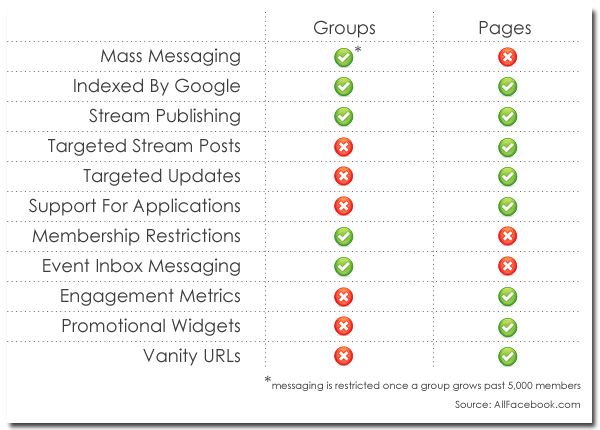
There are a number of other seasoned instructors who might want to share their ideas or thoughts on the use of both Facebook Pages and Groups (or other social networks) for UGST 1000. Take a look at the handy chart below that breaks up and compares the features; however with other social media things change and are always subject to change.
Facebook Groups & Pages Learning Resources:
10 Reasons Why Facebook is Ideal for Managing Social Learning
The Ultimate Guide for Using Facebook in Education
Facebook Groups Vs Pages: The Definitive Guide
Facebook Groups Vs. Pages: What’s The Difference
Facebook Tips: What’s the difference between a Facebook page and group?
 techKNOWtools

You must be logged in to post a comment.