
Learning Community, Learning Technologies, Professional Development

Exploring the Future of Courses

Exploring the Future of Courses: From Course to Dis/Course is a short, online (FREE) conference May 14 & 15, 2009. Anyone is able to join in the session presentations & discussions that delve into the topic of online learning and course content that is shared in Elluminate & in Moodle.

Current course models of development, creation and sharing is in question for our learners. Many challenges and changes to digital technologies will impact how to best design course content.

Today’s presentations included:

Most of the sessions discussed how educators are managing the challenges new technology presents and its effect on current course models, data-driven material and learner needs in a digital.

For those of you who could not attend today, be sure to join in online tomorrow OR catch up with the conversation online. If are not able to tune in live, be sure to follow along in Twitter, Delicious or blogs with the hash tag – #disc09

[The sessions in Elluminate will be recorded and archived shortly.]

Great question posed by George Siemens, towards the end of his presentation, to further ponder:

“What is the vital currency of education in a world where the information cycle is no longer controllable?”


Learning Community, Learning Technologies

Goodbye Textbooks, Hello Open-Source Learning!

Here is a very interesting TED talk by Richard Baraniuk about the vision behind Connexions, his open-source, online education system.

Imagine a world without textbooks in schools.  Knowledge would be shared and modified for various courses.  The materials would be online, free and accessible for the entire world.  Welcome to the knowledge ecosystem!

This talk is a few years old, which means much of what Baraniuk is talking about has and will continue to transform the traditional classroom experience. Resources like Flat World Knowledge already exist to share textbooks and course materials with college students.

How has (or will) open-source learning made an impact to your learning environment?

Learning Technologies

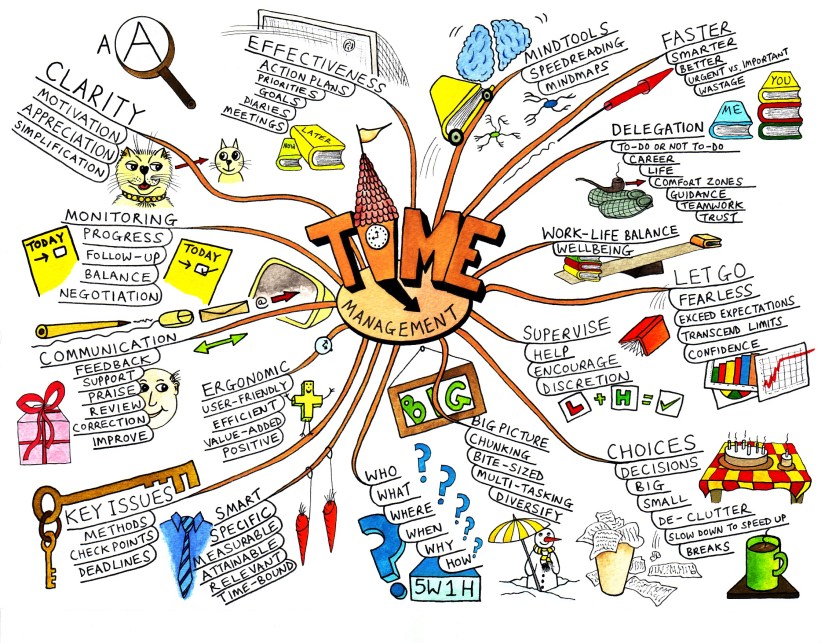
Mind-Map It Out.

To help process information it is always great to introduce a mind map as an effective learning tool.

A mind map is a diagram used to represent words, ideas, tasks, or other items linked to and arranged around a central key word or idea. Mind maps are used to generate, visualize, structure, and classify ideas, and as an aid in study, organization, problem solving, decision making, and writing. (c/o Wikipedia.org)

mindmap_2

(c) Mind Tools Ltd

There are a few online tools that best support the mind-mapping approach for learning. Lifehacker.com recently reviewed the Five Best Mind-Mapping Applications for online mapping action. These tools are FREE & very user-friendly.

These resources are quite useful for both learning and teaching. There are plenty of online mind-mapping resources to support visual learners which makes mapping information fun!

Map on, my friends. Map on.

blogs, Collaboration, Higher Education, Photo Sharing, Social Media

Happy Birthday ACE!

For those of you thinking about implementing a new online, web 2.0 project for student learning… I say: GO FOR IT!

This is the 1 year anniversary of the ACE pilot project that was initiated at The Academic Advising & Career Centre, University of Toronto Scarborough.  Happy Birthday, ACE!

ace

ACE (Academic & Career Explorer) is an online, peer buddy who connects with students at UTSC to share information & resources about job search, academic questions, career options and study skills support.  You can connect to ACE various ways online:

The ACE project was a fun project to work on with staff and students.  Kudos must go out to E-Lin, Suzanne, Esther & the great team of student staff at the Centre for all their creative work and on-going support.

Here’s a shot of E-Lin celebrating ACE’s birthday today with some cake (office tradition), of course:

photo_1

Collaboration, Learning Technologies

For the Love of Google (& Learning)

drseuss09

When we first look for things online, we often turn to the popular search engine – Google.  But have you thought about what else Google can do for you?  Take a look at the various Google Apps that could be utilized for your practice in education, and an interesting article that supports use of Google  technology for learning.

Here are a few suggestions on how YOU can use Google as an educator with your learners or colleagues:

  • Google Scholar: encourage scholary research & utilizing online publications for students and professional development; accurate & credible resources; also a fan of Google Book Search for similar use
  • Google Earth: geo-tagging is all the rage in higher education; you may want to include Google Maps to this app to create collaborate landmarking & mapping
  • Google Notebook:  Interested in keeping those searched websites in an orderly fashion?  Great for research & archiving
  • Google Docs: store Word, PowerPoint & Excel documents online; share & collaborate with students, staff & faculty; excellent project management tool
  • Google Calendar: keep track of assignments, itemize lesson plans visually, and more to help with better time management
  • Blogger:  course contributions, themed journal writing, writing & development classes, and MORE!  Blogger has been used for a wide variety of contributions to learning. Here are some blog examples in Higher Ed.
  • Google Sites: plan meetings or lessons, share information on a secure website, collaborate on projects, or stay connected to learning communities; similar to website or wiki development; easy to use 
  • Google Reader:  lets you subscribe to web sites so that new content comes to you when it’s posted; similar to RSS feeds
  • Google Talk: send instant text messages, voice and/or video conference, chat from desktop or Gmail, send documents, files or hyperlinks; easy way to host “office hours” from any location

Go forth and Google.